
WhatsApp Business, Download Business Messaging App, Catalog & Customer Management Tools
Just Now
7.78MB
V6.2
Andriod +
1000K +
Description
WhatsApp Business is a popular messaging application designed to help small businesses, entrepreneurs, and companies communicate with their customers more effectively. It provides a convenient platform for sending messages, answering customer questions, sharing product information, and managing business conversations. The application includes useful features such as business profiles, product catalogs, automated replies, quick messages, and customer labels. These tools help businesses present their services professionally and maintain better communication with customers.
One of the main advantages of WhatsApp Business is its simple interface and easy-to-use communication features. Business owners can create a professional profile, display their products and services, share updates through WhatsApp Status, and respond to customer inquiries directly. The application is available for Android and iOS devices, while WhatsApp Web and supported desktop options allow users to manage conversations from computers. It is a useful solution for businesses looking to improve customer service and build stronger relationships with their audience.
What Is WhatsApp Business and How Does It Work?
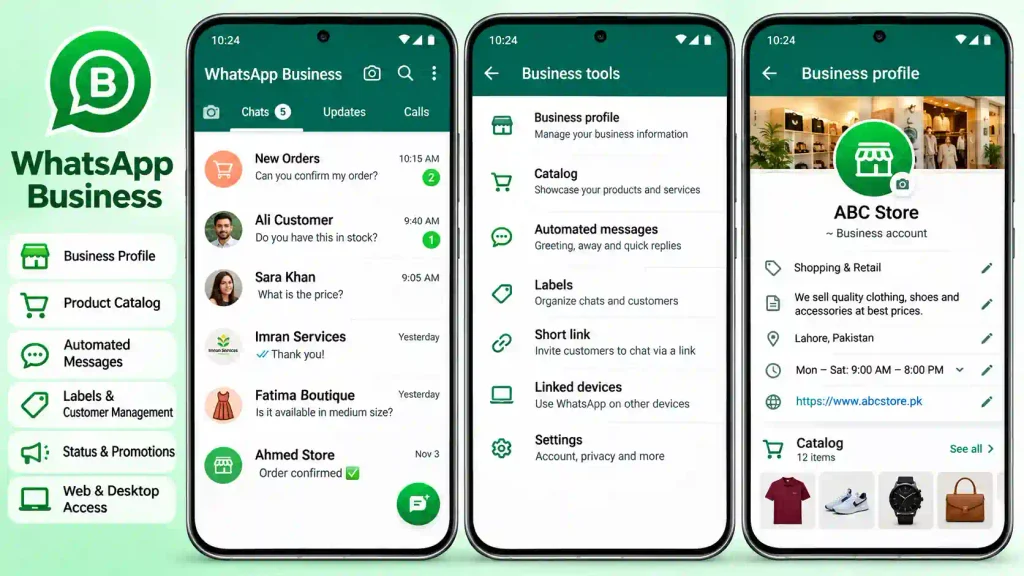
WhatsApp Business is a business-focused messaging application developed by Meta. It is designed to help business owners connect with customers through instant messaging and other communication tools. Unlike the standard WhatsApp application, it includes additional business features that make it easier to manage customer inquiries, organize conversations, display products, and provide business information. It is suitable for small shops, online stores, freelancers, service providers, and growing businesses.
WhatsApp Business works through an internet connection using a registered phone number. After creating an account, users can set up their business profile, add contact details, upload product information, and start communicating with customers. Businesses can also use greeting messages, away messages, and quick replies to handle common questions. Customers can contact the business directly, view its catalog, ask questions, and receive updates through the application. You can visit the website Apknova
Key Features and Benefits of WhatsApp Business
- Business Profile: Create a professional profile with business name, address, description, and contact details.
- Product Catalog: Display products and services with images, descriptions, and prices.
- Automated Messages: Send automatic greeting and away messages.
- Quick Replies: Save and reuse frequently sent messages.
- Customer Labels: Organize conversations using different labels.
- WhatsApp Status: Share business updates, offers, and announcements.
- Business Messaging: Communicate directly with customers.
- WhatsApp Web: Manage business conversations through a computer.
- Contact Management: Organize and communicate with customers.
- Privacy Features: Manage account privacy and security settings.
WhatsApp Business Interface and Main Components
- Home Screen: Displays recent conversations and available messaging options.
- Chats Section: Provides access to customer messages and conversations.
- Updates Tab: Allows businesses to share and view Status updates.
- Calls Section: Provides access to voice and video calling features.
- Business Tools: Contains catalog, automated messages, labels, and other business options.
- Profile Settings: Allows users to manage business information and account details.
- Search Bar: Helps find specific conversations and messages.
- Settings Menu: Provides access to privacy, notifications, storage, and account settings.
WhatsApp Business Account Registration, Sign Up, and Login Guide
Account Registration:
- Download and open WhatsApp Business.
- Agree to the terms and conditions.
- Enter your business phone number.
- Verify your number using the verification code.
- Enter your business name.
- Select a suitable business category.
- Add a profile picture and basic business information.
- Complete the account setup.
Account Login:
- Open WhatsApp Business on your registered device.
- Enter or verify your registered phone number if requested.
- Complete the verification process.
- Access your existing business conversations.
- Use the settings to manage your account.
WhatsApp Business Profile Setup and Business Information Management
- Business Name: Add the official name of your business.
- Profile Picture: Upload your company logo or business image.
- Business Description: Explain your products, services, and business activities.
- Business Category: Select the category that best describes your business.
- Business Address: Add your shop or office location.
- Email Address: Provide a professional contact email.
- Website Link: Add your official business website.
- Business Hours: Set your opening and closing times.
- Profile Updates: Edit your business information whenever necessary.
WhatsApp Business Messaging, Chats, and Customer Communication
- Individual Chats: Communicate privately with individual customers.
- Group Chats: Participate in group conversations where appropriate.
- Voice Messages: Send recorded audio messages.
- Video Messages: Share short video messages.
- Voice and Video Calls: Communicate with customers through supported calling features.
- File Sharing: Send documents, images, videos, and other supported files.
- Message Reactions: Respond to messages using emojis.
- Message Search: Find important conversations and previous messages.
- Customer Support: Answer questions and provide information about products and services.
WhatsApp Business Catalog, Products, and Services Management
- Product Listings: Add products to your business catalog.
- Product Images: Upload clear pictures of available products.
- Product Names: Provide suitable names for each item.
- Product Descriptions: Explain product features and details.
- Product Pricing: Display product prices where applicable.
- Product Links: Add product website links if available.
- Service Listings: Display different services offered by your business.
- Catalog Updates: Edit or remove products when required.
- Customer Browsing: Allow customers to explore your available products and services.
WhatsApp Business Automated Messages, Quick Replies, and Greeting Messages
- Greeting Messages: Automatically welcome customers when they contact your business under supported conditions.
- Away Messages: Send automatic replies when you are unavailable.
- Quick Replies: Save frequently used responses for faster communication.
- Message Shortcuts: Use shortcuts to insert saved replies.
- Customer Support: Answer common customer questions efficiently.
- Business Availability: Inform customers when your business is closed.
- Response Management: Reduce the time spent answering repeated questions.
WhatsApp Business Labels, Contacts, and Customer Management
- Customer Labels: Organize conversations using different labels.
- New Customer: Identify newly contacted customers.
- New Order: Mark conversations related to new orders.
- Pending Payment: Organize customers with outstanding payments.
- Completed Orders: Track conversations related to completed purchases.
- Customer Contacts: Manage customer contact information.
- Conversation Organization: Find important chats more easily.
- Follow-Up Management: Identify customers who need additional assistance.
WhatsApp Business Status, Marketing, and Promotional Tools
- Status Updates: Share business news, pictures, and videos.
- Product Promotions: Advertise products and special offers.
- Discount Announcements: Inform customers about available discounts.
- New Product Launches: Introduce newly available products.
- Business Videos: Share promotional videos with your audience.
- Customer Engagement: Encourage customers to interact with your business.
- Business Links: Share your WhatsApp contact link with potential customers.
- Click-to-WhatsApp Ads: Allow customers to start conversations through supported Meta advertisements.
WhatsApp Business Web, Desktop, and Multi-Device Features
- WhatsApp Web: Access business conversations through a supported web browser.
- Desktop Application: Use WhatsApp on a compatible computer.
- Device Linking: Connect additional supported devices to your account.
- Message Synchronization: Access conversations across linked devices.
- File Management: Send and receive supported documents from your computer.
- Customer Communication: Respond to messages while working on a desktop.
- Account Management: Manage linked devices through the mobile application.
- Multi-Device Access: Allow multiple supported devices to use the same account.
WhatsApp Business Download, Installation, and Setup Guide for Android and iOS
Android Installation:
- Open the Google Play Store.
- Search for WhatsApp Business.
- Select the official application.
- Tap the Install button.
- Wait for the download to complete.
- Open the application.
- Register your phone number and complete the setup.
iPhone Installation:
- Open the Apple App Store.
- Search for WhatsApp Business.
- Select the official application.
- Tap Get to download it.
- Complete the required authentication.
- Open the application.
- Register your number and set up your business profile.
Important Setup Tips:
- Download the application from official app stores.
- Use a phone number you can access.
- Create a professional business profile.
- Add your products and services to the catalog.
- Configure greeting and away messages.
- Review your privacy and security settings.
WhatsApp Business Free vs WhatsApp Business Premium – Features and Differences
WhatsApp Business provides free business communication tools, while optional premium features may be available through paid subscriptions in supported markets. Availability and pricing can vary by country.
| Features | WhatsApp Business Free | Premium (Where Available) |
|---|---|---|
| Business Profile | Available | Available |
| Messaging | Available | Available |
| Product Catalog | Available | Available |
| Automated Messages | Available | Available |
| Quick Replies | Available | Available |
| Customer Labels | Available | Available |
| WhatsApp Status | Available | Available |
| Linked Devices | Basic limits | Additional linked devices where supported |
| Business Web Presence | Basic options | Additional features where supported |
| Customer Communication | Available | Available |
| Subscription Fee | Free | Paid subscription |
Note: WhatsApp Business Platform (API) is a separate solution designed for businesses with larger messaging and customer support requirements. Its pricing and features are different from the standard WhatsApp Business application.
Advantages and Disadvantages of WhatsApp Business
| Advantages | Disadvantages |
|---|---|
| Free basic business communication tools | Requires an internet connection |
| Easy-to-use interface | Some advanced features may require payment |
| Professional business profiles | Limited built-in customer management tools |
| Product and service catalog | Catalog features may not suit every business |
| Automated greeting and away messages | Automated replies have limited customization |
| Quick replies save time | Not a complete CRM system |
| Direct customer communication | Managing many conversations can become difficult |
| Supports web and desktop access | Some features vary by device and region |
| Useful for small businesses | Business account restrictions may affect communication |
Frequently Asked Questions (FAQs) About WhatsApp Business
Q1. What is WhatsApp Business used for?
WhatsApp Business is used by businesses to communicate with customers, share product information, manage inquiries, display catalogs, and provide customer support.
Q2. Is WhatsApp Business free to use?
Yes, the standard WhatsApp Business application is free to download and use. Some optional premium features and business services may require payment.
Q3. Can I use WhatsApp Business on Android and iPhone?
Yes, WhatsApp Business is available for supported Android and iOS devices through their official application stores.
Q4. Can I use WhatsApp Business on my computer?
Yes, users can access WhatsApp Business through WhatsApp Web and supported desktop applications.
Q5. Can I use the same phone number for WhatsApp and WhatsApp Business?
A phone number cannot normally be registered on both applications simultaneously. You can move your existing number from standard WhatsApp to WhatsApp Business.







