Pixelcut AI Photo Editor APK – 7 Best AI Editing Features
Just Now
10 MB
V7.1
Andriod +
10M+
Description
Pixelcut AI Photo Editor is an AI-powered photo editing application designed to make image editing simple, fast, and accessible to everyone. It provides a collection of smart editing tools that help users remove backgrounds, erase unwanted objects, improve image quality, and create professional-looking pictures without requiring advanced photography or graphic design skills. Whether someone wants to edit personal photos, prepare product images for an online store, or create attractive social media content, Pixelcut offers several useful tools in one platform.
One of the main reasons people use Pixelcut is its ability to automate time-consuming editing tasks with artificial intelligence. Instead of manually selecting objects or spending hours adjusting backgrounds, users can complete many editing tasks with just a few taps. Its straightforward interface and creative features make it useful for beginners, content creators, online sellers, and small businesses looking for an easier way to produce high-quality images.
What Is Pixelcut AI Photo Editor and How Does It Work?
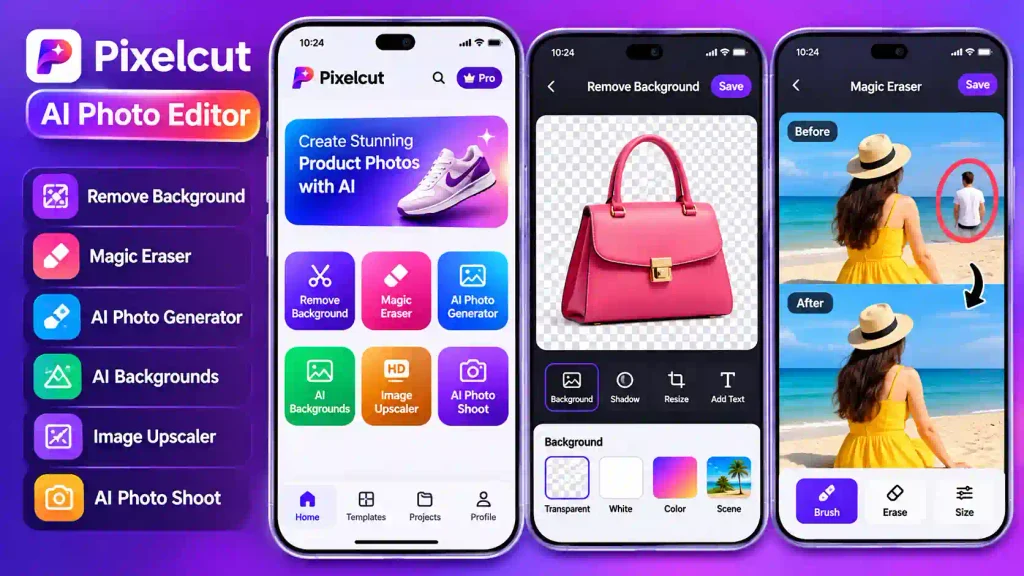
Pixelcut AI Photo Editor is a mobile and web-based photo editing platform that uses artificial intelligence to help users transform ordinary pictures into professional-looking images. It includes different editing options, such as background removal, object erasing, AI image generation, photo enhancement, and product photography tools. Users can upload an existing picture, choose the editing feature they need, and let the AI process the image automatically. This makes the application suitable for people who want professional results without learning complicated editing software. You can visite the website Apknova
The application works by analysing uploaded images and identifying different elements, such as people, products, objects, and backgrounds. Based on the selected tool, its AI technology can separate subjects from backgrounds, remove unwanted elements, generate new visual environments, or improve image resolution. After processing, users can review the results, make additional adjustments, and save their edited pictures. Some tools and advanced features may require a paid subscription, depending on the current Pixelcut plan.
Key Features and Benefits of Pixelcut AI Photo Editor
Pixelcut provides several AI-powered features that simplify everyday photo editing and creative design tasks. Its tools are particularly useful for users who regularly create product images, promotional graphics, and social media content.
- AI Background Remover: Automatically removes backgrounds from images.
- Magic Eraser: Removes unwanted objects and distractions from pictures.
- AI Photo Generator: Creates images using written text prompts.
- AI Backgrounds: Generates creative backgrounds for different types of photographs.
- AI Image Upscaler: Improves image resolution and visual clarity.
- AI Photo Shoot: Helps create professional-looking product photography.
- Image Editing Tools: Provides additional options for adjusting and improving pictures.
- Creative Templates: Offers ready-made designs for marketing and social media content.
These features can save editing time and reduce the need for multiple applications. Online sellers can prepare attractive product photographs, while content creators can design engaging images for their digital platforms. The availability of different tools in one place also makes Pixelcut AI Photo Editor a convenient option for everyday creative work.
Pixelcut AI Photo Editor Interface and Main Dashboard
Pixelcut AI Photo Editor offers a modern and straightforward interface that helps users access its editing tools without unnecessary complexity. The main dashboard provides access to different creative features, allowing users to select an editing option according to their requirements. Depending on the device and application version, users may find tools for background removal, object erasing, AI image generation, photo enhancement, and product photography.
The interface is designed to make the editing process easier for both beginners and experienced users. After selecting a tool, users can upload an image, apply the required changes, preview the edited result, and save their work. Its organised layout helps users move between different editing options without having to learn complicated menus. However, the available tools and their arrangement may vary between the mobile application and web version.
AI Background Remover and Background Changer
The AI Background Remover is one of the most useful features of Pixelcut. It automatically detects the main subject in an image and separates it from the surrounding background. This feature is particularly helpful for online sellers, photographers, and social media creators who need clean and professional-looking pictures. Instead of manually selecting every part of an image, users can upload a photograph and allow the AI tool to handle the background removal process.
After removing the original background, users can choose a replacement background or create a different visual appearance for their photographs. This makes it easier to prepare product images for online marketplaces, promotional materials, and business websites. For example, an online seller can remove a room background from a product photograph and replace it with a clean studio-style setting. The final result can then be reviewed and adjusted before saving.
Magic Eraser – Remove Unwanted Objects from Photos
Magic Eraser is an AI-powered editing feature that helps users remove unwanted objects and distracting elements from photographs. Sometimes a picture contains unnecessary items, people, or background distractions that affect its overall appearance. With this tool, users can select the unwanted area and allow Pixelcut’s AI technology to process the selected section. The application attempts to fill the removed area naturally so that the photograph looks cleaner.
This feature can be useful when editing travel photographs, personal pictures, product images, and social media content. For example, users can remove small unwanted objects from a background or clean up distracting elements around a product. The quality of the final result depends on the image, the size of the selected object, and the surrounding details. Larger or complicated objects may require additional editing to achieve a natural-looking appearance.
AI Photo Generator and AI Backgrounds Pixelcut AI Photo Editor
Pixelcut’s AI Photo Generator allows users to create visual content using written descriptions or text prompts. Instead of searching for an existing photograph, users can describe the image they want and let the AI generate a visual result. This feature can help content creators, designers, and business owners produce creative images for advertisements, social media posts, and other digital projects.
The AI Backgrounds feature provides another useful way to improve photographs by creating or changing their visual surroundings. Users can experiment with different backgrounds to give product images a more professional appearance or create attractive compositions for promotional content. These tools are particularly useful for online businesses that want to present their products in different settings without arranging a physical photography studio. Results may vary depending on the prompt, original image, and available AI features.
AI Image Upscaler – Enhance Photo Quality and Resolution Pixelcut AI Photo Editor
The AI Image Upscaler is designed to improve the quality and resolution of images. Sometimes photographs become blurry or lose detail when they are enlarged, compressed, or shared across different platforms. Pixelcut uses AI technology to analyse image details and generate an enhanced version with improved clarity. This can be useful when preparing photographs for websites, online stores, presentations, and digital marketing materials.
Users can upload an image and apply the upscaling feature to improve its appearance. The tool attempts to preserve important visual details while increasing the image resolution. It can be especially helpful for older photographs, smaller product images, and pictures that need to be displayed in larger formats. However, AI enhancement cannot always recover original details that are completely missing from a low-quality image, so users should review the final result before publishing it.
AI Photo Shoot – Create Professional Product Photography Pixelcut AI Photo Editor
AI Photo Shoot is a creative feature designed to help users produce professional-looking product photographs using artificial intelligence. Traditional product photography may require a camera, lighting equipment, suitable backgrounds, and a dedicated photography space. Pixelcut provides an alternative by allowing users to work with existing product images and create different visual presentations using AI-powered editing tools.
This feature can be particularly valuable for e-commerce businesses, small retailers, and online sellers who want attractive product images without arranging a complete photography setup. For example, a business owner can prepare a product photograph and experiment with different studio-style backgrounds and visual settings. These images can then be used for product listings, promotional campaigns, and social media content. The final quality depends on the original photograph and the selected AI generation options.
How to Download, Install, and Use Pixelcut AI Photo Editor
Pixelcut AI Photo Editor can be accessed through its supported mobile application and web platform. Android users can check Google Play, while iPhone users can find the application through Apple’s App Store. Users can also visit the official Pixelcut website to explore its online editing tools.
Steps to Download and Install Pixelcut:
- Open the Google Play Store on your Android device.
- Search for Pixelcut AI Photo Editor.
- Check the application name and developer details.
- Tap the Install button.
- Wait for the application to download and install.
- Open Pixelcut from your device.
- Follow the on-screen instructions to get started.
Steps to Edit Photos Using Pixelcut:
- Open the Pixelcut application or website.
- Select the photo editing tool you want to use.
- Upload an image from your device.
- Choose the required editing option, such as Background Remover or Magic Eraser.
- Allow the AI tool to process your photograph.
- Review the edited image and make additional adjustments if necessary.
- Save or export the finished image using the available options.
Some features may require an account, credits, or a paid subscription. Always check the available options before purchasing a plan.
Pixelcut Free vs Pro – Features, Pricing, and Subscription Plans Pixelcut AI Photo Editor
Pixelcut offers free and paid options, allowing users to explore its photo editing capabilities according to their needs. The free experience is suitable for people who want to try basic editing tools and create occasional images. However, access to certain advanced features, editing limits, and export options may depend on the current subscription arrangements.
The Pro subscription is designed for users who regularly need additional AI editing capabilities and greater creative flexibility. Depending on the current plan, paid access may include additional AI features, higher usage limits, and other premium editing options.
| Comparison | Free Version | Pro Version |
|---|---|---|
| Basic Photo Editing | Available tools | Available tools |
| Background Removal | Limited or available options | Expanded access |
| AI Editing Tools | Limited access | More advanced access |
| AI Image Generation | Usage restrictions may apply | Higher access may apply |
| Export Options | Standard options | Additional options may apply |
| Usage Limits | More restrictions | Higher limits may apply |
| Subscription | Free | Paid subscription |
Note: Actual features, prices, credits, and subscription limits can change by country, platform, and subscription period. Check the official Pixelcut application or website for the latest pricing before subscribing.
Frequently Asked Questions (FAQs) and Final Verdict Pixelcut AI Photo Editor
Q1. What is Pixelcut AI Photo Editor?
Pixelcut is an AI-powered photo editing application that helps users remove backgrounds, erase unwanted objects, generate images, and improve photographs.
Q2. Is Pixelcut AI Photo Editor free?
Pixelcut offers free access to certain tools, while some advanced features and additional usage options may require a paid subscription.
Q3. Is Pixelcut Photo Editor available for Android?
Yes, Pixelcut is available for supported Android devices through the Google Play Store.
Q4. Can Pixelcut remove photo backgrounds?
Yes, its AI Background Remover can automatically separate the main subject from the original background.
Q5. Can I remove unwanted objects using Pixelcut?
Yes, the Magic Eraser feature helps remove unwanted objects and distractions from photographs.
Q6. Can Pixelcut improve blurry images?
Its AI Image Upscaler can enhance image resolution and improve visual clarity, although results depend on the original image quality.
Q7. Is Pixelcut useful for online businesses?
Yes, its product photography, background editing, and AI image creation tools can help online sellers prepare attractive product images.
Q8. Is Pixelcut safe to use?
Users should download Pixelcut from its official website or recognised app stores and review its privacy policy and requested permissions before uploading personal or business photographs.