Google TV Download (Latest Version) – 7 Best Features for Smart Streaming and Entertainment
Just Now
10 MB
V5.2
Andriod +
1200K +
Description
Google TV is a smart entertainment platform developed by Google that brings movies, TV shows, streaming applications, and personalized recommendations together in one convenient place. It helps users discover entertainment from different streaming services without having to search through each application separately. Google TV is available on compatible smart TVs, streaming devices, and Android devices.
With its user-friendly interface and personalized content suggestions, Google TV makes it easier to find something interesting to watch. Users can explore movies, browse TV shows, manage their watchlist, and access supported streaming services. It also offers features such as Google Assistant, voice search, and Google Cast on compatible devices.
What Is Google TV and How Does It Work?
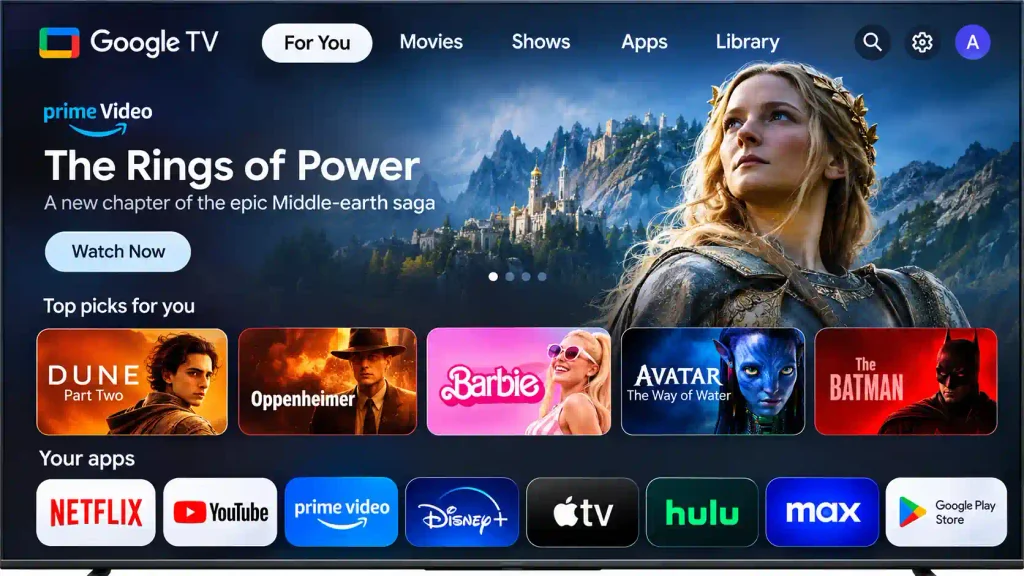
Google TV is an entertainment interface and platform that helps users discover and access content from supported streaming services. It organizes movies, TV shows, and entertainment recommendations into different sections, allowing users to explore available content from one screen. It is built on Google’s TV software experience and is available on supported devices. You can visite the website Apknova
Google TV works by connecting compatible streaming applications and presenting content recommendations based on available services and user preferences. Users can select a movie or show and open the application that provides it. Depending on the device, users can also search with their voice, create a watchlist, manage profiles, and cast supported content from their phones.
Key Features and Benefits of Google TV
- Personalized Recommendations: Discover movies and TV shows based on your interests.
- Streaming Applications: Access supported entertainment apps from one interface.
- Universal Search: Search for movies, shows, and other available content.
- Watchlist: Save movies and TV shows to watch later.
- Google Assistant: Use voice commands to search for entertainment on compatible devices.
- Google Cast: Stream supported content from your phone to a compatible TV.
- Multiple Profiles: Create separate viewing experiences where supported.
- Parental Controls: Manage children’s viewing access through available family settings.
- Easy Navigation: Explore entertainment through organized menus and categories.
Google TV Interface and Main Dashboard
- For You: Displays personalized entertainment recommendations.
- Live: Provides access to available live TV content and services.
- Movies: Explore available movies across supported services.
- Shows: Discover TV series and other television content.
- Apps: Browse installed and available streaming applications.
- Library: Access purchased or saved content where supported.
- Watchlist: Find movies and shows saved for later.
- Search: Look for specific titles, actors, or entertainment categories.
- Settings: Manage accounts, profiles, preferences, and device options.
Discover Movies, TV Shows, and Personalized Recommendations
- Movie Discovery: Explore movies from different supported streaming services.
- TV Shows: Find popular series and recommended television programs.
- Personalized Suggestions: Receive recommendations based on viewing preferences and available content information.
- Trending Entertainment: Discover popular titles and featured content.
- Genre Categories: Browse comedy, action, drama, adventure, and other categories.
- Content Details: Check descriptions, ratings, cast information, and availability where provided.
- Streaming Availability: See which supported services offer a selected title.
Streaming Apps and Services – Netflix, YouTube, Prime Video, and More
Google TV brings together content from compatible streaming applications.
- Netflix: Access movies, documentaries, and TV shows with a Netflix subscription.
- YouTube: Watch videos, music content, tutorials, and entertainment.
- Prime Video: Explore movies and series available through Amazon’s streaming service.
- Disney+: Watch available Disney, Marvel, and other entertainment content in supported regions.
- Other Streaming Apps: Install and access additional compatible applications.
- App Installation: Download supported apps through the Google Play Store on compatible devices.
- Subscriptions: Some streaming services require separate subscriptions or payments.
Google TV Watchlist – Save and Manage Your Favorite Content
- Add to Watchlist: Save movies and shows you want to watch later.
- Manage Saved Titles: Review your saved entertainment in one place.
- Remove Content: Delete titles from your watchlist when no longer needed.
- Content Discovery: Find additional movies and shows related to your interests.
- Google Account Sync: Watchlist availability and synchronization depend on your account and device.
- Quick Access: Return to saved titles without searching for them again.
Google Assistant and Voice Search – Find Entertainment Easily
- Voice Search: Search for movies, shows, and other entertainment using your voice.
- Google Assistant: Use supported voice commands to control compatible TV functions.
- Movie Search: Find titles by saying their names.
- Actor Search: Search for movies featuring particular actors.
- Content Recommendations: Ask for suggestions based on genres or interests.
- Playback Commands: Use supported commands to control playback.
- Device Compatibility: Voice features depend on the device, microphone, language, and regional availability.
Google Cast – Stream Movies and Videos from Your Phone
- Cast Videos: Send supported videos from your phone to a compatible TV.
- YouTube Casting: Play supported YouTube content on your television.
- Mobile Connectivity: Connect your phone and TV through a compatible network setup.
- Playback Control: Use your mobile device to control supported casting sessions.
- Screen Casting: Mirror your Android screen on compatible devices.
- App Compatibility: Casting availability depends on the application and receiving device.
Google TV Profiles, Parental Controls, and Family Features
- User Profiles: Create separate viewing experiences on supported devices.
- Kids Profiles: Set up child-friendly profiles where available.
- Parental Controls: Restrict access to certain content using supported settings.
- Content Restrictions: Apply age-based viewing limitations where supported.
- Screen Time: Use available family settings to manage children’s viewing habits.
- Google Account: Connect supported accounts to personalize the experience.
- Family Entertainment: Discover suitable movies and shows for different age groups.
How to Download, Install, and Use Google TV
How to Download and Install
- Open the Google Play Store on your compatible Android device.
- Search for Google TV.
- Check the app details and device compatibility.
- Tap Install if the app is available.
- Wait for the installation to complete.
- Open Google TV from your app menu.
How to Set Up and Use Google TV
- Open the Google TV application or turn on your compatible Google TV device.
- Sign in with your Google Account if required.
- Follow the on-screen setup instructions.
- Explore the home screen and available entertainment categories.
- Browse movies and TV shows.
- Select a title to check its streaming availability.
- Open the supported streaming application to watch the content.
- Add interesting movies and shows to your watchlist.
- Explore voice search and casting features if supported.
Frequently Asked Questions (FAQs) and Final Verdict
Q1. What is Google TV?
Google TV is Google’s smart entertainment platform that brings streaming applications, movies, TV shows, and personalized recommendations together in one interface.
Q2. Is Google TV free to use?
The Google TV app and platform are generally free to access, but watching content from some streaming services requires separate subscriptions or payments.
Q3. Can I watch Netflix on Google TV?
Yes, Netflix is available on compatible Google TV devices. You need a Netflix account and an appropriate subscription to watch its content.
Q4. Does Google TV support YouTube?
Yes, YouTube is supported on compatible Google TV devices, allowing users to watch videos, music, and other content.
Q5. Can I use Google TV on my smartphone?
Yes, the Google TV app is available on compatible Android devices and in supported regions.
Q6. Does Google TV require an internet connection?
An internet connection is generally required to browse streaming recommendations and watch online content. Some locally stored or downloaded content may be available offline through supported applications.
Q7. Can I cast videos from my phone t?
Yes, you can cast supported content from compatible mobile applications to a device.
Q8. Does support Google Assistant?
Yes, compatible devices support Google Assistant and voice search, although availability depends on device and region.
Q9. Can children use safely?
Yes, supported devices offer family features, including kids’ profiles and parental controls, to help manage children’s viewing experiences.
Q10. Is Google TV the same as Android TV?
No. Google TV is a newer entertainment interface and experience built on Android TV OS. Android TV is the underlying operating system used by supported devices.