Easy Voice Recorder Download – 7 Best Audio Recording Features
Just Now
10 MB
V4.6
Andriod +
1200K +
Description
Easy Voice Recorder is a simple and convenient audio recording application designed for people who want to capture conversations, personal notes, meetings, lectures, and other important sounds. The app provides an easy way to record audio directly from a smartphone without requiring complicated recording equipment or professional editing knowledge. Its straightforward design makes it suitable for students, teachers, professionals, journalists, and everyday users who need a reliable tool for recording important information.
One of the main advantages of Easy Voice Recorder is its flexibility and ease of use. Users can start recording with a few taps, save audio files, listen to previous recordings, and organise their saved content whenever needed. It also supports different recording formats and offers useful options for managing audio files. Whether someone wants to record a classroom lecture, prepare voice reminders, or capture ideas while travelling, Easy Voice Recorder provides practical tools for everyday audio recording.
What Is Easy Voice Recorder and How Does It Work?
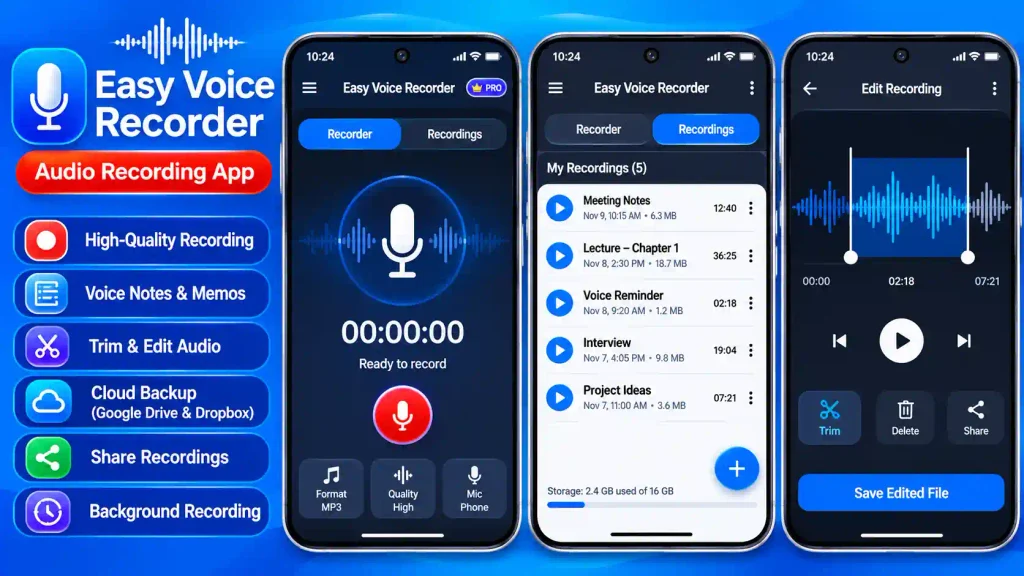
Easy Voice Recorder is an audio recording application developed by Digipom that allows users to record and manage sound using their Android devices. It is designed to make voice recording accessible without requiring advanced technical skills. Users can record lectures, interviews, meetings, personal reminders, and other audio content using their smartphone’s built-in microphone. The application also provides different recording options to help users choose settings according to their recording requirements.
The app works by capturing sound through the device’s microphone and converting it into a digital audio file. After starting a recording, users can stop or pause the process when supported, then save the audio for later playback. Depending on the device and selected settings, users can choose available audio formats and quality options. Saved recordings can be played, renamed, organised, and shared through supported applications. This simple process makes Easy Voice Recorder useful for both occasional recordings and regular audio recording activities. You can visit the website Apknova
Key Features and Benefits of Easy Voice Recorder
Easy Voice Recorder offers several useful features that help users capture, save, and manage audio recordings. Its tools are designed to make everyday recording tasks more convenient while providing additional flexibility for different recording situations.
- Simple Audio Recording: Start capturing voice and other sounds with an easy recording interface.
- High-Quality Recording: Choose from available audio quality and format settings.
- Multiple Audio Formats: Supports formats such as PCM, MP4, and AMR, depending on the version and settings.
- Background Recording: Continue recording while using other applications, subject to device support.
- Recording Management: Organise, rename, and access saved audio files.
- Audio Playback: Listen to previously recorded files directly within the application.
- File Sharing: Share recordings through supported applications and services.
- Widgets and Shortcuts: Access recording functions more quickly on supported devices.
- Cloud Backup: Use available backup and synchronisation options, depending on the subscription and configuration.
- Pro Features: Access additional recording and management options through the paid version.
These features make Easy Voice Recorder useful for students who record lectures, professionals who save meeting notes, and individuals who prefer keeping voice reminders instead of writing everything down. Its simple controls and recording options also help users manage their audio files more efficiently.
Easy Voice Recorder Interface and Main Dashboard
Easy Voice Recorder provides a straightforward interface that allows users to access its main recording functions without navigating through complicated menus. The main dashboard focuses on the recording process, making it easier to start capturing audio, view recording information, and access previously saved files. Users can quickly locate important controls and manage their recordings from the application’s main sections.
The interface also provides access to recording settings, playback options, and file management tools. Users can browse their saved recordings, select an audio file, and listen to it whenever required. Additional settings may allow users to adjust recording quality, choose available audio formats, and configure other preferences. The exact appearance and arrangement of these options can vary depending on the application version, device, and subscription plan.
High-Quality Audio Recording – PCM, MP4, and AMR Formats
One of the useful features of Easy Voice Recorder is its support for different audio recording formats. These formats allow users to select recording options according to their storage requirements and desired audio quality. PCM is generally used when users want high-quality, uncompressed audio, while MP4 can provide compressed audio suitable for saving and sharing recordings. AMR is designed for speech recording and can help reduce file sizes when storage efficiency is important.
Choosing the right format depends on how the recording will be used. For example, students recording classroom lectures may prefer a format that provides clear speech without consuming too much storage space. Users who need better audio quality for interviews or important recordings may prefer a higher-quality setting when available. It is also important to remember that the final recording quality depends on the microphone, surrounding environment, device capabilities, and selected settings.
Background Recording, Widgets, and Quick Recording Shortcuts
Background recording allows users to continue capturing audio while performing other activities on their smartphones. This can be helpful when recording a lecture, interview, or meeting because users do not always need to keep the recording screen open. Depending on the device and Android version, the application may continue recording while users switch to another application or lock their phone, provided the required permissions and system settings allow it.
Widgets and quick recording shortcuts provide another convenient way to access the application’s main functions. Instead of opening the application and navigating through several screens, users may be able to start recording directly through a supported home-screen widget or shortcut. These options can save time when someone needs to capture an important idea or voice reminder quickly. Availability may vary depending on the installed version, device manufacturer, and Android system restrictions.
Audio Playback, Recording Management, and File Sharing
Easy Voice Recorder includes playback and recording management options that allow users to access their saved audio files whenever needed. After completing a recording, users can open the recordings section and select the file they want to hear. The playback functionality makes it easier to review important conversations, revisit recorded lectures, and listen to personal voice notes without using a separate media player.
Recording management also helps users keep their audio files organised. Depending on the available application features, users can rename recordings, browse saved files, and manage unwanted audio content. File-sharing options make it possible to send recordings through supported messaging applications, email services, or other compatible platforms. This is particularly useful for students sharing lecture recordings or professionals sending recorded notes to colleagues. Users should always obtain permission before sharing recordings containing other people’s private conversations.
Audio Editing, Trimming, and Noise-Free Recording Features
Audio editing and trimming tools can help users manage recordings more effectively by removing unnecessary sections from audio files. For example, a long recording may contain silence at the beginning or end, or users may want to keep only a particular section of a lecture or interview. Where supported, trimming functionality allows users to select the required portion and create a shorter, more manageable audio file.
Recording quality can also be affected by background noise, microphone placement, and surrounding environmental conditions. Easy Voice Recorder provides recording settings that can help users adjust their recording experience, although noise reduction and advanced editing capabilities may depend on the specific version or available tools. For clearer recordings, users should keep their smartphone microphone close to the speaker, avoid noisy environments, and check the recording level before starting an important session. A completely noise-free result cannot be guaranteed in every recording situation.
Cloud Backup, Google Drive, Dropbox, and File Organization
Cloud backup is a useful feature for users who want to keep their important audio recordings सुरक्षित and accessible across different devices. Easy Voice Recorder Pro supports automatic uploading of new recordings to cloud storage services such as Google Drive and Dropbox. This feature can help users maintain copies of important lectures, business meetings, interviews, and personal voice notes without manually transferring every recording.
File organisation is another important part of managing audio content. The Pro version provides folder management options that allow users to arrange recordings according to their preferences. Users can also share recordings through compatible applications and transfer audio files to a computer for additional storage. It is worth remembering that recordings are normally stored on the device unless users configure a suitable backup option. Cloud backup should therefore be enabled and checked rather than assumed to happen automatically. Digipom+2
How to Download, Install, and Use Easy Voice Recorder
Easy Voice Recorder is available for supported Android and Apple devices through their respective official app stores. Downloading the application from a trusted source helps users install the correct version and avoid modified or potentially unsafe installation files. Android users can search for Easy Voice Recorder by Digipom in Google Play, while iPhone users can find the application through the Apple App Store.
Steps to Download and Install Easy Voice Recorder:
- Open the Google Play Store on your Android smartphone.
- Search for Easy Voice Recorder.
- Check that the developer is Digipom.
- Tap the Install button.
- Wait for the download and installation process to finish.
- Open the application after installation.
- Allow microphone permission when requested.
Steps to Record Audio Using Easy Voice Recorder:
- Launch Easy Voice Recorder on your device.
- Open the main recording screen.
- Tap the Record button to start capturing audio.
- Speak clearly or position your device near the sound source.
- Tap Stop when you have finished recording.
- Save your recording using the available options.
- Open the Listen section to play your saved audio.
- Rename or share the recording whenever required.
Users should test the microphone and recording settings before capturing important lectures or meetings. This helps ensure that the audio is clear and that the recording is saved correctly.
Easy Voice Recorder Free vs Pro – Features and Pricing
Easy Voice Recorder offers free and paid versions to accommodate different recording requirements. The free version provides essential recording tools, background recording, widgets, shortcuts, and basic file-sharing options. It is suitable for users who occasionally record personal notes, classroom lectures, meetings, or other everyday audio.
Easy Voice Recorder Pro provides additional features for users who need more control over their recordings. These include automatic cloud uploads, additional audio formats, Bluetooth microphone support, trimming tools, folder management, stereo recording, and other advanced options on supported devices. The Pro version is particularly useful for people who regularly record long lectures, interviews, and professional audio content. Digipom+1
| Features | Free Version | Pro Version |
|---|---|---|
| Basic Audio Recording | Yes | Yes |
| PCM and MP4 Recording | Yes | Yes |
| AMR Recording | Yes | Yes |
| Background Recording | Yes | Yes |
| Widgets and Shortcuts | Yes | Yes |
| Audio Sharing | Yes | Yes |
| MP3 and FLAC Formats | Not included | Yes |
| Automatic Cloud Upload | Not included | Yes |
| Audio Trimming | Not included | Yes |
| Bluetooth Microphone | Limited | Yes |
| Folder Management | Limited | Yes |
| Stereo Recording | Limited | Yes |
| Advertisements | May be present | No ads |
Pricing: Easy Voice Recorder Pro is a paid product. Its actual price depends on the country, app store, and available purchasing options. Check Google Play or the relevant app store for the latest price before purchasing.
Frequently Asked Questions (FAQs) and Final Verdict
Q1. What is Easy Voice Recorder?
Easy Voice Recorder is an audio recording application developed by Digipom. It allows users to record lectures, meetings, interviews, personal notes, and other sounds using their smartphones.
Q2. Is Easy Voice Recorder free to download?
Yes, the application offers a free version with basic audio recording features. Users can purchase the Pro version to access additional tools and advanced recording options.
Q3. Is Easy Voice Recorder available for Android?
Yes, Easy Voice Recorder is available for supported Android devices through the Google Play Store.
Q4. Can Easy Voice Recorder record in the background?
Yes, the application supports background recording, allowing users to continue recording while using other applications, subject to device and system restrictions.
Q5. Does Easy Voice Recorder support MP3 format?
MP3 recording is available as an additional feature in the Pro version. The free version supports other formats, including PCM and MP4.
Q6. Can I use Easy Voice Recorder without an internet connection?
Yes, basic audio recording and playback can work offline. However, internet access is required for online services such as cloud uploads.
Q7. Can Easy Voice Recorder automatically upload recordings to Google Drive?
Yes, the Pro version supports automatic uploading of new recordings to Google Drive and Dropbox when the feature is configured.
Q8. Can I edit or trim audio recordings?
Yes, the Pro version includes an editing mode that allows users to trim recordings and remove unwanted sections.
Q9. Can Easy Voice Recorder record phone calls?
Easy Voice Recorder is not designed as a dedicated call recorder and cannot record phone calls on most smartphones due to device and operating system restrictions.
Q10. Is Easy Voice Recorder safe to use?
Easy Voice Recorder is an established application from Digipom. Users should download it from official app stores, review its permissions, and avoid recording private conversations without appropriate permission.