Samsung Calculator Download (Latest Version) – 7 Best Features for Easy Calculations
Just Now
9.5 MB
V5.2
Andriod +
Description
Samsung Calculator is a useful calculator app designed for Samsung Galaxy smartphones and tablets. It helps users perform everyday mathematical calculations without needing a separate physical calculator. Whether you want to add numbers, subtract expenses, multiply values, or divide amounts, the app provides simple tools for completing calculations quickly.
The app also offers additional functions for users who need more than basic mathematics. Depending on the device and software version, Samsung Calculator may include a scientific calculator, unit converter, and calculation history. Its straightforward interface makes it suitable for students, professionals, and anyone who regularly works with numbers.
What Is Samsung Calculator and How Does It Work?
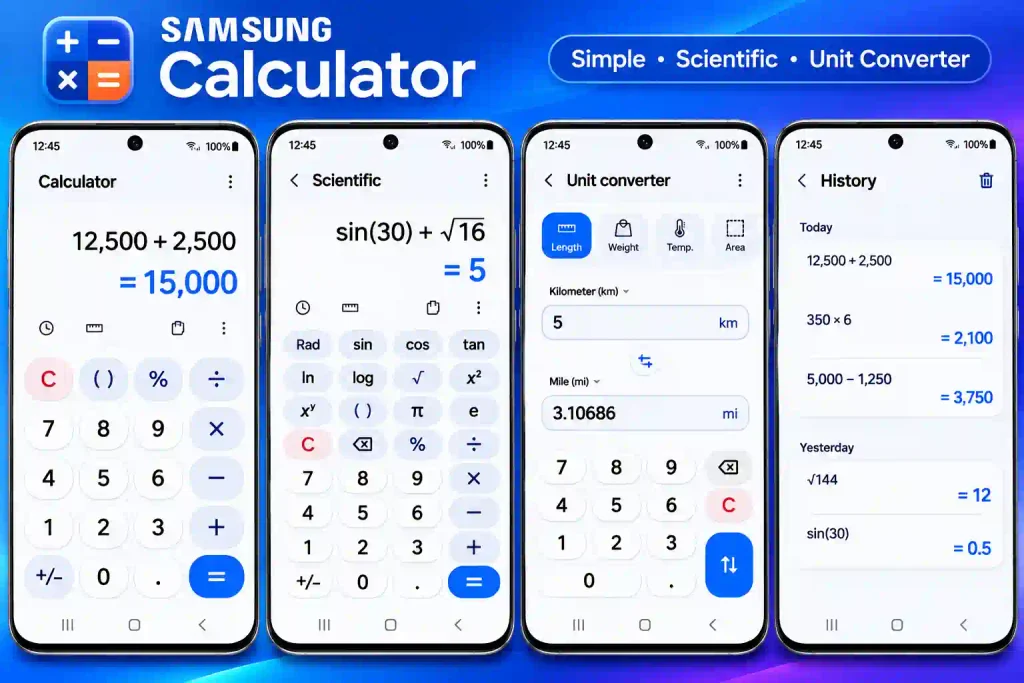
Samsung Calculator is a built-in or downloadable calculator application available for compatible Samsung Galaxy devices. It allows users to enter numbers using an on-screen keypad and select mathematical operations to calculate results. The app displays answers directly on the screen, making everyday calculations easy to complete. You can visit the website Apknova
To use it, simply open the application, enter the numbers, choose an operation, and view the result. Users can also access additional calculation modes, convert different measurement units, and review previous calculations where supported. The available tools may vary depending on the Samsung device and app version.
Key Features and Benefits of Samsung Calculator
- Basic Calculations: Perform addition, subtraction, multiplication, and division.
- Scientific Calculator: Access advanced mathematical functions on supported versions.
- Unit Converter: Convert different measurement units, including length, weight, and temperature.
- Calculation History: Review previous calculations when the history feature is available.
- Simple Keypad: Enter numbers and mathematical symbols using an easy-to-use interface.
- Decimal Calculations: Work with decimal numbers and fractions.
- Clear and Delete Options: Correct entries or clear calculations when needed.
- Samsung Integration: Enjoy a familiar experience on compatible Galaxy devices.
Samsung Calculator Interface and Main Dashboard
- Number Keypad: Enter numbers using the on-screen buttons.
- Operation Buttons: Select addition, subtraction, multiplication, and division.
- Result Display: View the current calculation and final answer.
- Scientific Mode: Access additional mathematical functions where available.
- Unit Converter: Open the conversion section to calculate measurement differences.
- History Option: Review previous calculations if supported.
- Clear Button: Remove the current calculation and start again.
- Menu Options: Access additional tools and settings.
Basic Calculator – Addition, Subtraction, Multiplication, and Division
Samsung Calculator includes the essential mathematical operations needed for everyday calculations.
- Addition (+): Combine two or more numbers, such as 25 + 15 = 40.
- Subtraction (−): Find the difference between numbers, such as 50 − 20 = 30.
- Multiplication (×): Multiply values, such as 8 × 5 = 40.
- Division (÷): Divide one number by another, such as 100 ÷ 4 = 25.
- Percentage (%): Calculate percentages using the available keypad functions.
- Decimal Numbers: Perform calculations using values such as 12.5 or 8.75.
Scientific Calculator – Advanced Mathematical Functions
The scientific calculator provides additional mathematical tools for more complex calculations on supported Samsung devices.
- Trigonometric Functions: Calculate sine, cosine, and tangent values.
- Logarithms: Perform logarithmic calculations using available functions.
- Square Roots: Calculate the square root of a number.
- Powers: Calculate numbers raised to a particular power.
- Parentheses: Organize complex mathematical expressions.
- Constants: Use mathematical constants where available.
- Advanced Operations: Access additional scientific functions depending on the app version.
Unit Converter – Length, Weight, Temperature, and More
The unit converter helps users change measurements from one unit to another without performing manual calculations.
- Length: Convert meters, kilometers, centimeters, and other supported units.
- Weight: Convert kilograms, grams, pounds, and other measurement units.
- Temperature: Convert Celsius, Fahrenheit, and Kelvin where available.
- Area: Convert square meters and other area measurements.
- Volume: Convert liters, milliliters, and other volume units.
- Other Measurements: Explore additional categories depending on the available converter options.
Calculation History – View and Manage Previous Calculations
- Previous Results: Review calculations performed earlier.
- Calculation Details: Check previous expressions and their results.
- Reuse Results: Use an earlier result in another calculation where supported.
- History Management: Clear previous entries if the app provides this option.
- Quick Reference: Check previous calculations without entering the same numbers again.
Number Formatting, Decimal Settings, and Calculation Options
- Decimal Values: Work with numbers that contain decimal points.
- Percentage Calculations: Calculate percentage values using the available functions.
- Negative Numbers: Perform calculations involving negative values.
- Number Display: View results in the format supported by the app.
- Clear Entry: Delete the most recent entry when correcting a calculation.
- Calculation Reset: Clear the current expression and begin again.
Samsung Calculator Widgets and One UI Integration
Samsung Calculator is designed to work within the Samsung Galaxy software environment.
- One UI Experience: Provides an interface that follows Samsung’s software design.
- App Integration: Works alongside other applications on compatible Galaxy devices.
- Home Screen Access: Add an app shortcut to the home screen for quick access.
- Quick Launch: Open the calculator whenever you need to perform a calculation.
- Device Compatibility: Features and appearance may differ across Samsung models and One UI versions.
How to Download, Install, and Use Samsung Calculator
How to Download and Install
- Open the Galaxy Store on your Samsung Galaxy device.
- Search for Samsung Calculator.
- Check the app information and compatibility.
- Tap Install or Update if an update is available.
- Wait for the installation process to finish.
- Open Samsung Calculator from your app menu.
How to Use Samsung Calculator
- Open the Samsung Calculator app.
- Enter the first number using the keypad.
- Select the required mathematical operation.
- Enter the second number.
- Tap the equals (=) button to view the result.
- Open scientific mode for advanced calculations if available.
- Select the unit converter to convert measurements.
- Use the history option to review previous calculations where supported.
Frequently Asked Questions (FAQs) and Final Verdict
Q1. What is Samsung Calculator?
Samsung Calculator is a calculator application for compatible Samsung Galaxy devices. It helps users perform basic and advanced mathematical calculations.
Q2. Is Samsung Calculator free?
Yes, Samsung Calculator is generally available free of charge on compatible Samsung devices.
Q3. Does Samsung Calculator support scientific calculations?
Yes, supported versions include scientific functions such as trigonometry, logarithms, and square roots.
Q4. Can I convert units using Samsung Calculator?
Yes, the app includes a unit converter on supported versions, allowing users to convert measurements such as length, weight, and temperature.
Q5. Does Samsung Calculator save calculation history?
Some versions provide a history feature that lets users review previous calculations.
Q6. Can I use Samsung Calculator offline?
Yes, basic calculations can generally be performed without an internet connection.
Q7. Is Samsung Calculator available for all Android phones?
Samsung Calculator is primarily designed for Samsung Galaxy devices. Availability on other Android phones may be limited.
Q8. Can Samsung Calculator calculate percentages?
Yes, users can perform percentage calculations using the available mathematical functions.
Q9. How can I update Samsung Calculator?
Open the Galaxy Store, search for Samsung Calculator, and install an update if one is available for your device.
Q10. Is Samsung Calculator suitable for students?
Yes, its basic and scientific calculation functions can be useful for students working on everyday mathematics and more advanced problems.