
IMO Download – 7 Best Features of Free Video Calling, Voice Calls & Messaging App for Android
Just Now
9.5 MB
V4.6
Andriod +
1B+
Description
IMO is a popular communication application that allows people to stay connected through voice calls, video calls, and instant messaging. It provides a convenient way to communicate with friends, family members, and colleagues, whether they are nearby or living in another country. The app offers a simple interface that makes it easy for users to send messages, share photos, exchange videos, and make calls using an internet connection.
One of the main reasons people use IMO is its convenient communication features and support for international calling. Users can connect through individual conversations or group chats without depending on traditional mobile calling services. IMO is available for Android and other supported platforms, making it accessible to people using different devices. Its features make it a useful option for everyday communication and staying in touch with loved ones.
What Is IMO and How Does It Work?
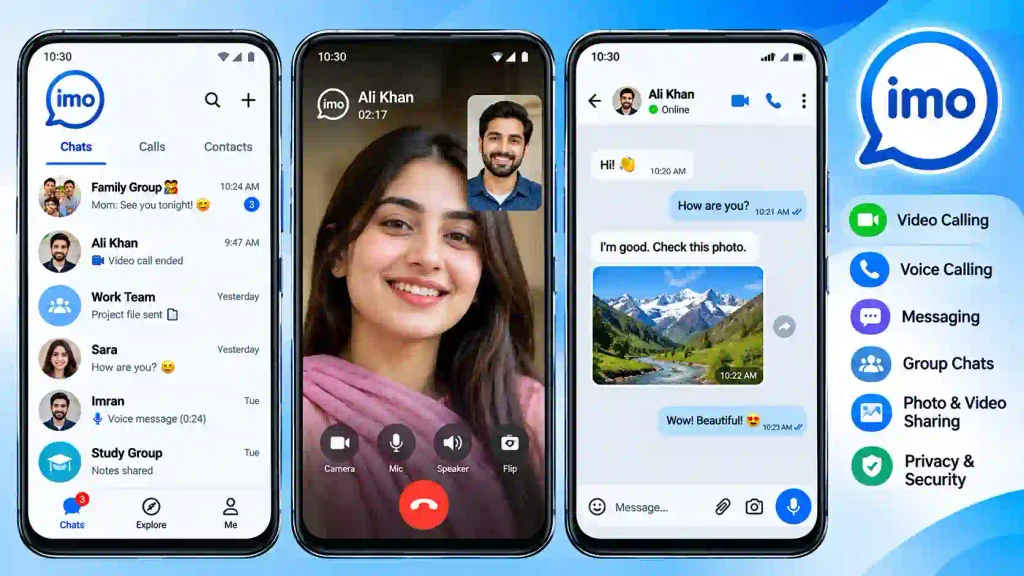
IMO is an internet-based messaging and calling application designed to help users communicate through their smartphones and other supported devices. Instead of relying entirely on traditional telephone networks, it uses an internet connection, such as Wi-Fi or mobile data, to provide voice calls, video calls, and messaging services. Users can create an account, find or add contacts, and start conversations with other IMO users.
The application works by connecting users through its online communication service. After installing IMO and completing registration, users can send text messages, make voice and video calls, and share supported media files. The quality of calls generally depends on internet speed, network stability, and device performance. Both users need compatible access to the service to communicate through its calling features. You can visit the website Apknova
Key Features and Benefits of IMO
IMO offers several communication tools that help users stay connected and share information easily.
- Free Voice Calls: Make internet-based voice calls with other IMO users without traditional call charges. Mobile data or Wi-Fi costs may apply.
- Video Calling: Communicate face-to-face with friends and family through video calls.
- Instant Messaging: Send and receive text messages through individual conversations.
- Group Communication: Create group chats and communicate with multiple people.
- Photo and Video Sharing: Share supported images, videos, and other media files.
- Stickers and Emojis: Make conversations more expressive with different visual elements.
- Contact Synchronization: Find people you know when contact access is enabled.
- Cross-Platform Support: Use IMO on supported devices and platforms.
IMO Interface and Main Dashboard
IMO has a straightforward interface designed to help users access its main communication features without unnecessary complications.
- Home Screen: Displays conversations and provides access to the main messaging area.
- Contact List: Helps users find and communicate with available contacts.
- Chat Window: Provides a space for sending messages, photos, and other supported media.
- Calling Options: Allows users to start voice and video calls.
- Group Chats: Provides access to conversations involving multiple participants.
- Profile Section: Allows users to manage account information and profile details.
- Settings Menu: Contains available options for notifications, privacy, and application preferences.
IMO Account Registration, Sign Up, and Login Guide
Creating an IMO account is a simple process. Users generally need a valid mobile phone number to complete registration and verify their identity.
Steps to Register:
- Download IMO from Google Play Store or another trusted official source.
- Open the application on your Android smartphone.
- Select your country and enter your mobile phone number.
- Request the verification code.
- Enter the code received through the available verification method.
- Add your name and profile picture if requested.
- Allow contact access if you want to find people from your phonebook.
Steps to Log In:
- Open the IMO application.
- Enter the mobile number associated with your account.
- Follow the available verification process.
- Enter the verification code when requested.
- Complete any additional security checks.
- Access your chats and contact list.
Never share your verification code with another person, even if they claim to be an IMO representative.
IMO Voice and Video Calling Features
IMO provides voice and video calling options that allow users to communicate over the internet.
- Voice Calling: Make audio calls to other users through an internet connection.
- Video Calling: See and speak with contacts using the device camera.
- Front and Rear Camera: Switch between available cameras during supported video calls.
- Microphone Controls: Mute or unmute the microphone during conversations.
- Speaker Options: Use the phone speaker or supported audio accessories.
- International Communication: Connect with people in different countries through the internet.
- Network-Based Quality: Call performance adjusts according to available internet conditions and device capabilities.
IMO Instant Messaging and Chat Options
The messaging section allows users to exchange information quickly without making a voice or video call.
- Text Messages: Send messages to individual contacts.
- Message Notifications: Receive alerts when new messages arrive, depending on notification settings.
- Photo Sharing: Send pictures through supported chat options.
- Video Sharing: Exchange video files with contacts.
- Voice Messages: Use available voice messaging features to communicate without typing.
- Conversation History: Access previous conversations within the application.
- Chat Management: Organize or manage conversations using the available options.
IMO Group Chats and Group Video Calls
Group communication is useful for families, friends, classmates, and professional teams. IMO provides group features that allow multiple users to communicate in a shared conversation.
- Create Group Chats: Start a group conversation with selected contacts.
- Add Participants: Invite other users to join an available group.
- Group Messaging: Send messages that can be viewed by group members.
- Group Media Sharing: Share supported photos and videos.
- Group Video Calls: Communicate face-to-face with multiple participants where supported.
- Group Notifications: Receive alerts about group messages and activities.
- Group Management: Use available settings to manage participants and group information.
IMO Stickers, Emojis, and Multimedia Sharing
IMO includes different communication options that help users make their conversations more interesting and expressive.
- Emojis: Add visual expressions to text messages.
- Stickers: Share stickers during conversations where available.
- Photo Sharing: Send pictures directly through chats.
- Video Sharing: Exchange supported video files.
- File Sharing: Use available options to send compatible files.
- Expressive Messages: Combine text, emojis, and stickers to communicate feelings.
- Media Conversations: Share visual content with individual contacts or groups.
IMO Privacy, Security, and Account Protection
Account security is important when using any messaging and calling application. IMO provides available privacy and account-management options, but users should also follow safe online practices.
- Phone Number Verification: Registration uses a mobile number verification process.
- Privacy Settings: Review available controls for managing account visibility and privacy.
- Profile Management: Manage personal profile information through account settings.
- Contact Permissions: Control whether the application can access your phone contacts through device settings.
- Block Contacts: Use available blocking options to restrict unwanted communication.
- App Permissions: Review camera, microphone, storage, and other requested permissions.
- Account Safety: Never share passwords, verification codes, or sensitive personal information.
Users should review IMO’s current privacy policy and security information to understand how their personal information and communications are handled.
IMO Download and Installation Guide for Android
Android users can install IMO by following a few simple steps.
Installation Steps:
- Open the Google Play Store on your Android smartphone.
- Search for IMO – International Calls and Chat.
- Check the developer information and application details.
- Tap the Install button if the official listing is available in your region.
- Wait for the download and installation process to finish.
- Open IMO from your phone’s application menu.
- Complete the registration process to start using the application.
Important: Always prefer Google Play Store or an official IMO source. Avoid modified APK files and unknown download websites because they may contain harmful software or compromise your account security. App availability and Android compatibility can vary by device and region.
IMO Notifications and Contact Management
IMO provides notification and contact-management options to help users organize their communication.
- Message Alerts: Receive notifications when new messages arrive.
- Call Notifications: Get alerts for incoming voice and video calls.
- Contact Synchronization: Find contacts from your phonebook when permission is enabled.
- Profile Updates: Manage available profile information.
- Notification Settings: Adjust supported alerts according to your preferences.
- Contact Blocking: Restrict communication from unwanted contacts.
- Conversation Management: Manage chats using the options available in the application.
IMO Data Usage and Call Quality
IMO uses an internet connection for messaging and calling. The amount of data consumed depends on the duration of communication, call quality, media sharing, and network conditions.
- Wi-Fi Connection: Use Wi-Fi to reduce mobile data consumption.
- Mobile Data: Make calls and send messages using an active mobile data connection.
- Voice Call Usage: Audio calls generally consume less data than video calls.
- Video Call Usage: Video communication normally requires more internet data.
- Network Stability: A stable connection helps reduce interruptions.
- Device Performance: Camera quality and smartphone performance can affect video calls.
- Data Management: Monitor mobile data usage through your Android device settings.
For a better calling experience, users should maintain a stable internet connection and close unnecessary background applications when needed.
Advantages and Disadvantages of IMO
| Advantages | Disadvantages |
|---|---|
| Supports internet-based voice calls. | Requires an internet connection. |
| Provides video calling features. | Video calls may consume considerable data. |
| Includes instant messaging options. | Call quality depends on network stability. |
| Supports group communication. | Some features may vary by region. |
| Allows photo and video sharing. | Requires a phone number for account registration. |
| Offers a simple communication interface. | Unwanted messages or calls may affect users. |
| Supports international communication. | Availability may vary across devices and platforms. |
Frequently Asked Questions (FAQs) About IMO
Q1. What is IMO used for?
IMO is used for internet-based voice calls, video calls, instant messaging, group chats, and sharing media with other users.
Q2. Is IMO free to download?
Yes, IMO can generally be downloaded for free from supported official app stores. However, mobile data charges may apply when using the application.
Q3. Can I make international calls ?
Yes, IMO supports internet-based international voice and video calls with other users, subject to service availability and network conditions.
Q4. Does work without the internet?
No, its online messaging and calling features require an active internet connection.
Q5. Can I use on Android?
Yes, is available for supported Android devices. Compatibility may depend on the Android version and regional availability.
Q6. Can I make group video calls on ?
Provides group communication and group video calling features where supported. The available participant limits may depend on the current application version.
Q7. Do I need a phone number to create an account?
Yes, Generally requires a mobile phone number and verification to register an account.
Q8. Can I send photos and videos through ?
Yes, users can share supported photos and video files through individual and group conversations.
Q9. Is safe to use?
Provides account and privacy options, but users should review their settings, download the official application, and avoid sharing sensitive information or verification codes.
Q10. How can I update?
You can check for updates through Google Play Store or another official distribution source supported in your region.
Conclusion – Is Worth Using?
IMO is a convenient communication application for people who want to stay connected through voice calls, video calls, and instant messaging. Its straightforward interface, group communication options, and multimedia-sharing features make it useful for everyday conversations.







