
Talabat 2026 – 10 Best Food Delivery & Grocery Shopping Features
Just Now
9.5 MB
V5.3
Andriod +
50M+
Description
Talabat is a popular online food delivery and shopping application that allows users to order meals, groceries, and other everyday products directly from their smartphones. It connects customers with restaurants, supermarkets, grocery stores, and delivery services through one convenient platform. Instead of visiting different shops or restaurants, users can browse available options, select their favourite products, place orders, and get them delivered to their chosen address.
The application is designed to make daily shopping and food ordering easier and faster. Users can explore restaurant menus, compare prices, check available offers, make online payments, and track their orders. Talabat also provides services such as grocery delivery and Talabat Mart in supported locations. Its availability, delivery options, payment methods, and subscription benefits may differ depending on the country and city.
What Is Talabat and How Does It Work?
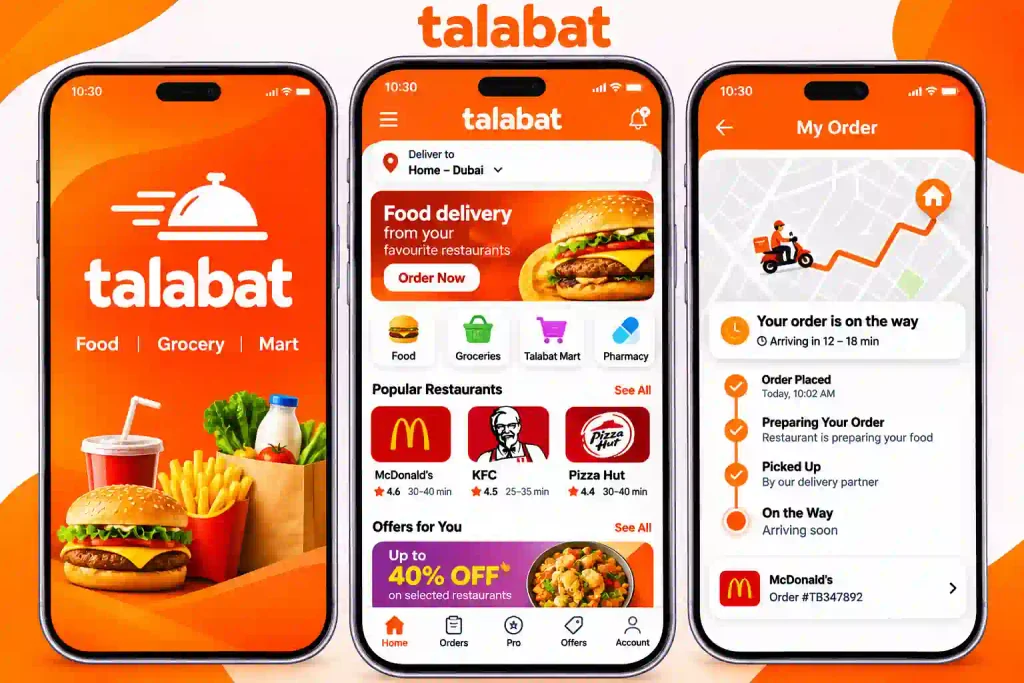
Talabat is an online delivery platform that helps customers order food and other products from participating businesses. Users can access the service through the mobile application or website, enter their delivery location, and explore restaurants and stores available in their area. Each restaurant or store provides its own product listings, prices, descriptions, and other details to help customers choose what they need.
The ordering process is simple. Customers select a restaurant or store, add their preferred items to the shopping cart, enter delivery details, and choose an available payment method. After confirming the order, the restaurant or store prepares the items, and a delivery partner may collect and deliver them. Users can check order progress through the application, depending on the service available in their location. You can visit the website Apknova
Key Features and Benefits of Talabat
- Restaurant Food Delivery: Allows customers to order meals from participating restaurants without visiting them.
- Grocery Shopping: Provides access to supermarkets and grocery stores for everyday household products.
- Talabat Mart: Offers quick delivery of selected groceries and daily essentials in supported locations.
- Restaurant Search: Helps users discover restaurants by name, cuisine, location, and food category.
- Order Tracking: Allows customers to follow the progress of their orders through available tracking updates.
- Online Payments: Supports different payment options depending on the country and order.
- Discounts and Promotions: Provides access to promotional offers, discount codes, and special deals when available.
Talabat Interface and Main Dashboard
- Location Selection: Allows users to enter or select their delivery address.
- Search Bar: Helps customers search for restaurants, dishes, grocery products, and stores.
- Food Categories: Displays different food options, such as burgers, pizza, sandwiches, desserts, and more.
- Restaurant Listings: Shows available restaurants with details such as ratings, estimated delivery times, and delivery fees where provided.
- Grocery Section: Provides access to supermarkets, grocery shops, and everyday products.
- Offers and Promotions: Displays available discounts, deals, and promotional campaigns.
- Account and Orders Section: Gives users access to their profiles, order history, saved addresses, and account settings.
Talabat Account Registration, Sign Up, and Login Guide
- Open Talabat: Download and launch the official Talabat application or visit its website.
- Select Sign Up: Choose the registration option if you do not already have an account.
- Enter Your Details: Provide the information requested, such as your name, email address, or mobile number.
- Verify Your Number: Enter the verification code sent to your mobile number if requested.
- Create Your Account: Follow the instructions to complete the registration process.
- Log In: Existing users can enter their registered details or use an available sign-in method.
- Add Your Address: Save your delivery location to find restaurants and stores that serve your area.
Talabat Restaurant Search, Food Categories, and Menu Browsing
- Search for Restaurants: Enter a restaurant name or food item in the search bar.
- Explore Food Categories: Browse different categories, including pizza, burgers, chicken, seafood, desserts, and more.
- Discover Nearby Restaurants: View participating restaurants that deliver to your selected location.
- Check Restaurant Details: Review available ratings, estimated delivery times, and delivery charges.
- Browse Menus: Open a restaurant to explore its available dishes, descriptions, and prices.
- Compare Food Options: Compare menu items and available offers before making a selection.
- Choose Your Favourite Meal: Select the dishes you want and add them to your shopping cart.
Talabat Food Ordering, Cart, and Checkout Process
- Select a Restaurant: Choose a restaurant that delivers to your location.
- Browse the Menu: Explore available meals, snacks, drinks, and other food items.
- Add Items to Cart: Select your preferred dishes and add them to your shopping cart.
- Review Your Order: Check the selected items, quantities, prices, and any available customizations.
- Enter Delivery Details: Select your saved address or provide a new delivery location.
- Choose Payment Method: Select an available payment option, such as cash on delivery or online payment, depending on your location.
- Confirm Your Order: Review the final amount and submit your order through the application.
Talabat Grocery Shopping and Talabat Mart Features
- Grocery Store Selection: Browse supermarkets and grocery stores available in your delivery area.
- Product Categories: Explore categories such as fruits, vegetables, dairy products, snacks, beverages, and household essentials.
- Product Search: Search for specific grocery items using the search bar.
- Product Details: Check available product information, sizes, quantities, and prices.
- Talabat Mart: Access selected everyday essentials through Talabat Mart where the service is available.
- Shopping Cart: Add multiple grocery products to your cart and review your selections before checkout.
- Home Delivery: Place your grocery order and receive the selected items at your delivery address.
Talabat Order Tracking, Delivery Updates, and Notifications
- Order Confirmation: Receive confirmation after successfully placing an order.
- Preparation Updates: Check available updates while the restaurant or store prepares your order.
- Delivery Status: Follow the progress of your order through the application.
- Delivery Partner Information: View delivery partner details when provided by the service.
- Estimated Arrival Time: Check the estimated delivery time displayed for your order.
- Push Notifications: Receive updates about order progress and delivery information if notifications are enabled.
- Order History: Review previous orders and access their details through your account.
Talabat Payment Methods, Promo Codes, Discounts, and Vouchers
- Credit and Debit Cards: Pay using supported bank cards where online card payments are available.
- Cash on Delivery: Pay in cash when this option is offered for your location and order.
- Digital Payment Options: Use supported digital wallets or other electronic payment services where available.
- Promo Codes: Enter eligible promotional codes during checkout to receive applicable discounts.
- Restaurant Offers: Explore special offers and discounts provided by participating restaurants.
- Delivery Fee Discounts: Look for promotions that reduce or remove delivery charges when available.
- Review Final Payment: Check the item prices, delivery fees, service charges, and discounts before confirming your order.
Talabat Pro Subscription, Rewards, and Loyalty Benefits
- Talabat Pro Membership: Provides a paid subscription option in supported markets.
- Delivery Benefits: Eligible orders may receive reduced or free delivery under the membership conditions.
- Restaurant Offers: Members may receive special deals from participating restaurants.
- Grocery Benefits: Selected grocery orders may qualify for additional membership benefits.
- Exclusive Promotions: Members may access offers that are not available to all customers.
- Subscription Management: Users can check their membership details and manage available subscription settings.
- Membership Conditions: Benefits, minimum order values, eligible stores, prices, and availability vary by country.
Talabat Download and Installation Guide for Android and iOS
Talabat is available for compatible Android and Apple devices in supported countries. Users should download the official application through their device’s app store to ensure they install the genuine version.
For Android:
- Open the Google Play Store on your Android smartphone.
- Search for Talabat in the search bar.
- Select the official application published by Talabat.
- Tap the Install button to download the application.
- Wait for the installation process to finish.
- Open Talabat from your home screen.
- Register or log in and enter your delivery address to get started.
For iOS:
- Open the Apple App Store on your iPhone or iPad.
- Search for Talabat.
- Select the official Talabat application.
- Tap Get to begin downloading the application.
- Confirm the installation if your device requests authentication.
- Wait until the application is installed.
- Open Talabat, sign in or register, and enter your delivery location.
Advantages and Disadvantages of Talabat
| Advantages | Disadvantages |
|---|---|
| Easy-to-use application for food and grocery ordering. | Delivery fees may increase the total order cost. |
| Provides access to different restaurants and stores. | Not all restaurants and products are available in every area. |
| Saves time by offering home delivery. | Delivery times may be affected by traffic or busy periods. |
| Offers multiple food and grocery categories. | Product availability can change frequently. |
| Provides order tracking and delivery notifications. | Tracking information may sometimes be delayed. |
| Offers discounts, vouchers, and promotional deals. | Some discounts have minimum order requirements or restrictions. |
| Supports different payment methods in supported markets. | Payment options vary depending on the country and location. |
| Provides Talabat Pro membership in selected markets. | Subscription benefits may not apply to every restaurant or order. |
Frequently Asked Questions (FAQs) About Talabat
Q1. What is Talabat used for?
Talabat is an online delivery application used to order food, groceries, and everyday products from participating restaurants and stores.
Q2. Is free to download?
Yes, the application is generally free to download. However, users may need to pay for food, groceries, delivery, and other applicable charges.
Q3. Is available in every country?
No, Talabat operates in selected markets. Its services and availability depend on the country and delivery location.
Q4. How can I create a account?
Download the application, select the registration option, enter the required details, verify your mobile number if requested, and complete the registration process.
Q5. Can I order groceries through Talabat?
Yes, Talabat provides grocery delivery through participating supermarkets and stores. Talabat Mart is also available in selected locations.
Q6. How can I track my order?
Open the application, go to your orders section, select your active order, and check the available delivery updates.
Q7. Does accept cash on delivery?
Cash on delivery is available in some locations and for eligible orders. Check the payment options displayed during checkout.
Q8. What is Pro?
Talabat Pro is a paid membership service that offers selected benefits, such as delivery savings and special offers, depending on the country and membership conditions.
Q9. Can I cancel a order?
Order cancellation depends on the order status and applicable cancellation policy. Open your active order and check the available cancellation options or contact customer support.
Q10. Does offer discount codes?
Yes, Talabat sometimes provides promotional codes, restaurant discounts, and special offers. Their availability and conditions may vary.
Q11. Is Talabat available for iPhone users?
Yes, Talabat is available for compatible iPhones through the Apple App Store in supported countries.
Q12. How can I contact Talabat customer support?
You can use the Help or Customer Support section in the application to find assistance with orders, payments, delivery problems, and account-related questions.
Conclusion
Talabat is a convenient online food delivery and grocery shopping application that connects customers with restaurants, supermarkets, and delivery services. It offers useful features such as restaurant search, menu browsing, grocery shopping, order tracking, online payments, and promotional discounts. Although delivery charges, service availability, and membership benefits vary by location, Talabat provides a simple way to order meals and everyday essentials from home.







