Snapchat, Share Photos, Videos, Stories & Connect with Friends Online
Just Now
15MB
V6.2
Andriod +
25000K +
Description
Introduction to Snapchat – Social Media and Multimedia Messaging Platform
Snapchat is a popular social media and multimedia messaging platform that allows people to communicate through photos, videos, messages, and voice or video calls. It is designed to help users share everyday moments with friends and family in a quick and creative way. Unlike traditional social media platforms, Snapchat opens directly to the camera, making it easy to capture and share moments instantly.
The platform offers several features, including Stories, filters, Lenses, Snap Map, Memories, and Spotlight. Users can edit their photos and videos with creative effects before sharing them with friends or posting them for a wider audience. Snapchat is available on mobile devices and also offers selected features through its web version. What is Snapchat?+1
What Is Snapchat and How Does It Work?
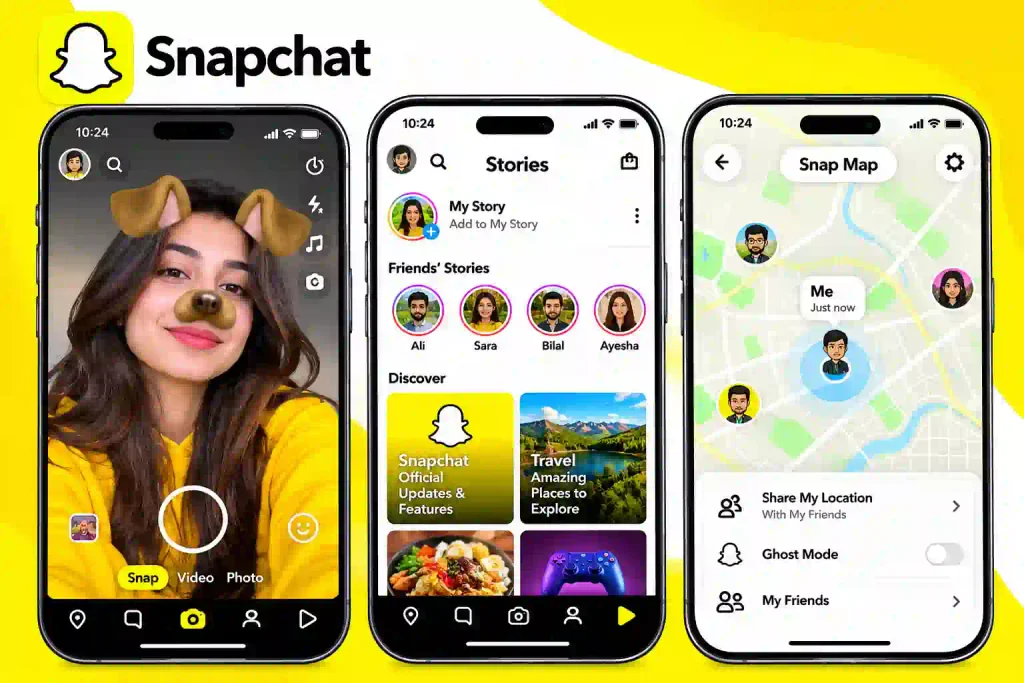
Snapchat is a multimedia communication application developed by Snap Inc. It allows users to send temporary photo and video messages called Snaps, exchange text messages, make calls, and share updates through Stories. Users can add friends, follow creators, explore public content, and interact with different features within the application.
Snapchat works mainly through its camera and messaging system. Users can take a photo or record a video, add filters, text, stickers, or other effects, and send it to selected friends. They can also publish content through Stories or explore videos on Spotlight. Some messages are designed to disappear automatically, but recipients may still save or capture content, so users should always think carefully before sharing. What is Snapchat?+2, you can visit the website Apknova
Key Features of Snapchat
- Photo and Video Snaps: Capture and share photos or short videos with friends.
- Stories: Share photos and videos that friends can view for a limited period.
- Chat: Communicate through text messages, pictures, stickers, and other attachments.
- Lenses and Filters: Apply creative effects to photos and videos.
- Spotlight: Discover entertaining videos shared by the Snapchat community.
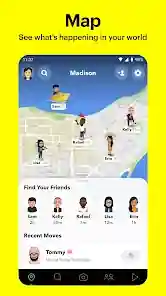
- Snap Map: Explore places and view location-based content.
- Memories: Save selected Snaps and Stories for later.
- Bitmoji: Create a personalised cartoon avatar.
- Voice and Video Calls: Communicate with friends through calls.
- Friendship Profiles: View shared content and information connected to individual friendships. App Store+1
Snaps, Stories, Photos, and Video Sharing on Snapchat
- Take photos directly through the Snapchat camera.
- Record videos by pressing and holding the camera button.
- Send Snaps privately to selected friends.
- Add photos and videos to My Story.
- Choose available Story privacy options before sharing.
- Add captions, emojis, drawings, and stickers to your Snaps.
- View Stories shared by friends and followed accounts.
- Remember that viewers may save or capture shared content. What is Snapchat?+1
Snapchat Filters, Lenses, Stickers, and Creative Tools
- Use Filters to add visual effects and overlays to photos.
- Apply AR Lenses to change appearances or add interactive effects.
- Explore different face effects and creative camera options.
- Add stickers and emojis to photos and videos.
- Write captions using the text editing tool.
- Draw directly on Snaps with the available drawing tools.
- Add music where the feature is available.
- Explore new Lenses created by Snapchat and its community. App Store+1
Snapchat Chat, Voice Calls, and Video Calling Features
- Send private text messages to friends.
- Share photos, videos, and stickers in conversations.
- Start individual or group chats.
- Make voice calls with friends.
- Start video calls using the supported calling features.
- Send saved photos and videos from Memories.
- Check when messages or Snaps have been opened.
- Save selected messages when the feature is available.
- Manage chat deletion settings where supported. What is Snapchat?+1
How to Create a Snapchat Account
- Download Snapchat from the official app store.
- Open the application on your device.
- Tap the Sign Up option.
- Enter your first and last name.
- Provide your correct date of birth.
- Choose a username for your account.
- Create a strong password.
- Enter your phone number or email address.
- Complete the verification process.
- Add a profile picture or Bitmoji if you want.
- Find and add friends to start using Snapchat.
Snapchat generally requires users to be at least 13 years old, or the minimum age required in their jurisdiction. Homepage+1
How to Download and Install Snapchat
- Open Google Play Store on an Android device.
- Search for in the search bar.
- Select the official application developed by Snap Inc.
- Tap Install and wait for the download to finish.
- Open the App Store on an iPhone or iPad.
- Select the official Snapchat application.
- Tap Get to download and install it.
- Open the app after installation.
- Sign in or create a new account.
Always download Snapchat from an official app store or Snapchat’s official website to reduce the risk of installing an unsafe or modified application. App Store+1
How to Log In and Manage Your Snapchat Account
- Open Snapchat on your mobile device.
- Tap Log In on the welcome screen.
- Enter your username, email address, or phone number.
- Type your account password.
- Complete any requested security verification.
- Open your profile by tapping your profile icon.
- Update your personal information where permitted.
- Manage your friends and friend requests.
- Review your privacy and notification settings.
- Use account recovery options if you cannot access your account.
Snapchat Stories, Spotlight, and Discover Features
- Stories: View photos and videos shared by friends and other accounts.
- My Story: Share selected moments with your chosen audience.
- Spotlight: Explore short videos from users and creators.
- Discover: Find content from publishers, creators, and other sources.
- Subscriptions: Follow available creators and content channels.
- Recommendations: Discover content based on your activity and interests.
- Content Sharing: Share interesting Stories or Spotlight videos with friends.
- Content Controls: Report or hide content that you do not want to see. Support+1
Snap Map – Location Sharing and Exploring Places
- Open Snap Map through the map option in Snapchat.
- Explore places and location-based public content.
- View friends’ locations only when they choose to share them with you.
- Share your location with selected friends.
- Use Ghost Mode to hide your location from the map.
- Explore Snaps and Stories connected to different places.
- Check available location-related information.
- Review location permissions in your device settings.
- Avoid sharing your live location with people you do not trust.
Location sharing is optional and is off by default for Snapchat users. What is Snapchat?+1
Snapchat Memories – Saving and Managing Photos and Videos
- Save selected Snaps to Memories.
- Open Memories from the camera screen.
- Browse previously saved photos and videos.
- Search for saved content using available options.
- Edit old Snaps before sharing them again.
- Send saved content to friends.
- Create Stories using saved photos and videos.
- Export selected Memories to your device where supported.
- Use My Eyes Only to protect selected Memories with a passcode.
- Keep a secure backup of important photos and videos.
Privacy Settings, Account Security, and Parental Controls
- Choose who can contact you through Snapchat.
- Manage who can view your Stories.
- Review friend requests before accepting them.
- Enable two-factor authentication for additional account security.
- Create a strong and unique password.
- Use Ghost Mode if you do not want to share your location.
- Review connected devices and active sessions.
- Report suspicious accounts or inappropriate content.
- Block users who make you uncomfortable.
- Review available parental controls and Family Center features.
- Never share passwords or verification codes with anyone.
Snapchat Compatibility with Android, iOS, and Web Browsers
- Snapchat is available for supported Android smartphones and tablets.
- iPhone and iPad users can download it through the Apple App Store.
- Supported mobile devices can use the camera, chat, Stories, and other features.
- Web allows users to access selected communication features through a browser.\
- Some features may work differently between mobile and desktop versions.
- Device compatibility depends on the operating system and app requirements.
- Keep the application updated for improved performance and security.
Pros and Cons of Using Snapchat
| Pros | Cons |
|---|---|
| Easy photo and video sharing | Some features may take time to understand |
| Creative Filters and Lenses | Frequent notifications can be distracting |
| Private and group messaging options | Users may receive unwanted messages |
| Voice and video calling features | Requires an internet connection |
| Stories and Spotlight for entertainment | Public content may not always be suitable |
| Memories for saving selected moments | Saved content may use device or account storage |
| Optional location-sharing controls | Sharing location can create privacy risks |
| Available on mobile and web | Some features differ across devices |
Frequently Asked Questions (FAQs) About Snapchat
1. What is Snapchat used for?
Snapchat is used for sharing photos, videos, messages, and Stories. It also provides voice calls, video calls, creative filters, and entertainment content.
2. Is free to use?
Yes, can be downloaded and used for free. However, it also offers optional paid features and in-app purchases.
3. Can I use on a computer?
Yes. Web allows users to access selected features, including chatting and calling, through a supported web browser.
4. How do I create a account?
Download the application, enter your name and date of birth, choose a username, create a password, and verify your phone number or email address.
5. What are Stories?
Stories are collections of photos and videos that users share with their selected audience. They are generally available for 24 hours.
6. What is Spotlight?
Spotlight is a section where users can explore short videos and creative content shared by.
7. What is Snap Map?
Snap Map is an interactive map that allows users to explore locations and view location-based content. Friends can also share their locations if they choose.
8. Can I save photos and videos?
Yes. Users can save selected photos and videos in Memories or export supported content to their devices.
9. Is safe for children?
Includes privacy settings and parental tools, but parents should review its features, discuss online safety, and supervise age-appropriate use. The platform generally requires users to be at least 13 years old.
10. Can messages disappear automatically?
Many Snaps and chats are designed to disappear according to their settings. However, recipients may save messages, take screenshots, or capture content using another device.
11. What is Ghost Mode?
Ghost Mode is a privacy feature that hides your location from other users on Snap Map.
12. Who developed ?
Snapchat was developed by Snap Inc., a technology company that operates the platform.
Images