
Reddit App Download 2026 – 10 Best Social Networking, Community & Discussion Features
Just Now
15MB
V5.2
Andriod +
100M +
Description
Reddit is a popular social media and online discussion platform where people can share information, ask questions, discuss different topics, and connect with communities from around the world. It provides a space for users to explore content related to technology, education, entertainment, gaming, business, sports, science, lifestyle, and many other interests. Reddit is different from traditional social media platforms because its content is mainly organized into topic-based communities known as subreddits.
Reddit allows users to publish text posts, share images and videos, add comments, and vote on content shared by other members. People can join communities that match their interests and participate in conversations with users who have similar hobbies or opinions. Whether someone wants advice, product recommendations, educational information, or entertainment, Reddit offers a wide range of discussions and user-generated content in one place.
What Is Reddit and How Does It Work?
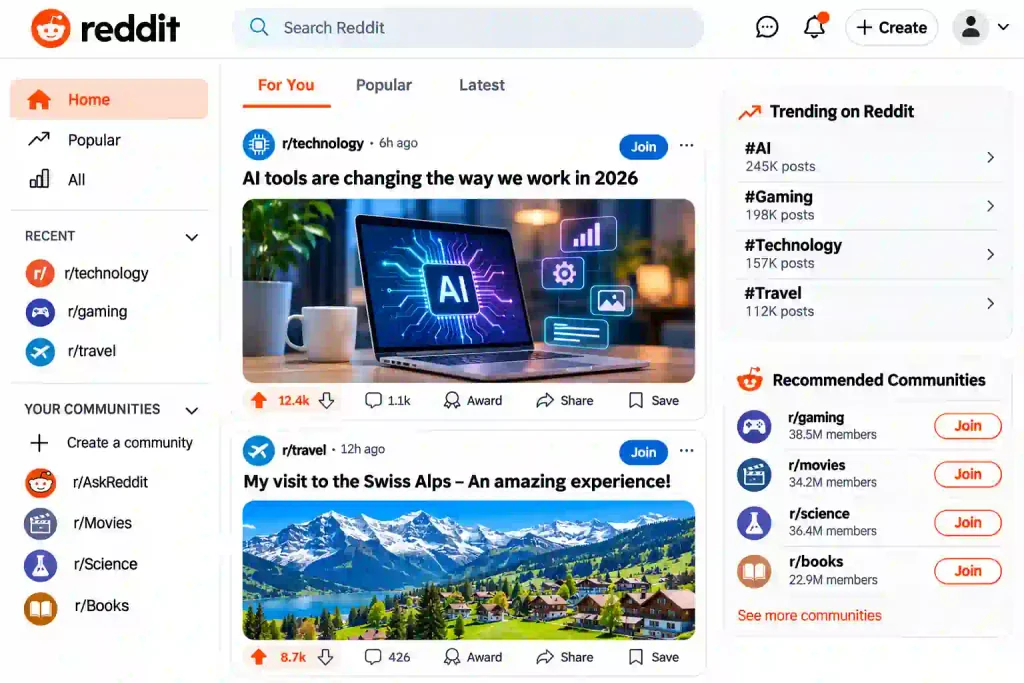
Reddit is an online platform that combines social networking, community discussions, news sharing, and content discovery. Users can create an account, join different communities, publish posts, ask questions, and interact with other members. Each community focuses on a particular subject and has its own rules and moderators. These communities are called subreddits and usually begin with the letter “r/”, followed by the community name.
Reddit works through user participation and a voting system. Members can upvote posts and comments they find useful or interesting and downvote content they do not find relevant. Popular posts may appear higher in community feeds or on Reddit’s Popular page. Users can also follow communities, search for specific topics, send messages, and personalize their home feed according to their interests. You can visite the website Apknova
Key Features and Benefits of Reddit
- Topic-Based Communities: Reddit provides thousands of communities covering different interests, hobbies, professions, and subjects.
- Post Sharing: Users can publish text, images, videos, links, and other supported content.
- Upvotes and Downvotes: Members can vote on posts and comments to help highlight useful or interesting contributions.
- Comments and Discussions: Users can participate in conversations, ask questions, and share opinions.
- Personalized Home Feed: Reddit displays content from communities and topics that users follow.
- Search and Discovery: The search feature helps users find communities, posts, comments, and discussions.
- Karma Points: Users can earn karma through positive engagement with their posts and comments.
Reddit Interface and Main Dashboard
- Home Feed: Displays posts from communities that users follow and other recommended content.
- Navigation Menu: Provides access to Home, Popular, Explore, and other sections.
- Search Bar: Allows users to search for communities, posts, topics, and discussions.
- Community Sidebar: Helps users access their joined subreddits and discover new communities.
- Post Creation Button: Allows members to create and publish new posts.
- Notification Section: Shows updates about replies, comments, messages, and other activities.
- Profile Menu: Provides access to account details, posts, comments, saved content, and settings.
Reddit Account Registration, Sign Up, and Login Guide
- Open Reddit: Visit the official Reddit website or open the Reddit mobile application.
- Select Sign Up: Click or tap the Sign Up option to begin creating an account.
- Enter Your Email: Provide a valid email address if requested during registration.
- Choose a Username: Select a unique username for your Reddit profile.
- Create a Password: Set a strong password to protect your account.
- Complete Verification: Follow any email or security verification steps shown on the screen.
- Log In to Reddit: Use your registered login details or an available supported sign-in method to access your account.
Reddit Communities (Subreddits), Topics, and Discussion Groups
- Discover Subreddits: Explore communities related to your interests, hobbies, and professional activities.
- Join Communities: Join available subreddits to see their posts and discussions in your feed.
- Explore Different Topics: Find communities covering technology, gaming, education, entertainment, travel, and more.
- Read Community Rules: Check each community’s guidelines before publishing posts or comments.
- Participate in Discussions: Ask questions, share experiences, and respond to other members.
- Create a Community: Eligible users can create their own subreddit, subject to requirements.
- Manage Joined Communities: Visit your joined subreddits and adjust your feed according to your interests.
Posts, Comments, Upvotes, and Downvotes Features
- Create Text Posts: Share questions, stories, opinions, and useful information with a community.
- Share Images and Videos: Upload supported media to participate in visual discussions.
- Publish Link Posts: Share links to websites, articles, videos, and other online resources.
- Write Comments: Respond to posts and join conversations with other users.
- Use Upvotes: Upvote content that you find helpful, interesting, or relevant.
- Use Downvotes: Downvote content that does not contribute positively to a discussion.
- Reply to Comments: Continue conversations by replying directly to other members’ comments.
Home Feed, Popular Posts, and Content Discovery Guide
- Open the Home Feed: View posts from communities you have joined and other recommended sources.
- Explore Popular Content: Visit the Popular section to discover widely discussed posts.
- Check the Latest Posts: Use available sorting options to explore newer community content.
- Follow Interesting Communities: Join subreddits that regularly share content you enjoy.
- Discover Recommended Posts: Explore suggestions based on your activity and interests.
- Save Useful Content: Save posts to find them again later.
- Customize Your Feed: Manage followed communities and available content preferences.
Search, Trending Topics, and Community Exploration Features
- Search for Communities: Enter keywords to find subreddits related to particular subjects.
- Find Specific Posts: Search for questions, discussions, news, and shared content.
- Explore Popular Topics: Browse widely discussed subjects and trending conversations.
- Use Search Filters: Apply available filters to narrow results by community, content type, or other options.
- Discover New Communities: Explore suggestions to find groups that match your interests.
- Search Within Subreddits: Look for specific information inside individual communities.
- Explore Related Discussions: Open relevant posts and comments to learn more about a topic.
Chat, Messaging, and User Interaction Features
- Start Conversations: Use Reddit’s available messaging features to communicate with other members.
- Send Chat Messages: Exchange messages with users when chat is available to your account.
- Receive Message Requests: Review incoming requests and decide whether to accept or ignore them.
- Reply to Members: Respond to messages and continue conversations.
- Check Notifications: Receive updates about comments, replies, and other interactions.
- Manage Conversations: Use available chat controls to manage or leave conversations.
- Control Communication: Adjust messaging and privacy settings to manage who can contact you.
Reddit Profile Customization, Karma Points, and Account Settings
- Set Up Your Profile: Add a display name, profile picture, and other available profile information.
- Choose a Username: Your username identifies your account across Reddit.
- View Your Posts: Access the posts you have published on the platform.
- Check Your Comments: Review your previous comments and discussions.
- Understand Karma Points: Karma reflects the positive voting activity received by your posts and comments.
- Manage Saved Posts: Find content you have saved for future reference.
- Update Account Settings: Manage preferences, profile details, notifications, and other account options.
Reddit Privacy, Security, Moderation, and Content Controls
- Manage Privacy Settings: Review available options for controlling your account visibility and personal information.
- Enable Account Security: Use a strong password and available two-factor authentication options.
- Block Users: Block accounts you do not want to interact with.
- Report Inappropriate Content: Report posts, comments, or accounts that violate rules.
- Use Content Controls: Manage available settings for sensitive or mature content.
- Follow Community Rules: Respect subreddit guidelines when posting and commenting.
- Manage Notifications: Customize alerts to control which activities generate notifications.
Reddit Download and Installation Guide for Android, iOS, and Desktop
- Android Download: Open the Google Play Store on your Android device.
- Search for: Enter in the search bar and find the official application.
- Install the App: Tap Install and wait for the download and installation process to finish.
- iPhone and iPad Download: Open the Apple App Store and search
- Complete Installation: Tap Get or the download option and follow the on-screen instructions.
- Desktop Access: Visit the official website through a supported web browser without installing the mobile app.
- Open and Sign In: Launch and log in or create a new account to start exploring communities.
- Official website:
Advantages and Disadvantages
| Advantages | Disadvantages |
|---|---|
| Thousands of topic-based communities | Some communities contain misleading information |
| Helpful discussions and user experiences | Content quality can vary |
| Free access to many features | Advertisements appear on the platform |
| Easy content discovery | Discussions can become overwhelming |
| Useful learning and educational resources | Some content may be inappropriate |
| Opportunities to connect with people | Community rules can be different |
| Available on mobile and desktop | Privacy requires careful account management |
Frequently Asked Questions (FAQs) A
Q1. What is sed for?
Is used for online discussions, sharing information, asking questions, discovering communities, and connecting with people who have similar interests.
Q2. Is free to use?
Yes, Offers free account registration and access to many platform features. Optional paid features and subscriptions may also be available.
Q3. Do I need an account to use ?
No, users can browse many public posts without an account. However, an account is generally required to post, comment, vote, and join communities.
Q4. What are subreddits on ?
Subreddits are individual communities focused on specific topics. For example, users can find communities about technology, gaming, education, travel, and entertainment.
Q5. What is Karma?
Karma is a score associated with an account that reflects the upvotes received on its posts and comments. It is not money or a direct measure of a user’s expertise.
Q6. Can I post pictures and videos ?
Yes, Reddit supports image and video posts in communities where the relevant content types are allowed.
Q7. Is Reddit available on Android and iPhone?
Yes, the official application is available for supported Android and iOS devices.
Q8. Can I use on a computer?
Yes, users can access through a web browser on desktop and laptop computers.
Q9. How can I find communities on ?
You can use search feature to find communities by entering keywords related to your interests.
Q10. Can I delete my posts and comments?
Yes, Provides options to delete your own posts and comments, subject to the platform’s available controls.
Q11. Is safe for users?
Provides privacy, blocking, reporting, and moderation tools. However, users should be careful with personal information and verify information shared by other members.
Q12. Can I send private messages ?
Yes, Provides chat and messaging features, although availability and communication settings may vary by account.
16. Conclusion – Is Reddit Worth Using in 2026?
Reddit remains a useful social networking and discussion platform in 2026 for people who want to explore different topics, share information, ask questions, and connect with online communities. Its subreddit system makes it easy to find discussions about almost any subject, while features such as posts, comments, voting, search, and personalized feeds provide different ways to participate.







