
Photoroom – Download AI Photo Editor APK for Background Removal, Image Editing & Product Photography
Just Now
9.5 MB
V5.5
Andriod +
200K +
Description
Photoroom is an AI-powered photo editing application designed to help users create professional-looking images quickly and easily. It is especially useful for removing backgrounds, changing image scenes, improving product photos, and creating attractive designs. Whether someone runs an online store, promotes products on social media, or simply wants to edit personal pictures, Photoroom offers tools that make photo editing easier without requiring advanced design skills.
One of the main reasons people use Photoroom is its automatic background removal feature. Users can upload a picture, and the app uses artificial intelligence to identify the main subject and separate it from the background. They can then add a new background, adjust the image, insert text, or use ready-made templates. Photoroom is available on mobile devices and through its website, although some tools and features may vary depending on the device and subscription plan.
2. What Is Photoroom and How Does It Work?
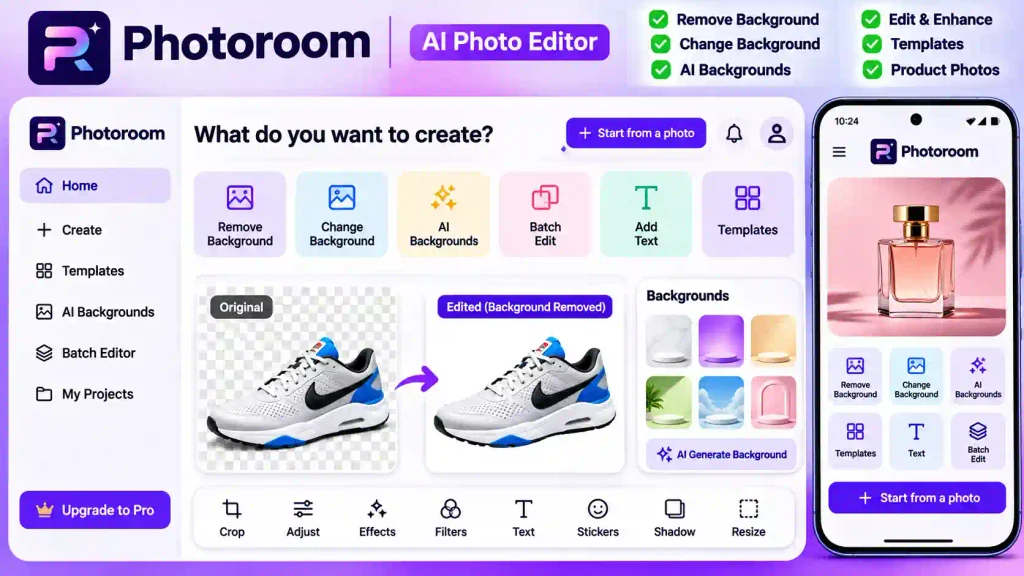
Photoroom is a photo editing platform that uses artificial intelligence to simplify image editing and design. It helps users remove unwanted backgrounds, create new image backgrounds, edit product photographs, and prepare pictures for online shops and social media. Instead of manually selecting every part of an image, users can rely on AI tools to complete many editing tasks automatically.
Using Photoroom is straightforward. First, users upload or select a photo from their device. The app processes the image and identifies the main subject, such as a person, product, or object. After removing the original background, users can choose a different background, apply editing tools, add text, or select a design template. Once the editing is complete, they can export the finished image and use it wherever needed. Some advanced editing and export options may require a paid subscription. You can visit the website Apknova
3. Key Features and Benefits of Photoroom
1. AI Background Removal: Photoroom automatically removes the background from photos and separates the main subject, making images cleaner and more professional.
2. Background Changer: Users can replace the original background with a solid colour, another image, or an available design to create a different look.
3. AI Photo Editing: Its AI-powered editing tools help users improve images and make adjustments without complicated editing processes.
4. AI Background Generation: Users can create new backgrounds for their pictures using available AI features and text prompts, depending on their plan.
5. Product Photography Tools: Photoroom helps online sellers prepare product images with clean backgrounds and attractive layouts for e-commerce platforms.
6. Ready-Made Templates: Users can select templates for social media posts, promotional graphics, product displays, and other creative projects.
7. Batch Editing: Supported plans and workflows allow users to process multiple images more efficiently, helping save time when editing large collections of photos.
4. Photoroom Interface and Main Components
1. Home Screen: The home screen provides access to the main editing tools and helps users start a new photo editing project.
2. Image Upload Option: Users can select pictures from their device or upload images to begin editing.
3. Background Removal Tool: This feature automatically detects the main subject and removes the background from the selected picture.
4. Editing Workspace: The editing area displays the selected image and provides tools to adjust its appearance and design.
5. Background and Template Section: Users can browse available backgrounds, colours, and templates to change the overall appearance of their images.
6. Text and Design Tools: These options allow users to add text, graphics, and other design elements to their pictures.
7. Export and Download Option: After completing an edit, users can export their finished image using the available download settings.
5. Photoroom Account Registration, Sign Up, and Login Guide
1. Visit Photoroom: Open the official Photoroom website or install the application from your device’s official app store.
2. Select the Sign-Up Option: Look for the registration or account access option to begin creating an account.
3. Choose a Registration Method: Depending on the available options, users may be able to register using an email address or a supported account provider.
4. Enter Account Details: Provide the requested information and follow the instructions displayed on the screen.
5. Verify Your Account: If Photoroom requests email or other verification, complete the process to confirm your account.
6. Log In to Photoroom: Existing users can open the app or website and sign in using their registered account details or supported login method.
7. Start Editing Photos: After signing in, users can access their workspace, upload images, and begin using the available editing features.
6. Photoroom AI Background Remover and Background Changer
1. Automatic Background Detection: The AI background remover identifies the main subject in a photo and separates it from the surrounding background.
2. One-Tap Background Removal: Users can remove the original background without manually selecting every part of the image.
3. Transparent Background: Where supported, users can export images with transparent backgrounds for use in other designs.
4. Background Replacement: After removing the original background, users can add a new image, colour, or design behind the subject.
5. Product Image Editing: Online sellers can create clean product photographs by removing distracting backgrounds and placing products against simple scenes.
6. Subject Preservation: The tool aims to keep important details of the subject, such as its shape and visible edges, while changing the background.
7. Final Image Adjustment: Users can review the result and make additional changes before exporting the edited picture.
7. Photoroom AI Photo Editing and Image Enhancement Tools
1. AI-Powered Editing: Photoroom uses artificial intelligence to simplify different photo editing tasks and help users achieve their desired results.
2. Image Adjustments: Users can make available adjustments to improve the overall appearance of their photographs.
3. Unwanted Object Removal: Supported AI tools can help remove selected unwanted objects or distracting elements from an image.
4. Image Retouching: Users can improve the presentation of pictures with available editing and retouching options.
5. Shadow Effects: Some editing tools allow users to add or adjust shadows to make product images look more natural.
6. Image Composition: Users can reposition and resize subjects to create a better arrangement within the design.
7. Creative Editing: By combining different editing options, users can prepare images for product listings, advertisements, and social media posts.
8. Photoroom AI Backgrounds and Image Generation Features
1. AI Background Creation: Photoroom offers AI-powered tools that can generate new backgrounds for selected images.
2. Text Prompt Support: Where available, users can describe the background they want and let the AI create a suitable scene.
3. Different Background Styles: Users can explore different visual styles, such as simple studio settings, decorative scenes, and lifestyle backgrounds.
4. Product Presentation: AI-generated backgrounds can help make product photographs more attractive for online stores and promotional content.
5. Creative Image Designs: Users can experiment with different backgrounds to create fresh designs for social media and marketing materials.
6. Background Customisation: Available editing options help users adjust the background to match the subject and overall design.
7. Preview Before Exporting: Users can review the generated result and make further changes before saving the final image.
9. Photoroom Product Photography and E-Commerce Image Editing
1. Professional Product Images: Photoroom helps sellers prepare clean and attractive product photographs for online shops.
2. Background Cleaning: Users can remove distracting backgrounds and replace them with simple, professional-looking designs.
3. Product Display: Edited products can be placed against suitable backgrounds to improve their visual presentation.
4. Marketing Images: Users can create promotional pictures for product announcements, advertisements, and online campaigns.
5. Social Media Product Posts: Templates and design tools help sellers prepare product images for social media platforms.
6. Consistent Image Style: Using similar backgrounds and layouts can help businesses maintain a consistent appearance across product collections.
7. Time-Saving Workflow: AI editing tools can reduce the time needed to prepare product images, especially when handling multiple photographs.
10. Photoroom Templates, Text, Graphics, and Design Tools
1. Ready-Made Templates: Photoroom provides design templates that users can customise for different creative purposes.
2. Text Addition: Users can insert text into images to display product names, promotional messages, prices, or other information.
3. Text Styling: Available options may allow users to adjust text appearance, size, position, and other design settings.
4. Graphic Elements: Users can add supported visual elements to make their images more attractive and informative.
5. Colour Selection: Background and design colours can be changed to match a particular theme or brand style.
6. Image Arrangement: Users can move, resize, and position different elements to create a balanced design.
7. Custom Promotional Designs: By combining templates, text, and graphics, users can create banners, advertisements, and social media content.
11. Photoroom Batch Editing and Multiple Image Processing
1. Multiple Image Editing: Batch editing helps users work with more than one image instead of repeating every step individually.
2. Background Removal in Batches: Supported batch workflows can apply background removal to multiple selected pictures.
3. Consistent Backgrounds: Users can maintain a similar background style across several product photographs.
4. Time Management: Processing multiple images together can save time for businesses and content creators with large photo collections.
5. Product Catalogue Preparation: Online sellers can use batch workflows to prepare product images for their catalogues.
6. Organised Image Workflow: Working with several images in one process can make photo editing easier to manage.
7. Plan Availability: Batch editing features and usage limits may depend on the Photoroom subscription plan and the platform being used.
12. Photoroom Mobile App Download and Installation Guide
1. Open the Official App Store: Android users can visit Google Play Store, while iPhone users can open the Apple App Store.
2. Search for Photoroom: Enter “Photoroom” in the search bar and locate the official application.
3. Check App Information: Review the app name, publisher, description, and compatibility details before installing it.
4. Download the App: Tap the Install or Get option to download Photoroom onto your mobile device.
5. Wait for Installation: Allow the device to complete the download and installation process.
6. Open Photoroom: Once installation is complete, tap the app icon to launch it and follow the initial setup instructions.
7. Start Using the App: Upload a picture, select an editing tool, and begin creating or improving your images.
13. Photoroom Free vs Paid Plans and Subscription Features
1. Free Access: Photoroom offers a free way to explore its photo editing tools, although some features and usage limits may apply.
2. Paid Subscriptions: Paid plans provide access to additional tools and higher usage limits, depending on the subscription selected.
3. AI Editing Features: Some advanced AI tools or additional usage allowances may be included in paid subscriptions.
4. Batch Processing: More extensive batch editing capabilities may be available through eligible paid plans.
5. Export Options: Available export formats, quality settings, and other options can vary depending on the plan and feature.
6. Business Workflows: Users who regularly edit product images may benefit from subscription features designed for larger editing workloads.
7. Check Current Pricing: Subscription prices, included features, and usage limits can change. Users should check the official Photoroom website or app before purchasing a plan.
14. Photoroom Advantages and Disadvantages
| Advantages | Disadvantages |
|---|---|
| Easy-to-use interface for beginners | Some advanced features require a paid subscription |
| AI-powered background removal saves time | AI results may not always be perfect |
| Useful tools for product photography | Certain features may have usage limits |
| Helps create professional-looking images | Requires an internet connection for many AI features |
| Provides templates and design options | Some editing options may take time to learn |
| Supports creative backgrounds and image editing | Subscription costs may not suit every user |
| Useful for social media and e-commerce content | Results can require manual adjustments |
15. Frequently Asked Questions (FAQs) About Photoroom
Q1. What is Photoroom used for?
Photoroom is used for photo editing, background removal, background replacement, product photography, and creating designs for social media and online businesses.
Q2. Is Photoroom free to use?
Photoroom offers free access to selected features. However, some advanced tools, additional usage, and subscription benefits may require a paid plan.
Q3. Can Photoroom remove photo backgrounds automatically?
Yes. Its AI background remover can automatically detect the main subject and remove the surrounding background from a picture.
Q4. Can I change the background of a photo in Photoroom?
Yes. After removing the original background, users can select another background, colour, or available design to change the appearance of the image.
Q5. Is Photoroom suitable for product photography?
Yes. Photoroom is useful for editing product photographs, creating clean backgrounds, and preparing images for online stores and marketing campaigns.
Q6. Does Photoroom have an AI background generator?
Yes. Photoroom provides AI-powered background generation features that can help users create new scenes for their pictures. Availability may depend on the plan and platform.
Q7. Can I use Photoroom on my mobile phone?
Yes. Photoroom offers mobile applications for supported Android and iOS devices. Users can download the official app from their device’s app store.
Q8. Can Photoroom edit multiple photos at once?
Yes. Photoroom supports batch editing workflows for multiple images, although available features and limits depend on the subscription plan.







