
Microsoft Copilot – Download, Features, Uses & Complete Guide for Android
Just Now
9.5 MB
V4.6
Andriod +
500K +
Description
Introduction to Microsoft Copilot – AI-Powered Assistant and Productivity Tool
Microsoft Copilot is an advanced artificial intelligence (AI) assistant developed by Microsoft to help users complete everyday tasks, improve productivity, and access information more efficiently. It allows users to ask questions, generate text, summarize information, translate languages, and receive assistance through interactive conversations. Copilot is designed for students, professionals, businesses, and everyday users who want to benefit from AI technology in their personal and professional activities.
Microsoft Copilot also provides creative and productivity features, including AI-powered image generation, writing assistance, research support, and integration with Microsoft services. Depending on the available account and subscription, users can access Copilot features through Microsoft Word, Excel, PowerPoint, Outlook, and other supported applications. Whether you need help preparing documents, analyzing information, creating presentations, or generating new ideas, Microsoft Copilot offers a convenient way to work smarter and save time.
What Is Microsoft Copilot and How Does It Work?
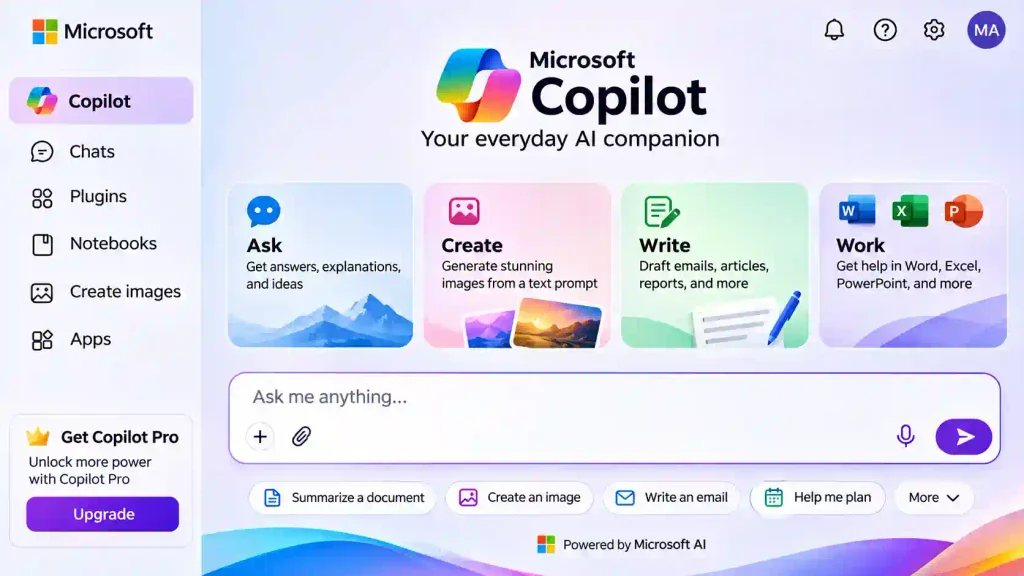
Microsoft Copilot is an AI-powered virtual assistant that uses advanced artificial intelligence models to understand questions and generate helpful responses. Users can interact with Copilot by entering text prompts, asking questions, uploading supported files, or using voice features where available. It can assist with writing, research, brainstorming, summarizing documents, explaining complicated topics, and solving different problems. Its conversational interface makes it easy for beginners and experienced users to communicate with AI.
Microsoft Copilot works by analyzing the user’s instructions and processing relevant information to generate responses. Depending on the version and account, it can use web information, uploaded files, and authorized Microsoft 365 work data to provide assistance. It can also help users create documents, spreadsheets, presentations, and images. Available features depend on the user’s account, subscription, permissions, and region. Microsoft Learn+1, you can visite the website Apknova
Key Features of Microsoft Copilot
Microsoft Copilot offers a variety of AI-powered features designed to improve productivity, creativity, and everyday communication.
- AI Chat Assistant: Ask questions and receive helpful AI-generated responses.
- Text Generation: Create articles, emails, reports, and professional documents.
- Image Generation: Create visual content using text descriptions where supported.
- Voice Interaction: Communicate with Copilot using supported voice features.
- Web Search Assistance: Explore information and receive web-grounded answers.
- Document Summarization: Summarize lengthy documents and extract important information.
- Writing Assistance: Improve grammar, rewrite sentences, and develop content.
- Coding Support: Generate code and understand programming concepts.
- Microsoft 365 Integration: Work with supported Microsoft applications.
- File Assistance: Upload and analyze supported files.
- Productivity Tools: Organize information, brainstorm ideas, and manage tasks.
Copilot AI Chat, Text Generation, and Conversations
Microsoft Copilot AI Chat allows users to communicate with an intelligent virtual assistant through natural conversations. Users can ask questions about different subjects, request explanations, explore ideas, and receive answers. Copilot can also help users understand complicated information by presenting explanations in simple language. Its conversational capabilities make it useful for learning, professional communication, and everyday problem-solving.
The text-generation feature helps users prepare different types of written content, including emails, articles, business reports, social media captions, and professional messages. Users can ask Copilot to rewrite existing text, correct grammar, change writing styles, or summarize lengthy information. These capabilities can save time and make writing tasks easier for students, employees, freelancers, and business professionals.
Microsoft Copilot Image Generation and Creative Tools
Microsoft Copilot provides AI-powered image-generation capabilities that allow users to create visual content using written descriptions. Users can enter a text prompt explaining the image they want, and Copilot can generate visual results where the feature is available. This functionality can help create illustrations, creative concepts, promotional graphics, and social media visuals.
In addition to image generation, Copilot supports creative activities such as brainstorming, storytelling, content planning, and idea development. Users can explore different concepts, improve existing designs, and request creative suggestions through interactive conversations. Image-generation availability and usage limits may vary depending on the account, subscription, and region.
Copilot for Writing, Research, and Content Creation
Microsoft Copilot is a useful AI assistant for writing, research, and content creation. It can help users prepare website articles, blog posts, business emails, product descriptions, reports, presentations, and educational materials. Users can also request grammar corrections, content improvements, summaries, and different writing styles according to their requirements.
For research purposes, Copilot can help explore topics, summarize information, identify important points, and provide relevant sources for further reading. Content creators can use it to develop SEO-friendly headings, article outlines, website descriptions, and social media content. However, users should review generated content and verify important facts because AI responses may sometimes contain inaccurate or outdated information.
Microsoft Copilot Integration with Office 365 Apps
Microsoft Copilot can work with Microsoft’s productivity applications to help users complete professional and everyday tasks more efficiently. Depending on the Microsoft 365 subscription, account type, and available license, Copilot features may be accessible within applications such as Word, Excel, PowerPoint, Outlook, and Teams. Microsoft Learn+1
Some useful integrations include:
- Microsoft Word: Draft, rewrite, summarize, and improve documents.
- Microsoft Excel: Analyze data, generate formulas, and identify useful insights.
- Microsoft PowerPoint: Create presentation content and organize slides.
- Microsoft Outlook: Draft emails and summarize supported email conversations.
- Microsoft Teams: Summarize meetings and assist with workplace communication.
- Microsoft OneNote: Organize notes and develop written ideas.
- OneDrive: Work with supported files and stored documents.
These integrations help users save time and manage information across Microsoft’s productivity ecosystem. Not every feature is included in every Microsoft account or subscription.
Copilot Advanced Features and AI Models
Microsoft Copilot offers advanced AI capabilities designed to support complex tasks, professional workflows, and creative activities. Depending on the available version and subscription, users may access different AI models and specialized tools.
Some advanced capabilities include:
- Advanced Reasoning: Helps analyze complex questions and solve problems.
- AI Research: Assists with exploring topics and organizing research.
- Multimodal Capabilities: Understands supported combinations of text, images, and other inputs.
- Image Creation: Generates visual content using AI-powered tools.
- File Analysis: Helps summarize and understand supported documents.
- Coding Assistance: Supports code generation, explanations, and debugging.
- AI Agents: Helps automate certain tasks and workflows where available.
- Microsoft 365 Assistance: Supports document creation, spreadsheet analysis, and presentations.
Some advanced features require an eligible Microsoft 365 subscription or additional Copilot license. Feature availability can change as Microsoft updates its AI services.
How to Create an Account and Sign In to Microsoft Copilot
Creating a Microsoft Copilot account is simple. Users can access Copilot through its official website or mobile application. Depending on the available sign-in options, users can use a personal Microsoft account or an eligible Google or Apple account.
Follow these steps to get started:
- Visit the official Microsoft Copilot website
- Click the Sign In option.
- Enter your Microsoft account email address or choose another supported sign-in method.
- Enter your password if required.
- Complete any necessary security verification.
- Review the applicable privacy settings and terms.
- Open the Copilot chat interface.
- Enter your first question in the message box.
- Start using Microsoft Copilot.
Users with a work or school account can also sign in using their organization’s Microsoft account. Available features depend on the account and assigned subscription. Microsoft Support+1
How to Use Microsoft Copilot – Complete Step-by-Step Guide
Microsoft Copilot is designed with a simple interface that makes it easy for users to interact with AI technology.
Follow these steps:
- Open Microsoft Copilot: Visit the official website or launch the mobile application.
- Sign In: Log in using your Microsoft or another supported account.
- Start a New Chat: Open the chat interface to begin a conversation.
- Enter Your Prompt: Type a question or describe the task you want Copilot to complete.
- Submit Your Request: Send your message and wait for the generated response.
- Review the Answer: Read the information provided by the AI assistant.
- Ask Follow-Up Questions: Continue the conversation to receive more detailed information.
- Upload Files: Use supported file-upload features to analyze documents.
- Explore Creative Tools: Try available image-generation and writing features.
- Manage Your Conversations: Use the available options to review or manage your chat history.
Users can also explore additional features such as voice conversations, research assistance, and Microsoft 365 integrations where supported.
How to Download and Install Microsoft Copilot on Android
Android users can download the official Microsoft Copilot application from the Google Play Store. The application provides access to AI chat, writing assistance, creative features, and other supported tools directly from a smartphone.
Steps to Download and Install Copilot APK on Android:
- Open the Google Play Store on your Android smartphone.
- Search for Microsoft Copilot.
- Find the official application published by Microsoft Corporation.
- Open the application listing.
- Tap the Install button.
- Wait for the download and installation process to finish.
- Open Microsoft Copilot from your application menu.
- Sign in using your Microsoft account or another supported account.
- Start asking questions and exploring AI features.
Important: Download the official Microsoft Copilot application from Google Play. Avoid unofficial or modified APK files because they may contain security risks. Microsoft Support+1
Microsoft Copilot Pros and Cons
| Pros (Advantages) | Cons (Disadvantages) |
|---|---|
| Easy-to-use AI chatbot interface | AI responses may sometimes contain mistakes |
| Helps generate written content | Requires an internet connection for most features |
| Supports research and information searches | Some advanced features require paid subscriptions |
| Offers AI-powered image generation | Image-generation limits may apply |
| Supports voice conversations | Voice availability varies by region |
| Integrates with Microsoft applications | Some integrations require additional licenses |
| Helps summarize documents | Uploaded information should be reviewed |
| Provides coding assistance | Complex code may require manual testing |
| Available on Android and iOS | Some features may not be available on every device |
| Supports business productivity | Work features depend on organizational permissions |
Frequently Asked Questions (FAQs) About Microsoft Copilot
Q1. What is Microsoft Copilot?
Microsoft Copilot is an artificial intelligence assistant developed by Microsoft. It helps users answer questions, generate content, create images, conduct research, and improve productivity.
Q2. Is Microsoft Copilot free to use?
Yes, Microsoft offers free access to Copilot with a signed-in account. However, certain advanced features and Microsoft 365 integrations may require a paid subscription or additional license.
Q3. Can I use Microsoft Copilot on Android?
Yes, Android users can download the official Microsoft Copilot application from the Google Play Store and access its supported AI features.
Q4. Can Microsoft Copilot generate images?
Yes, Copilot supports AI-powered image generation. Users can describe their desired images through text prompts, subject to available features and usage limits.
Q5. Can Microsoft Copilot write articles and emails?
Yes, Copilot can help create blog articles, professional emails, business reports, website content, social media captions, and other written materials.
Q6. Does Microsoft Copilot support voice conversations?
Yes, Microsoft Copilot supports voice-based interactions, allowing users to communicate with the AI assistant using their voice where available.
Q7. Can Microsoft Copilot work with Microsoft Word and Excel?
Yes, eligible Copilot experiences can assist with writing in Word, analyzing information in Excel, and creating presentations in PowerPoint. Availability depends on the subscription and license.
Q8. Is Microsoft Copilot available for iPhone?
Yes, iPhone users can download the official Microsoft Copilot application from the Apple App Store or access Copilot through a web browser.
Q9. Can Microsoft Copilot summarize PDF files?
Yes, Copilot can help summarize supported uploaded documents, including PDFs where file-upload functionality is available.
Q10. Is Microsoft Copilot useful for students?
Yes, students can use Copilot to understand educational topics, summarize study materials, explain difficult concepts, practice questions, and generate learning ideas.
Q11. Can Microsoft Copilot help with programming?
Yes, Copilot can generate code, explain programming concepts, identify errors, and assist with debugging and development tasks.
Q12. What is the difference between Microsoft Copilot and ChatGPT?
Both are AI-powered assistants that support conversations, writing, research, and creative tasks. Microsoft Copilot is particularly integrated with Microsoft’s ecosystem, including eligible Microsoft 365 applications, while ChatGPT offers its own tools and integrations.
Q13. Do I need a Microsoft account to use Copilot?
A Microsoft account is one supported way to access Copilot. Depending on the platform, personal users may also have other sign-in options, including Google or Apple accounts.
Q14. Is Microsoft Copilot safe to use?
Microsoft provides privacy and security controls for Copilot. However, users should avoid sharing sensitive information unnecessarily and review AI-generated responses before relying on them.
Q15. Can Microsoft Copilot create PowerPoint presentations?
Yes, eligible Copilot features can help users generate presentation content and create or edit PowerPoint presentations.
Q16. Where can I access Microsoft Copilot?
You can access Microsoft Copilot through its official website, desktop application, or mobile application.







