
Meta AI – 7 Best Features of This Powerful AI Chatbot and Image Generator
Just Now
7.78MB
V6.2
Andriod +
100M+
Description
Meta AI is an artificial intelligence assistant developed by Meta, the company behind popular platforms such as Facebook, Instagram, WhatsApp, and Messenger. It is designed to help users answer questions, find information, create content, generate images, and complete everyday tasks. Users can interact with Meta AI by typing messages or using supported voice features. Its simple conversational style makes it accessible to people who want quick assistance without needing advanced technical knowledge.
Meta AI brings artificial intelligence into everyday digital communication. Users can access it through the Meta AI app, website, and supported Meta platforms, depending on their country and device. It can help with learning, writing, brainstorming, creative ideas, and general information. Its integration with social and messaging platforms makes it convenient for people who already use Meta services for communication and entertainment.
What Is Meta AI and How Does It Work?
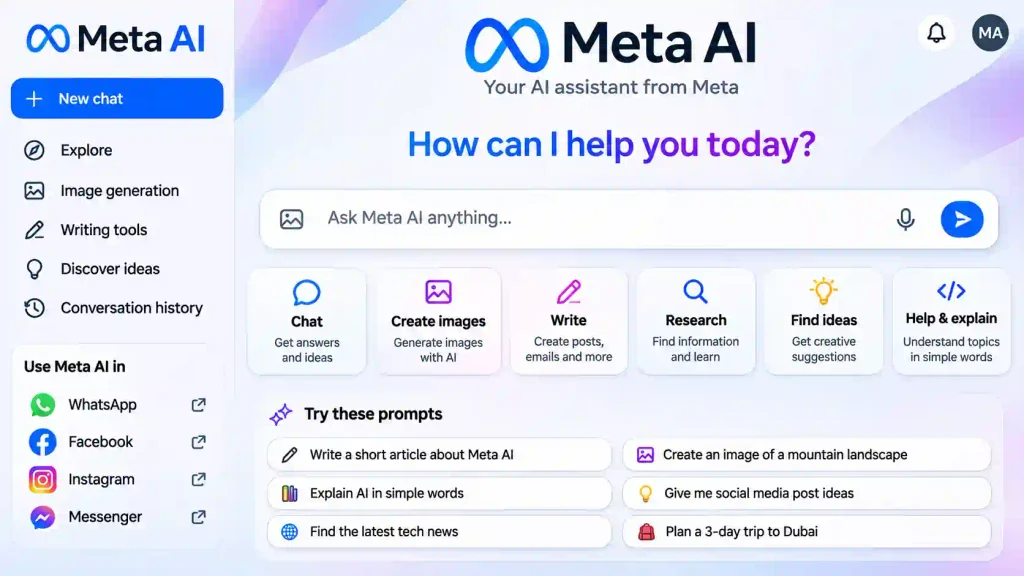
Meta AI is a virtual assistant powered by artificial intelligence models developed by Meta. It understands questions and instructions written in natural language and generates responses based on the information it has learned and the context of the conversation. Users can ask it to explain a topic, write a message, suggest ideas, summarize information, or help solve a problem. It works similarly to other AI chatbots but is also connected with Meta’s digital platforms and services.
Meta AI works by processing the user’s message and generating a response that matches the request. For example, if someone asks for a travel plan, it can suggest destinations and activities. Users can also request images, ask follow-up questions, or use supported voice interactions. Some features may use web search or other connected tools to provide additional information. However, AI responses are not always correct, so important details should be checked before relying on them. You can visit the website Apknova
Key Features and Benefits of Meta AI
1. AI-Powered Conversations: Meta AI allows users to ask questions and receive responses in natural language. It can help with general knowledge, explanations, and everyday problem-solving.
2. Image Generation: Users can describe an image they want to create, and Meta AI can generate visual content using its supported image-generation features.
3. Writing Assistance: It can help prepare emails, social media captions, messages, articles, descriptions, and other types of written content.
4. Voice Interaction: Supported versions allow users to communicate with Meta AI through voice commands and spoken conversations.
5. Information and Research: Meta AI can help users explore topics, understand information, and find answers to different questions. Web search availability may vary.
6. Meta Platform Integration: Users can access Meta AI through supported services such as WhatsApp, Facebook, Instagram, and Messenger.
7. Easy Accessibility: Its simple interface and integration with familiar applications make it convenient for beginners and regular users.
Meta AI Interface and Main Components
1. Main Chat Screen: The chat screen is the main area where users communicate with Meta AI and read its responses.
2. Message Input Box: Users can type questions, instructions, and prompts into the message box to start a conversation.
3. Voice Input Option: Supported versions include voice controls that allow users to speak instead of typing.
4. Image Creation Tools: The interface may provide options for generating images from written descriptions and exploring creative ideas.
5. Conversation History: Users may be able to view previous conversations and return to earlier discussions, depending on the platform and settings.
6. Navigation Menu: The navigation area provides access to available features, account options, and other sections of the application.
7. Profile and Settings: Users can manage account information, privacy options, and available preferences through the settings area.
Meta AI Account Registration, Sign Up, and Login Guide
1. Visit the Official Website: Open your browser and visit the official Meta AI website
2. Open the Meta AI App: Alternatively, download the official Meta AI application from Google Play Store or Apple’s App Store, where available.
3. Select the Login Option: Choose the available sign-in option displayed on the website or mobile application.
4. Use Your Meta Account: Depending on the available options, you may be able to sign in using an existing Facebook or Instagram account.
5. Complete Verification: Follow any verification instructions displayed on the screen to confirm your account.
6. Review Account Settings: Check the available privacy and account settings before starting to use the assistant.
7. Start Using Meta AI: Open a conversation, type your first question, or explore the available AI tools.
Meta AI Chat, Conversations, and Smart Responses
1. Ask Questions: Users can ask Meta AI questions about different subjects, including education, technology, travel, and everyday life.
2. Natural Conversations: It understands everyday language, allowing users to communicate without writing complicated instructions.
3. Follow-Up Questions: Users can continue a conversation by asking additional questions related to the previous response.
4. Detailed Explanations: Meta AI can explain difficult topics in simpler language and provide examples to improve understanding.
5. Idea Generation: Users can request suggestions for projects, business ideas, social media content, and personal activities.
6. Message Assistance: It can help users prepare replies, greetings, short messages, and other everyday communication.
7. Conversation Support: Users can discuss different subjects and request changes to responses, such as making them shorter, clearer, or more detailed.
Meta AI Writing, Content Creation, and Text Editing Tools
1. Article Writing: Meta AI can help users prepare blog posts, website articles, introductions, and informative content.
2. Social Media Captions: It can suggest captions and post descriptions for platforms such as Facebook and Instagram.
3. Email and Message Writing: Users can request professional emails, customer replies, greetings, and personal messages.
4. Text Rewriting: Meta AI can rewrite sentences and paragraphs to make them clearer, shorter, or easier to understand.
5. Grammar Assistance: Users can ask it to identify spelling mistakes, grammar problems, and unclear wording.
6. Creative Content: It can generate story ideas, slogans, product descriptions, video scripts, and other creative text.
7. Content Ideas: Website owners and creators can use Meta AI to brainstorm article topics, titles, headings, and content plans.
Meta AI Image Generation and AI-Powered Creative Features
1. Text-to-Image Generation: Users can describe an image in words and ask Meta AI to create a visual based on the prompt.
2. Creative Image Ideas: It can help generate ideas for illustrations, wallpapers, characters, and other visual projects.
3. Different Visual Styles: Users can request different styles, such as realistic, cartoon, artistic, or digital illustrations, depending on available capabilities.
4. Image Editing: Supported image features may allow users to make changes to generated images or transform visual ideas.
5. Social Media Visuals: Users can create images and creative concepts for social media posts and other online content.
6. Prompt-Based Creation: Users can improve their results by describing the subject, background, colours, and style they want.
7. Creative Exploration: Meta AI makes it easier to experiment with visual ideas without requiring professional graphic design skills.
Meta AI Voice Commands and Voice Conversation Features
1. Voice Questions: Users can ask questions by speaking through a supported microphone feature instead of typing.
2. Spoken Responses: Supported versions can provide spoken answers, making conversations more natural.
3. Hands-Free Interaction: Voice communication can be useful when users are busy or unable to type comfortably.
4. Natural Conversations: Users can speak to Meta AI in a conversational way and ask follow-up questions.
5. Everyday Assistance: Voice features can help users request explanations, ideas, and general information.
6. Mobile Voice Access: Voice interaction is particularly useful on supported smartphones through the Meta AI app or integrated services.
7. Feature Availability: Voice options, languages, and capabilities may vary by country, device, application version, and account.
Meta AI Web Search, Research, and Information Assistance
1. Information Search: Where supported, Meta AI can help users find information about different subjects through connected search capabilities.
2. Research Assistance: Users can explore topics and ask for explanations to better understand a subject.
3. Current Information: Available search features can help users access more recent information from online sources.
4. Topic Summaries: Meta AI can turn complicated information into shorter explanations that are easier to read.
5. Learning Support: Students can use it to explore educational topics, understand concepts, and prepare study notes.
6. Comparing Information: Users can ask it to compare products, services, ideas, and different approaches to a topic.
7. Checking Sources: When links or references are provided, users should review the original sources to confirm important information.
Meta AI Integration with WhatsApp, Facebook, Instagram, and Messenger
1. WhatsApp Integration: In supported regions, users can interact with Meta AI through WhatsApp chats to ask questions and receive assistance.
2. Facebook Integration: Meta AI may be available within Facebook to help users explore information and interact with AI features.
3. Instagram Integration: Supported Instagram users can access Meta AI through messaging features and use it for questions and creative assistance.
4. Messenger Integration: Users in supported locations can interact with Meta AI through Messenger conversations.
5. Group Chat Assistance: On supported platforms, users may be able to mention Meta AI in group conversations to ask questions.
6. Content Creation Support: Meta AI can help users generate ideas, captions, and other content while using supported Meta services.
7. Regional Availability: Integration and available features differ across countries, applications, and accounts. Not every user will see the same options.
Meta AI Mobile App Download and Installation Guide
1. Open Google Play Store: Android users should open the Google Play Store on their smartphones.
2. Open Apple App Store: iPhone users should visit the Apple App Store to search for the official application.
3. Search for Meta AI: Enter “Meta AI” in the search bar to find the application.
4. Check the Developer: Verify that the application is published by Meta to avoid downloading unofficial apps.
5. Download the Application: Select the official app and tap Install or Get, depending on your device.
6. Open and Sign In: After installation, open the app and follow the available account login instructions.
7. Start Using Meta AI: Once signed in, explore the chat interface, image-generation tools, and other available features.
Important: App availability may vary by country. If Meta AI is not available in your app store, check the official website for supported access options.
Meta AI Personalization, Memory, and User Settings
1. Personalized Conversations: Meta AI may use conversation context to provide responses that are more relevant to the user’s current request.
2. Memory Features: Where available, memory features can help Meta AI remember certain information or preferences shared by users.
3. Account Settings: Users can access available account controls to review their preferences and manage their experience.
4. Privacy Controls: Meta provides privacy-related settings that users should review to understand how their information is handled.
5. Conversation Management: Depending on the platform, users may have options to manage or delete their AI conversations.
6. Personalization Options: Supported features may allow users to adjust aspects of their AI experience and interactions.
7. Review Data Settings: Users should regularly check the available privacy and data controls to understand what information is stored or used.
Meta AI Free Access, Availability, and Supported Features
1. Free Access: is generally available without a separate subscription fee in supported markets.
2. Website Access: Users can visit the official website to explore its available AI assistant features.
3. Mobile Application: The mobile app provides access to supported features on compatible Android and iOS devices.
4. Meta Platform Access: Users may also find within WhatsApp, Facebook, Instagram, and Messenger in supported regions.
5. Image Generation: Image-generation tools are available in supported versions, although usage limits and capabilities may apply.
6. Language Support: supports selected languages, but the available languages and features can differ by location.
7. Availability Changes: Meta regularly updates its AI services, so features, access conditions, and usage limits may change over time.
Meta AI Advantages and Disadvantages
| Advantages | Disadvantages |
|---|---|
| Easy-to-use conversational interface. | Availability varies by country and region. |
| Helps with writing and content creation. | Responses can sometimes contain incorrect information. |
| Supports AI image generation. | Image generation may have usage limits. |
| Integrates with popular Meta platforms. | Some features may not be available on every platform. |
| Offers convenient voice interaction in supported versions. | Voice features may have language and regional limitations. |
| Useful for learning, brainstorming, and everyday questions. | Complex topics may require additional research. |
| Generally available without a separate subscription fee. | Features and usage conditions can change over time. |
Frequently Asked Questions (FAQs)
Q1. What is ?
Is an artificial intelligence assistant developed by Meta. It helps users answer questions, create content, generate images, and complete everyday tasks.
Q2. Is free to use?
Is generally available for free in supported regions. However, availability and usage limits may vary.
Q3. How can I access ?
You can access through its official website, mobile application, and supported Meta platforms such as WhatsApp, Facebook, Instagram, and Messenger.
Q4. Can generate images?
Yes. Offers image-generation features that allow users to create images by describing what they want in a written prompt.
Q5. Can I use on WhatsApp?
Yes. Is integrated with WhatsApp in supported regions. Users can interact with it through the available chat features.







