
Meta AI APK Download – Free AI Chatbot, Image Generator, Voice Assistant & Smart AI App for Android
Just Now
15MB
V7.1
75K +
Description
Meta AI is an artificial intelligence platform developed by Meta that helps users complete everyday tasks, find information, generate creative content, and communicate through AI-powered conversations. It is designed to make digital activities easier by allowing people to ask questions, receive answers, explore ideas, and use different AI tools. Meta AI is connected with Meta’s popular platforms, including WhatsApp, Facebook, Instagram, and Messenger, making AI assistance accessible through applications that many people already use.
One of the main advantages of Meta AI is its ability to understand natural language and provide helpful responses to different types of questions. Users can interact with the assistant through text and, where supported, voice commands. It also offers creative tools for generating images, writing content, explaining topics, and finding useful information. Whether someone wants help with studies, entertainment, daily tasks, or creative projects, Meta AI provides a convenient way to explore artificial intelligence technology.
What Is Meta AI and How Does It Work?
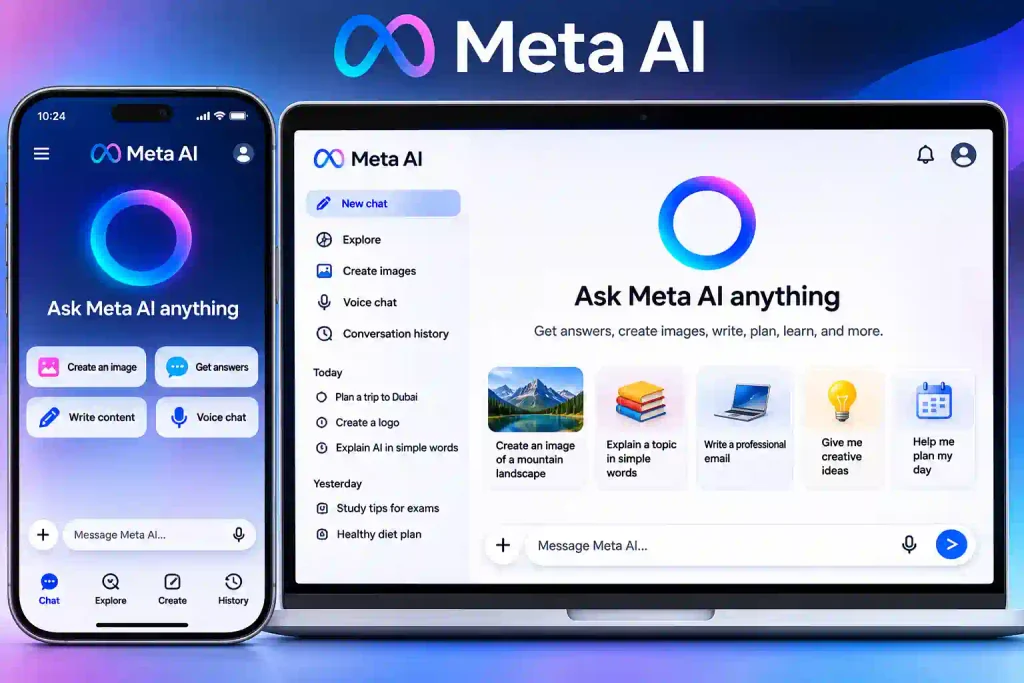
Meta AI is an AI-powered virtual assistant designed to understand user requests and generate responses using artificial intelligence technology. It is powered by Meta’s Llama family of AI models and provides assistance with different activities, such as answering questions, explaining information, writing content, brainstorming ideas, and generating images. Users can access Meta AI through its website, supported mobile applications, and integrations with selected Meta services.
Meta AI works by processing the information users enter into the chat and generating responses based on the request. For example, users can ask it to explain a difficult topic, write a short paragraph, suggest travel ideas, or create an image from a text description. The assistant analyzes the request and provides a relevant response within the conversation. Its available features may differ depending on the device, country, application version, and account settings. You can visit the website Apknova
Key Features and Benefits of Meta AI
- Meta AI includes several useful features that make artificial intelligence easier to access and use in everyday activities.
- AI Chat Assistant: Allows users to ask questions and receive AI-generated answers.
- Image Generation: Creates images based on written descriptions and creative prompts.
- Content Writing: Helps users write paragraphs, captions, messages, and other content.
- Voice Interaction: Supports voice-based conversations and commands in supported versions.
- Information Assistance: Helps users explore topics, understand concepts, and find information.
- Social Media Integration: Works with supported Meta platforms, including WhatsApp, Facebook, Instagram, and Messenger.
- Free Access: Provides access to many AI features without requiring a paid subscription, although availability and usage limits may vary.
Meta AI Interface and Main Dashboard
- Meta AI offers a simple and modern interface that allows users to interact with the AI assistant without complicated navigation.
- Home Screen: Provides access to the main AI assistant and available tools.
- Chat Interface: Allows users to enter questions and communicate with the AI assistant.
- Message Box: Provides a space to type instructions, questions, and creative prompts.
- Image Creation Section: Allows users to explore AI-powered image generation.
- Voice Interaction: Provides voice-related controls where supported.
- Conversation History: Helps users access previous conversations where history is available.
- Settings Section: Allows users to manage available account preferences and application settings.
Meta AI Account Registration, Sign Up, and Login Guide
- Users can access Meta AI through supported Meta applications or its official website. The sign-in process may vary depending on the access method and country.
- Visit the Official Website: Open www.meta.ai using your web browser.
- Open Meta AI: Navigate to the AI assistant interface.
- Select Login: Choose the available sign-in option if prompted.
- Choose an Account: Use a supported Meta account or sign-in method.
- Enter Required Details: Provide the requested login information.
- Complete Verification: Follow any security or verification instructions.
Meta AI Chatbot, AI Conversations, and Question Answering
- The Meta AI chatbot allows users to communicate with artificial intelligence through natural language. It is designed to understand different questions and provide useful responses.
- Instant Conversations: Users can start conversations by entering questions or instructions.
- Question Answering: Helps explain general topics and provide useful information.
- Educational Support: Explains difficult concepts and provides learning assistance.
- Writing Assistance: Helps prepare emails, paragraphs, captions, and messages.
- Idea Generation: Suggests creative ideas for projects, businesses, and personal activities.
Meta AI Image Generation and Creative Tools
- Meta AI includes creative tools that allow users to generate images and explore different visual ideas through text prompts.
- Text-to-Image Generation: Creates images based on written descriptions.
- Creative Designs: Helps users explore different artistic styles and visual concepts.
- Social Media Images: Can generate creative visuals for supported social media activities.
- Image Variations: Allows users to explore alternative visual results where supported.
- Creative Prompts: Users can describe objects, backgrounds, colours, and scenes.
- Visual Inspiration: Helps generate ideas for artwork, designs, and creative projects.Image Sharing: Allows users to share generated images through supported applications and features.
Meta AI Voice Commands, Messaging, and Communication Features
- Meta AI provides voice and messaging features that make communication with an AI assistant more convenient.
- Voice Conversations: Supports spoken interactions in compatible applications and regions.
- Voice Questions: Allows users to ask questions using supported voice features.
- Text Messaging: Users can communicate with the assistant through written messages.
- Natural Communication: Understands everyday language and conversational instructions.
- Message Assistance: Helps users prepare and improve written messages.
- Follow-Up Conversations: Allows users to ask additional questions within an ongoing chat.
- Hands-Free Interaction: Supported voice modes can make AI assistance easier when typing is inconvenient.
Meta AI Integration with WhatsApp, Facebook, Instagram, and Messenger
One of Meta AI’s important features is its integration with several Meta applications. This allows users to access AI assistance within supported social media and messaging platforms.
WhatsApp Integration: Users can interact with Meta AI through supported WhatsApp features and conversations.
Facebook Integration: Meta AI provides AI assistance through available Facebook features.
Instagram Integration: Users can access Meta AI through supported Instagram experiences.
Messenger Integration: The assistant can help users with questions and conversations through Messenger.
AI Search Assistance: Helps users explore information within supported experiences.
Creative Content: Provides assistance with ideas, writing, and image generation where available.
Convenient Access: Allows users to explore AI features without always opening a separate application.
Note: Available integrations and features may differ by country, application version, and account.
Meta AI Search, Information, and Content Assistance
- Meta AI can help users explore information, understand different subjects, and prepare useful content through AI-powered assistance.
- General Information: Provides explanations about different topics and everyday questions.
- Online Information Assistance: Helps explore information and provides web-related results where supported.
- Educational Research: Explains academic subjects and helps students understand important concepts.
- Content Creation: Helps prepare articles, descriptions, captions, and other written material.
- Language Assistance: Helps users understand words, improve sentences, and work with different languages.
- Recommendations: Suggests ideas for entertainment, travel, learning, and everyday activities.
- Quick Explanations: Simplifies complicated information into easier language.
Meta AI App Download and Installation Guide
Users can access Meta AI through supported mobile applications and web browsers. A dedicated Meta AI application is also available in supported markets.
For Android Users:
Open the Google Play Store on your Android device.
Search for Meta AI.
Find the official application published by Meta Platforms, Inc.
Tap the Install button.
Open the application after installation.Sign in using an available account option and start exploring.
For iPhone Users:
Open the Apple App Store.
Search for Meta AI.
Select the official Meta AI application
Tap Get to begin downloading.
Complete the installation process.
Open the application.
Follow the sign-in instructions and start using the available features.
For Computer Users:
- Visit the official Meta AI website.
- Open the AI assistant in a supported browser.
- Sign in if required.
- Start a conversation using the chat interface.
Always download the application from official app stores to avoid unofficial or potentially unsafe versions.
Meta AI Account Settings, Privacy, and Security
Meta AI provides account and privacy-related options that help users manage their experience and understand how their information is handled.
Account Management: Allows users to access available account-related settings.
Privacy Settings: Provides access to relevant privacy controls.
Conversation Management: Offers available options for managing conversations and chat history.
Data Controls: Users should review available settings relating to information and AI interactions.
Account Security: Strong passwords and secure sign-in practices help protect accounts.
Personal Information: Avoid sharing sensitive personal, financial, or confidential information in AI conversations.
Privacy Policy: Users can review Meta’s official privacy information to understand how data is collected and processed.
Meta AI for Students, Professionals, and Everyday Users
Meta AI can support different types of users by providing assistance with learning, professional activities, and everyday tasks.
For Students: Helps explain academic topics, prepare notes, and understand difficult lessons.
For Teachers: Provides ideas for educational activities, lesson planning, and teaching materials.
For Professionals: Helps prepare business messages, reports, and professional content.
For Content Creators: Supports creative ideas, captions, and image generation.
For Business Owners: Helps with brainstorming, marketing ideas, and customer communication drafts.
For Everyday Users: Provides assistance with general questions, planning, and daily activities.
For Creative Users: Helps explore new ideas, visual concepts, and different content styles.
Advantages and Disadvantages of Meta AI
Meta AI offers several benefits, but users should also understand its limitations before depending on it for important activities.
| Advantages | Disadvantages |
|---|---|
| Easy-to-use AI chat assistant. | AI responses may sometimes contain incorrect information. |
| Provides answers to different questions. | Some advanced features are limited by region. |
| Supports AI image generation. | Generated images may not always match the requested description. |
| Integrates with popular Meta applications. | Requires an internet connection for most features. |
| Helps with writing and content creation. | Responses may require checking and editing. |
| Offers voice interaction in supported regions. | Voice features may not be available on every device. |
| Provides access to many features for free. | Usage limits and feature availability may change. |
Frequently Asked Questions (FAQs) About Meta AI
Here are some common questions and answers about Meta AI, its features, installation, and usage.
| Question | Answer |
|---|---|
| What is Meta AI? | Is an artificial intelligence assistant developed by Meta that helps users answer questions, create content, and generate images. |
| Is free to use? | Many features are available for free, although some features and usage limits may vary. |
| Can I use on WhatsApp? | Yes, is integrated into supported WhatsApp experiences in selected regions. |
| Can generate images? | Yes, it can generate images using written descriptions through supported image-generation features. |
| Is available in Pakistan? | Availability can vary by service and feature. Users should check the official website and their application for current access. |
| Can I use without downloading an application? | Yes, users can access through its official website where supported. |
| Does support voice commands? | Yes, voice interaction is available in supported applications, devices, and regions. |
| Can students use for learning? | Yes, students can use it to understand subjects, explore ideas, and get educational explanations. |
| Who developed ? | Meta Platforms, Inc. developed |
| Is I safe to use? | It can be used responsibly, but users should review privacy settings and avoid sharing sensitive information. |
Conclusion – Is Worth Using?
Meta AI is a useful artificial intelligence assistant that makes digital communication, information searching, content creation, and everyday activities easier. Its chatbot, image-generation tools, voice interaction, and integration with popular Meta applications provide users with different ways to explore AI technology. It is suitable for students, professionals, content creators, business owners, and general users who want convenient AI assistance.







