
Khan Academy Download – Free Online Learning, Courses & Educational App for Android
Just Now
15MB
V6.2
Andriod +
10M+
Description
Khan Academy is a popular online educational platform designed to help students and learners improve their knowledge through free digital learning resources. It provides lessons in different subjects, including mathematics, science, computer programming, economics, history, and more. The platform is designed for learners of different ages and educational levels, making it useful for school students, college learners, teachers, and anyone interested in gaining new knowledge. Its main purpose is to make quality education accessible to everyone through an easy-to-use online learning environment.
One of the best things about Khan Academy is that users can learn at their own pace without paying subscription fees for its core educational resources. The platform offers video lessons, interactive practice exercises, quizzes, and learning activities that help users understand different topics step by step. Students can access lessons through a computer, tablet, or smartphone, allowing them to study from almost anywhere with an internet connection. Whether someone wants to improve their mathematics skills, prepare for exams, or explore a new subject, Khan Academy provides a convenient way to continue learning.
What Is Khan Academy and How Does It Work?
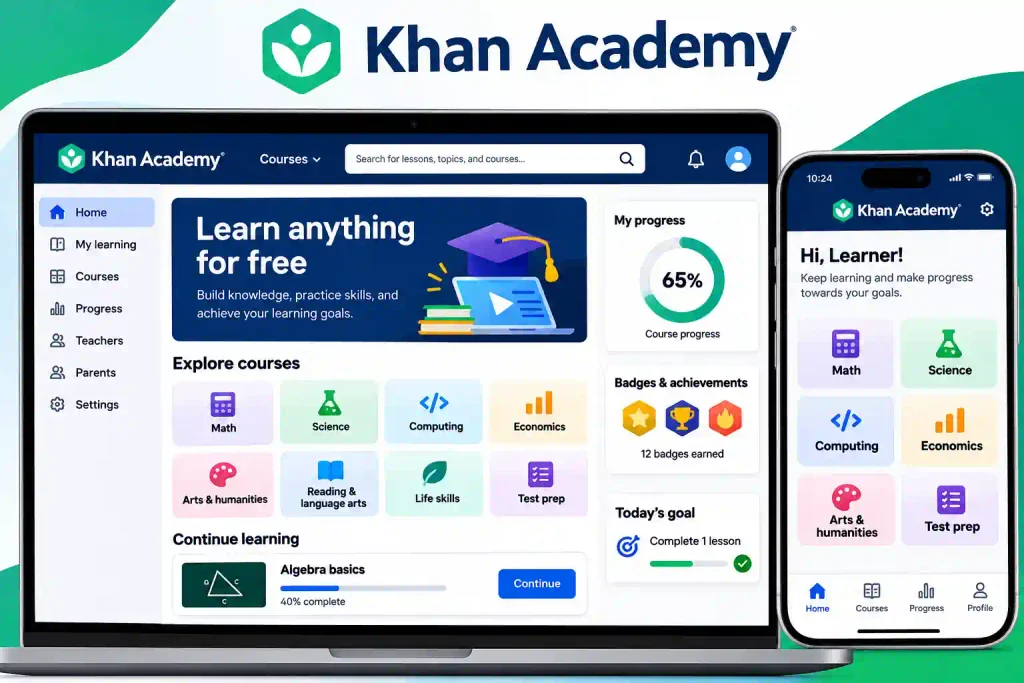
Khan Academy is a nonprofit educational organization that offers free online courses and learning materials for students, teachers, and parents. It was created to make education more accessible by providing structured lessons and practice activities through its website and mobile applications. Users can explore different subjects, select their preferred topics, and follow lessons according to their educational needs. The platform includes beginner-friendly explanations as well as more advanced learning materials, helping users build knowledge gradually.
Khan Academy works through a simple learning process. After creating an account, users can select a subject or course and start watching educational videos. They can then complete practice questions, quizzes, and exercises to test their understanding. The platform also tracks learning activity and provides feedback to help users identify areas where they need more practice. Students can continue lessons at their own pace, while teachers and parents can use available tools to support and monitor learning progress. You can visit the website Apknova
Key Features and Benefits of Khan Academy
Khan Academy offers several educational features that make online learning easier, more flexible, and accessible. Its tools are designed to support independent study, classroom learning, and continuous skill development.
- Free Educational Resources: Users can access a wide range of educational lessons and practice materials without paying subscription fees.
- Video Lessons: Short educational videos explain different subjects and topics in a simple and understandable way.
- Interactive Exercises: Students can solve questions and practice what they have learned.
- Multiple Subjects: The platform covers mathematics, science, computing, economics, history, and other educational areas.
- Personalized Learning: Learners can study at their own speed and revisit lessons whenever needed.
- Progress Tracking: Students can monitor their learning activities and see their progress.
- Teacher Tools: Teachers can assign lessons and exercises to students and review their performance.
- Mobile Accessibility: Users can access learning resources through supported Android and iOS applications.
- AI-Powered Learning Support: Khan Academy offers Khanmigo, an AI-powered learning assistant available through eligible plans and access options.
These features make Khan Academy a useful platform for students who want to improve their academic performance and develop new skills.
Khan Academy Interface and Main Dashboard
Khan Academy provides a clean and user-friendly interface that makes it easy for users to find educational materials and manage their learning activities. The homepage allows visitors to explore available subjects, access courses, and learn more about the platform. After signing in, users can access their learning dashboard, where they can find recommended content, recently viewed lessons, and available learning activities.
The main dashboard is organized to help users navigate different educational sections without difficulty. Students can select subjects, open individual lessons, complete exercises, and review their learning progress. The interface also provides access to account settings and other useful tools. Its simple layout makes the platform suitable for beginners as well as experienced learners who want to organize their online studies.
Khan Academy Account Registration, Sign Up, and Login Guide
Creating a Khan Academy account is a straightforward process. Users can register through the official website or supported mobile application. An account allows learners to access personalized learning features, save their progress, and continue their lessons across supported devices.
Steps to Create a Khan Academy Account:
- Visit the official website at www.khanacademy.org.
- Click the Sign Up option on the homepage.
- Select the appropriate account registration method.
- Enter the required information, such as your email address and other requested details.
- Follow the instructions to complete registration.
- Verify your email address if requested.
- Select your learning interests and begin exploring courses.
Steps to Log In:
- Open the Khan Academy website or mobile application.
- Click the Log In option.
- Enter your registered email address or use your linked sign-in method.
- Enter your password if required.
- Complete any additional verification steps.
- Access your account and continue learning.
Users who forget their passwords can follow the available password recovery instructions to regain access to their accounts.
Khan Academy Courses and Learning Subjects
Khan Academy offers educational courses across several subjects, allowing learners to explore topics based on their interests, academic requirements, and skill levels. The platform provides structured learning materials that help students understand basic concepts before moving towards more advanced topics.
Some of the major learning subjects available on Khan Academy include:
- Mathematics: Arithmetic, algebra, geometry, trigonometry, statistics, and calculus.
- Science: Biology, chemistry, physics, and other scientific topics.
- Computer Programming: Programming fundamentals, computer science, and coding-related lessons.
- Economics and Finance: Personal finance, microeconomics, and macroeconomics.
- Arts and Humanities: Art history, world history, and other humanities subjects.
- Reading and Language Arts: Reading comprehension, grammar, and language skills.
- Test Preparation: Selected learning resources for standardized tests and academic preparation.
The availability of specific courses and learning materials may vary according to the subject, educational level, and region.
Khan Academy Mathematics, Science, and Computer Programming Lessons
Mathematics, science, and computer programming are important parts of Khan Academy’s educational resources. These subjects include structured lessons that help students understand concepts through explanations, examples, and interactive activities.
Mathematics Lessons: Khan Academy provides lessons covering basic arithmetic, algebra, geometry, trigonometry, statistics, and calculus. Students can watch explanations, solve mathematical problems, and practice different question types to improve their understanding.
Science Lessons: The science section includes educational content about biology, chemistry, physics, and related topics. Students can explore scientific principles, understand important concepts, and learn how different processes work through videos and practice activities.
Computer Programming Lessons: Learners interested in technology can explore programming and computer science topics. The platform includes introductory coding lessons and interactive programming activities that help beginners understand programming concepts and develop basic coding skills.
Khan Academy Video Lessons, Practice Exercises, and Quizzes
Khan Academy uses different learning methods to make educational content easier to understand. Video lessons are one of its main learning resources, providing step-by-step explanations of subjects and topics. Students can watch lessons whenever they need and revisit difficult sections to improve their understanding.
Video Lessons: Educational videos explain important concepts using examples, demonstrations, and visual explanations. They allow students to learn at their own pace.
Practice Exercises: Interactive exercises help learners apply the knowledge gained from video lessons. Students can answer questions, receive feedback, and repeat exercises to improve their skills.
Quizzes and Assessments: Quizzes help students check their understanding of different topics. They can identify areas that require additional practice and work towards improving their performance.
Combining videos, exercises, and quizzes creates a learning experience that supports both theoretical knowledge and practical understanding.
Khan Academy Progress Tracking, Learning Dashboard, and Achievements
Khan Academy includes learning progress tools that help students monitor their educational activities. When users complete lessons, exercises, and other learning tasks while signed in, the platform can record their activity and display relevant progress information. This makes it easier to understand which topics have been completed and which areas require additional attention.
The learning dashboard helps students organize their studies and continue previously started lessons. Depending on the course and learning activity, users may see progress indicators, mastery levels, learning goals, and achievement-related features. These tools can encourage students to maintain a regular learning routine and gradually improve their knowledge. Teachers can also use available classroom tools to review student performance and identify topics where additional support may be needed.
Khan Academy App Download and Installation Guide
Khan Academy provides mobile applications that allow users to access educational resources through supported smartphones and tablets. The applications make it convenient to watch lessons, complete exercises, and continue learning without always needing a computer.
For Android Users:
- Open the Google Play Store on your Android smartphone.
- Search for Khan Academy.
- Find the official application published by Khan Academy.
- Tap the Install button.
- Wait for the application to download and install.
- Open the application and sign in or create a new account.
For iPhone and iPad Users:
- Open the Apple App Store.
- Search for Khan Academy.
- Select the official application.
- Tap Get to download it.
- Complete the installation process.
- Open the application and sign in to your account.
For Computer Users:
Users do not need to install additional software to access Khan Academy on a computer. They can simply visit the official website through a supported web browser and sign in to their accounts.
For security, always download the application from official app stores rather than unknown third-party websites.
Khan Academy Account Settings, Privacy, and Security
Khan Academy provides account settings that allow users to manage their personal information, learning preferences, and account-related options. Users can access available settings after signing in to their accounts. These options help learners manage their profiles and control certain aspects of their platform experience.
Account security is also important when using an online educational service. Users should create strong passwords, avoid sharing their login information, and use secure devices when accessing their accounts. Parents and teachers should also pay attention to available privacy settings, particularly when children use the platform. It is recommended to review Khan Academy’s official privacy policy and account guidance to understand how personal information and learning data are handled.
Khan Academy for Students, Teachers, and Parents
Khan Academy is designed to support different types of learners, including students, teachers, and parents. Each group can use the platform in different ways depending on its educational requirements.
For Students: Students can explore subjects, watch video lessons, complete exercises, prepare for exams, and improve their academic knowledge. They can also study independently and revisit lessons whenever they need additional explanations.
For Teachers: Teachers can use classroom features to organize learning activities, assign exercises, and monitor student progress. These tools can support classroom teaching and provide additional practice opportunities outside school hours.
For Parents: Parents can use available parent features to support their children’s learning activities and follow their educational progress. They can encourage regular study habits and help children find suitable learning resources.
By supporting these three groups, Khan Academy provides a flexible learning environment for both independent education and classroom activities.
Advantages and Disadvantages of Khan Academy
Khan Academy offers several benefits for online education, but it also has some limitations that users should understand before choosing it as their primary learning platform.
| Advantages | Disadvantages |
|---|---|
| Free access to a wide range of educational resources. | Requires an internet connection for most learning activities. |
| Covers multiple academic subjects and skill levels. | Some subjects have more learning resources than others. |
| Provides easy-to-understand video lessons. | Video-based learning may not suit every student. |
| Offers interactive exercises and quizzes. | Some learners may need additional guidance from teachers. |
| Allows students to learn at their own pace. | Does not replace formal school or university education. |
| Includes progress tracking and learning tools. | Some advanced features may have limited or paid access. |
| Supports students, teachers, and parents. | Course availability and features may vary by region. |
| Provides mobile applications for convenient learning. | Practical classroom interaction is limited compared with traditional education. |
Overall, Khan Academy is a useful educational resource, particularly for learners who want affordable and flexible ways to improve their knowledge.
Frequently Asked Questions (FAQs) About Khan Academy
Here are some common questions about Khan Academy, its educational resources, account registration, and mobile applications.
| Question | Answer |
|---|---|
| What is Khan Academy? | Khan Academy is a nonprofit online educational platform that provides free lessons, exercises, and learning resources. |
| Is Khan Academy free to use? | Yes, its core educational resources are available free of charge. |
| Do I need an account to use Khan Academy? | You can explore some learning materials without an account, but signing up allows you to save progress and access personalized features. |
| Can I use Khan Academy on my mobile phone? | Yes, you can access it through supported Android and iOS applications or a mobile browser. |
| What subjects are available on Khan Academy? | It offers subjects such as mathematics, science, computer programming, economics, history, and more. |
| Is Khan Academy suitable for children? | Yes, it provides educational resources for school-age learners, with appropriate parental guidance. |
| Can teachers use Khan Academy? | Yes, teachers can use classroom tools to assign learning activities and monitor student progress. |
| Does Khan Academy provide certificates? | Khan Academy is primarily a learning platform and does not generally provide formal academic qualifications or certificates for completing its courses. |
| Can I learn programming on Khan Academy? | Yes, it offers introductory computer programming and computer science learning resources. |
| Is Khan Academy available in Pakistan? | Yes, users in Pakistan can access its website and supported applications through an internet connection. |
| Can I track my learning progress? | Yes, registered users can access available progress tracking and learning tools. |
| Is Khan Academy better than traditional education? | It is a useful learning supplement, but it does not replace formal education, teachers, or recognized qualifications. |
Conclusion – Is Khan Academy Worth Using?
Khan Academy is a valuable online educational platform for students, teachers, parents, and independent learners who want to improve their knowledge through digital learning resources. Its free educational content, video lessons, interactive exercises, quizzes, and progress tracking tools make it a convenient option for studying different subjects. Users can explore mathematics, science, computer programming, economics, and many other topics according to their interests and educational needs.
What's new
Introduction to Khan Academy – Free Online Learning and Educational Platform – make me in 2 paragraphs
What Is Khan Academy and How Does It Work? – make me in 2 paragraphs
Key Features and Benefits of Khan Academy
Khan Academy Interface and Main Dashboard
Khan Academy Account Registration, Sign Up, and Login Guide
Khan Academy Courses and Learning Subjects
Khan Academy Mathematics, Science, and Computer Programming Lessons
Khan Academy Video Lessons, Practice Exercises, and Quizzes
Khan Academy Progress Tracking, Learning Dashboard, and Achievements
Khan Academy App Download and Installation Guide
Khan Academy Account Settings, Privacy, and Security
Khan Academy for Students, Teachers, and Parents
Advantages and Disadvantages of Khan Academy – make me in a table
Frequently Asked Questions (FAQs) About Khan Academy – make me in table
Conclusion – Is Khan Academy Worth Using?







