
InShot 2026 – 10 Best Video & Photo Editing Features
Just Now
7.78MB
V7.1
Andriod +
Description
InShot is a popular video editing and photo editing application designed for users who want to create attractive videos and improve their pictures directly from their smartphones. It provides a range of editing tools that make it easier to trim videos, combine clips, add music, apply filters, insert text, and create engaging visual content. The application is suitable for beginners, social media creators, content creators, and anyone who wants to edit videos without using complicated desktop software.
One of the main reasons behind InShot’s popularity is its simple interface and collection of creative editing features. Users can create videos for platforms such as TikTok, Instagram, YouTube, and Facebook using different aspect ratios, transitions, effects, and background music. InShot also includes photo editing options that allow users to adjust brightness, contrast, colors, and other visual settings. It offers both free and Pro features, making it a convenient choice for everyday photo and video editing.
What Is InShot and How Does It Work?
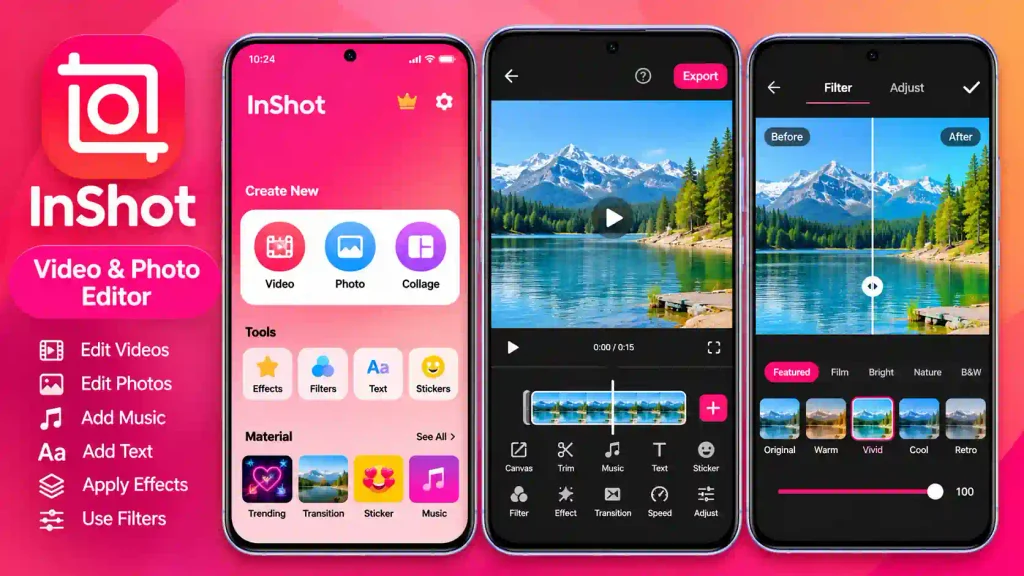
InShot is a mobile multimedia editing application that allows users to edit videos and photos using different creative tools. It provides an easy way to transform ordinary video clips and pictures into polished content. Users can import media files from their phone gallery, arrange video clips, remove unwanted sections, add transitions, include background music, and apply visual effects. The application also supports different video formats and aspect ratios, helping users prepare content for various social media platforms.
InShot works through a straightforward editing process. After opening the application, users can select Video, Photo, or Collage depending on their editing requirements. They can then choose their preferred pictures or video clips and start editing with the available tools. Once the editing is complete, users can preview their projects, select export settings, and save the final content to their devices. This simple workflow makes InShot useful for both new users and experienced content creators. You can visite the website Apknova
Key Features and Benefits of InShot
InShot provides several useful features that help users create professional-looking videos and attractive photographs. Its editing tools are designed to make everyday content creation simple and convenient.
- Video Trimming and Cutting: Remove unwanted sections and shorten video clips.
- Video Merging: Combine multiple video clips into one project.
- Transitions and Effects: Add creative transitions and visual effects between clips.
- Music and Audio: Include background music, sound effects, and voice recordings.
- Filters and Adjustments: Improve video appearance using filters and color adjustment tools.
- Text and Stickers: Add captions, titles, subtitles, and decorative stickers.
- Speed Control: Make videos faster or slower using speed adjustment options.
- Background Editing: Change video backgrounds and use blur or color effects.
- Photo Editing: Adjust brightness, contrast, saturation, and other image settings.
- Social Media Formats: Prepare videos in different aspect ratios for social media platforms.
These features make InShot a convenient editing solution for social media content, personal videos, promotional clips, and everyday photography.
InShot Interface and Main Dashboard
The InShot interface is designed with a simple layout that allows users to access its main editing options without difficulty. When users open the application, they can find separate options for Video, Photo, and Collage projects. This dashboard helps users choose the type of content they want to create before entering the editing workspace.
The video editing dashboard includes a timeline where users can arrange clips, adjust their duration, and add different editing elements. The toolbar provides access to features such as Canvas, Music, Text, Stickers, Filters, Effects, and Transitions. During editing, users can preview their work and make changes whenever necessary. The interface also provides export and save options, allowing users to select their preferred output quality.
InShot Account Registration, Sign Up, and Login Guide
InShot allows users to access its basic editing features without necessarily creating an account. This makes it convenient for people who want to start editing videos and photos immediately. However, certain features, purchases, or subscription-related services may require an account or platform-based authentication, depending on the device and application version.
Users can follow these general steps when account registration or login is required:
- Open the InShot application on your smartphone.
- Visit the account, profile, or settings section if available.
- Select the available sign-in or account option.
- Follow the instructions displayed on the screen.
- Enter the requested account information or use a supported sign-in method.
- Complete any verification process if required.
- Access the available account-related features.
Users should always use their genuine information and keep their account credentials secure.
InShot Video Editing Tools and Features
InShot offers a collection of video editing tools that help users create and customize video projects directly from their mobile devices. These tools allow users to modify clips, improve video appearance, control playback speed, and add creative elements to their content.
Some important video editing tools include:
- Trim and Split: Remove unwanted video sections or divide clips into smaller parts.
- Merge: Combine multiple video clips into one continuous project.
- Crop and Canvas: Adjust video dimensions and select suitable aspect ratios.
- Speed Control: Create slow-motion or fast-motion video effects.
- Transitions: Add smooth visual changes between different clips.
- Filters and Effects: Apply creative styles to improve video appearance.
- Keyframe Animation: Create movement and animation effects for selected elements.
- Chroma Key: Remove or replace supported green-screen backgrounds.
- Reverse Video: Play supported video clips in reverse.
- Freeze Frame: Hold a particular video frame for a selected duration.
These tools are particularly useful for creating social media videos, tutorials, travel clips, product promotions, and personal projects.
InShot Photo Editing Tools and Filters
InShot also includes photo editing tools that allow users to improve pictures without switching to another editing application. Users can import photographs from their smartphone gallery and customize their appearance using different adjustment options, filters, effects, and creative elements.
The photo editing section provides tools for adjusting brightness, contrast, saturation, warmth, highlights, shadows, and other image settings. Users can also crop pictures, change their aspect ratios, apply filters, add stickers, insert text, and create attractive photo designs. These options make it easier to prepare images for social media posts, profile pictures, stories, and personal collections.
InShot Music, Sound Effects, Stickers, and Text Features
Music and creative elements play an important role in making videos more engaging. InShot provides audio editing options that allow users to add background music, sound effects, and voice recordings to their video projects. Users can adjust audio volume, control the placement of sound, and synchronize audio with different video scenes.
The application also includes text and sticker features for adding titles, captions, labels, and decorative elements. Users can customize text styles, colors, sizes, and positions to match their video designs. Stickers and animated elements can make content more attractive, while supported text and subtitle tools help communicate important information to viewers. Users should ensure they have the necessary rights to use any music or audio they add to their projects.
InShot Download and Installation Guide for Android and iOS
InShot is available for Android and iOS devices through their respective official application stores. Users should download the application from a trusted source to receive the genuine version and avoid modified or potentially harmful installation files.
For Android Devices:
- Open the Google Play Store on your Android smartphone.
- Search for InShot – Video Editor & Maker.
- Check the application name and developer information.
- Tap the Install button.
- Wait for the download and installation process to finish.
- Open InShot from your application menu.
- Allow the necessary media permissions when required.
For iPhone and iPad:
- Open the Apple App Store.
- Search for InShot.
- Check the official application listing.
- Tap Get to download the application.
- Complete authentication using your Apple account if requested.
- Wait for installation to finish.
- Open the application and start editing.
Always check the device compatibility and available storage space before installation.
InShot Export Settings, Video Quality, and Sharing Options
InShot provides export settings that allow users to save their edited videos in different resolutions and frame rates. These settings help users select suitable video quality according to their project requirements and the platform where they intend to share their content.
Users can generally choose from available resolution options such as 720p, 1080p, and, on supported devices and projects, higher resolutions. Frame rate options may also be available, depending on the source video and application version. Higher resolutions and frame rates can increase the final file size and processing time.
After completing a project, users can tap the Save or Export option, select their preferred settings, and wait for the application to process the video. The exported video can then be saved to the phone gallery or shared through supported applications such as Instagram, TikTok, YouTube, and WhatsApp.
InShot Free vs Pro Version – Features and Differences
InShot offers free and paid Pro options. The free version provides useful editing tools for everyday video and photo editing, while the Pro subscription unlocks additional premium features and content. Exact features and pricing may vary depending on the country, device, and application version.
| Features | InShot Free | InShot Pro |
|---|---|---|
| Basic Video Editing | Available | Available |
| Photo Editing | Available | Available |
| Basic Filters | Available | Available |
| Music and Audio Tools | Available | Available |
| Text and Stickers | Selected options | Additional premium options |
| Premium Effects | Limited | More options |
| Watermark | May require removal through available options | Watermark-free export |
| Advertisements | May contain ads | Ad-free experience |
| Premium Content | Limited | Expanded access |
| Subscription | Free | Paid subscription |
The free version is suitable for users who need basic editing tools, while the Pro version is more suitable for creators who regularly use premium effects, stickers, and additional editing resources.
Advantages and Disadvantages of InShot
InShot offers several benefits for mobile video and photo editing, but there are also some limitations users should consider before choosing it as their primary editing application.
| Advantages | Disadvantages |
|---|---|
| Simple and user-friendly interface | Some features require a paid subscription |
| Useful video and photo editing tools | Free version may display advertisements |
| Supports different aspect ratios | Some exports may include a watermark |
| Provides music and sound effects options | Advanced editing capabilities are limited compared with professional desktop software |
| Includes filters, stickers, and text tools | Large projects may require more storage |
| Suitable for social media content creation | Exporting high-quality videos can take time |
| Available for Android and iOS | Some features depend on device compatibility |
Overall, InShot is a convenient choice for users who want straightforward mobile editing tools without learning complicated professional software.
Frequently Asked Questions (FAQs) About InShot
Q1. What is InShot used for?
InShot is used for editing videos and photos. It allows users to trim clips, add music, apply filters, insert text, use stickers, and create content for social media platforms.
Q2. Is free to use?
Yes, offers a free version with several editing tools. However, some premium features, effects, and content require a paid Pro subscription.
Q3. Is available for Android and iOS?
Yes, is available for Android smartphones and Apple devices, including iPhones and iPads.
Q4. Can I edit photos using InShot?
Yes, InShot includes photo editing tools that allow users to crop images, adjust colors, apply filters, add text, and use stickers.
Q5. Does InShot support 1080p video export?
Yes, InShot supports 1080p video export on compatible devices and projects. Other resolution options may also be available.
Q6. Can I add music to videos in InShot?
Yes, users can add background music, sound effects, and voice recordings using the available audio editing tools.
Q7. Does InShot add a watermark to videos?
The free version may include an InShot watermark. Users can remove it through the available removal option or by using the Pro version.
Q8. Is InShot suitable for beginners?
Yes, its simple interface and easy-to-use editing tools make it suitable for beginners as well as regular content creators.
Q9. Can I use InShot for YouTube and TikTok videos?
Yes, users can edit videos in different aspect ratios and prepare content for YouTube, TikTok, Instagram, and other supported social media platforms.
Q10. Is InShot safe to download?
InShot should be downloaded from its official Google Play Store or Apple App Store listing. Users should avoid unknown websites and unofficial modified APK files.
Conclusion
InShot is a useful mobile application for people who want to edit videos and photos using simple and accessible tools. Its features include video trimming, transitions, filters, music, stickers, text, photo adjustments, and different export options. Whether someone is creating short social media videos, editing personal photographs, or preparing promotional content, InShot provides a convenient editing experience. Its free version is a good starting point, while the Pro version offers additional features for users who need more creative options.







