
Google Gemini AI App Download, Features, Uses & Complete Guide for Android
Just Now
9.5 MB
V7.1
Andriod +
200K +
Description
Introduction to Gemini – Google’s AI-Powered Chatbot and Virtual Assistant
Google Gemini AI App Download is an advanced artificial intelligence (AI) chatbot developed by Google to help users find information, answer questions, generate content, and complete everyday tasks. It is designed to understand natural language and provide helpful responses through interactive conversations. Users can ask questions, explore different topics, get explanations, translate languages, and receive assistance with various activities. Gemini makes AI technology easier to access for students, professionals, businesses, and everyday users.
Google Gemini AI App Downloadalso offers creative and productivity tools that help users write articles, summarize information, generate ideas, solve problems, and work more efficiently. It can assist with research, coding, image-related tasks, and content creation, depending on the available features and model. With its integration into Google’s ecosystem, Gemini provides a convenient way to use artificial intelligence for learning, communication, creativity, and productivity.
What Is Gemini and How Does It Work?
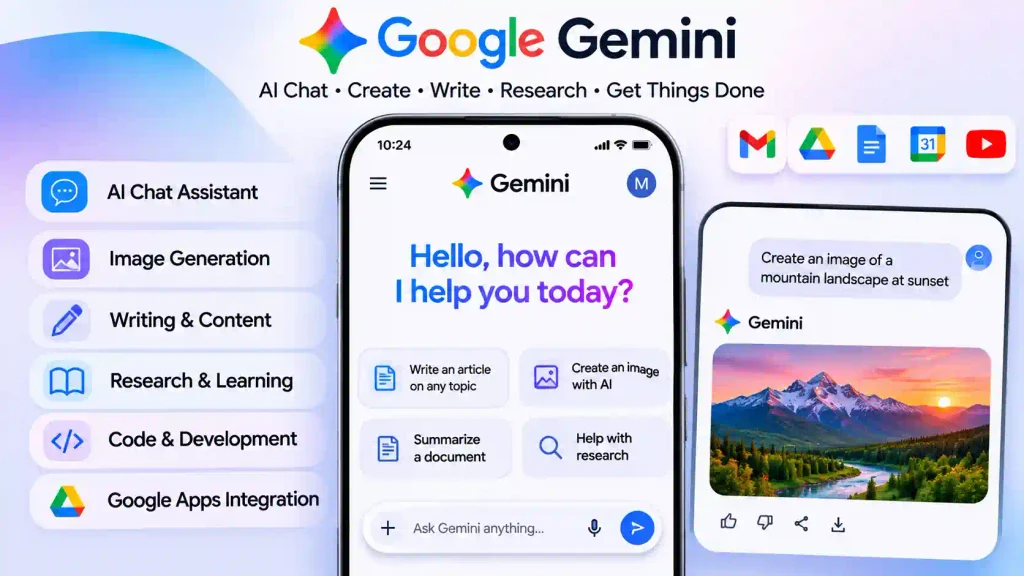
Gemini is Google’s AI-powered assistant that uses advanced language models to understand user questions and generate relevant responses. It processes the information provided by users and uses its AI capabilities to produce answers in natural language. Users can interact with Gemini by typing questions or, where supported, using voice and image inputs. It can explain complex subjects, provide suggestions, translate text, write content, and help users complete different tasks.
Gemini works by analyzing the context and meaning of a user’s request before generating a response. It uses machine learning and large-scale AI models trained to recognize language patterns, understand information, and generate useful content. Depending on the version and available features, Gemini can also work with images, files, and connected Google services. Its main purpose is to make information easier to understand and help users complete tasks more efficiently. You can visit the wesbiste Apknova
Key Features of Google Gemini
Google Gemini offers several AI-powered features designed to improve productivity, creativity, and everyday communication.
- AI Chat Assistant: Communicate with Gemini and receive answers to different questions.
- Text Generation: Create articles, emails, descriptions, and other written content.
- Image Understanding: Upload supported images and ask questions about their content.
- Creative Assistance: Generate ideas, stories, captions, and creative concepts.
- Research Support: Explore topics and understand complicated information.
- Language Translation: Translate text and understand different languages.
- Coding Assistance: Generate, explain, and troubleshoot programming code.
- Voice Interaction: Communicate with Gemini using supported voice features.
- Google Integration: Access supported Google services and connected applications.
- Productivity Support: Summarize information, organize ideas, and assist with everyday tasks.
Gemini AI Chat, Text Generation, and Conversations
Google Gemini AI App Download Chat allows users to communicate with Google’s artificial intelligence through simple conversations. Users can ask questions, request explanations, discuss different topics, and receive responses within seconds. The chatbot is designed to understand conversational language, making it easier for beginners and experienced users to interact with AI technology.
Google Gemini AI App Download also provides text-generation capabilities for creating different types of written content. Users can generate emails, articles, social media captions, business descriptions, reports, and study notes. They can also ask Gemini to rewrite existing text, improve grammar, change writing styles, or summarize lengthy information. These tools make Gemini useful for students, content creators, professionals, and businesses.
Gemini Image Generation and Creative Tools
Gemini includes AI-powered creative capabilities that can help users explore visual ideas and generate images where supported. Users can describe the image they want through text prompts and use available image-generation tools to create visual content. These features can support graphic design concepts, illustrations, social media content, and creative projects.
In addition to image generation, Gemini can assist with brainstorming, storytelling, content planning, and creative writing. Users can request different ideas, improve existing concepts, and develop creative projects through interactive conversations. Available image-generation features and usage limits may vary depending on the account, region, and subscription plan.
Gemini AI for Writing, Research, and Content Creation
Google Gemini AI App Download is a helpful AI assistant for writing, research, and content development. Users can ask it to prepare blog articles, introductions, product descriptions, professional emails, business reports, and educational materials. It can also help improve sentence structure, correct grammar, simplify complicated language, and adjust content according to different audiences.
For research purposes, Gemini can explain subjects, summarize information, organize important points, and suggest useful ideas for further investigation. Content creators can use it to develop article outlines, SEO-friendly headings, social media posts, and website content. However, users should always review important information and verify facts because AI-generated responses may sometimes contain mistakes.
Gemini Integration with Google Apps and Services
One of the useful aspects of Gemini is its connection with Google’s ecosystem. Depending on availability, account settings, and supported integrations, Gemini can work with Google services to help users manage information and complete everyday tasks.
Some supported Google services and integrations include:
- Google Gemini AI App Download: Help find information in emails and draft messages.
- Google Gemini AI App Download Drive: Work with supported files and documents.
- Google Gemini AI App Download Docs: Assist with writing and editing documents.
- Google Gemini AI App Download Maps: Help explore locations and find useful information.
- Google Gemini AI App Download Flights: Assist with travel-related searches.
- Google Gemini AI App Download Calendar: Help manage schedules and events.
- YouTube: Find and explore video-related information.
The availability of these integrations can vary by country, language, account type, and Google service settings.
Gemini Advanced Features and AI Models
Google Gemini AI App Download offers different AI models and advanced capabilities designed for various types of tasks. Depending on the available model, users can receive assistance with complex questions, mathematical problems, programming, research, and creative projects.
Some advanced capabilities include:
- Advanced Reasoning: Helps work through complex questions and problems.
- Multimodal Understanding: Processes supported combinations of text, images, audio, and other inputs.
- Coding Support: Assists with programming, debugging, and code explanations.
- Long-Context Processing: Works with larger amounts of supported information.
- Deep Research: Helps investigate topics and organize research findings.
- File Analysis: Assists with understanding supported uploaded documents.
- Personalized Assistance: Provides features that can adapt to user preferences where available.
Some advanced features may require a paid Google AI subscription, while availability and usage limits depend on Google’s current plans and policies.
How to Create an Account and Sign Up for Gemini
Creating a Google Gemini AI App Download account is a simple process. Users generally need a Google Account to access the service.
Follow these steps:
- Open the official Gemini website
- Click the Sign In option.
- Enter your Google Account email address.
- Enter your password to access your account.
- Complete any required verification steps.
- Review and accept the applicable terms and conditions.
- Once signed in, open the Gemini chat interface.
- Enter your first question in the message box and start using Gemini.
Note: Access requirements may vary depending on age, country, account type, and Google’s current policies.
How to Use Gemini – Complete Step-by-Step Guide
Using Gemini is straightforward, even for people who are new to artificial intelligence.
- Google Gemini AI App Download: Visit the official Gemini website or launch the official Android application.
- Sign In: Log in using your Google Account if required.
- Start a Conversation: Find the message box on the main screen.
- Enter a Prompt: Type a question or describe the task you want Gemini to complete.
- Send Your Request: Submit your message and wait for the AI-generated response.
- Review the Answer: Read the information provided by Gemini.
- Ask Follow-Up Questions: Continue the conversation to get more detailed information.
- Explore Additional Features: Try supported image, voice, research, and file-related tools.
- Manage Your Conversations: Use available options to review or manage your chat history.
How to Download and Install Gemini APK on Android
Android users can access Gemini through Google’s official Android application. The safest recommended option is to download the application through the Google Play Store.
Installation steps:
- Open the Google Play Store on your Android smartphone.
- Search for Google Gemini.
- Find the official application published by Google LLC.
- Open the application listing.
- Tap the Install button.
- Wait for the download and installation to finish.
- Open Gemini from your application menu.
- Sign in with your Google Account if required.
- Start chatting with Gemini.
Important: Always download the official Gemini application from Google Play or use Google’s official website. Avoid unknown APK files and unofficial modified versions because they may contain security risks.
Gemini Pros and Cons
| Pros (Advantages) | Cons (Disadvantages) |
|---|---|
| Easy-to-use AI chatbot interface | AI responses may sometimes be inaccurate |
| Helps generate articles and content | Requires an internet connection for most features |
| Supports multiple languages | Some features are region-restricted |
| Provides writing and research assistance | Advanced features may require a paid subscription |
| Supports image understanding and generation | Generated images may not always match expectations |
| Offers voice-based interaction | Voice features may not support every language |
| Integrates with supported Google services | Some integrations require additional permissions |
| Helps with coding and problem-solving | Complex answers may need manual verification |
| Available on web and Android | Usage limits may apply |
Frequently Asked Questions (FAQs) About Gemini
Q1. What is Google Gemini AI App Download?
Google Gemini AI App Download is an artificial intelligence assistant developed by Google. It helps users answer questions, generate content, conduct research, understand images, and complete everyday tasks.
Q2. Is Google Gemini free to use?
Yes, Google Gemini AI App Download offers free access to many AI features. However, some advanced models and tools require a paid Google AI subscription.
Q3. Can I use Gemini on Android?
Yes, Android users can download the official Google Gemini application from the Google Play Store and use it on supported devices.
Q4. Can Gemini generate images?
Yes, Google Gemini AI App Download offers AI-powered image-generation and editing capabilities. Availability and usage limits depend on the user’s account and region.
Q5. Can Gemini write articles and blog posts?
Yes, Gemini can help create blog posts, website articles, product descriptions, emails, social media captions, and other written content.
Q6. Does Gemini support voice conversations?
Yes, Google Gemini AI App Download supports voice interaction, including conversational features such as Gemini Live, where available.
Q7. Can Google Gemini AI App Download understand uploaded images?
Yes, users can upload supported images or use their camera to ask questions and receive information about visual content.
Q8. Is Gemini available for iPhone?
Yes, iPhone users can access Gemini through the official iOS application where available or through a web browser.
Q9. Can Gemini help with programming and coding?
Yes, Gemini can generate code, explain programming concepts, identify coding errors, and assist with debugging.
Q10. Is Google Gemini safe to use?
Gemini is a Google AI service with privacy and security controls. However, users should avoid sharing sensitive personal information and verify important AI-generated answers.
Q11. Does Gemini work with Gmail and Google Drive?
Yes, Gemini supports integrations with services such as Gmail and Google Drive, depending on account settings, permissions, and availability.
Q12. What is the difference between Gemini and Google Assistant?
Google Assistant traditionally focuses on voice commands and device-related tasks, while Gemini provides more advanced generative AI capabilities, including writing, research, reasoning, and conversational assistance.
Q13. Do I need a Google Account to use Gemini?
A Google Account is generally required to access Gemini’s main features. Some access conditions may vary depending on the service and region.
Q14. Can students use Gemini for learning?
Yes, students can use Gemini to understand difficult subjects, summarize study materials, explain concepts, practice questions, and generate learning ideas.
Q15. Where can I access Google Gemini?
You can access Gemini through its official website or download the official mobile application.







