
EPIK – 10 Powerful AI Photo Editing Features, Video Tools & Complete Guide
Just Now
15MB
V5.2
Andriod +
50M+
Description
EPIK is an AI-powered photo and video editing application designed to help users improve their pictures and create attractive visual content using a smartphone. It offers a variety of editing tools, including photo enhancement, beauty retouching, filters, effects, stickers, background editing, and creative templates. Whether you want to improve a selfie, adjust a portrait, create a photo collage, or give an ordinary picture a fresh look, EPIK provides tools to make the editing process easier.
One of the main advantages of EPIK is that it combines traditional photo-editing options with modern AI-powered features. Users can make quick adjustments or explore more detailed editing tools to achieve their preferred results. The app also includes selected video-editing features, making it useful for people who want to work with both photos and short videos in one place.
What Is EPIK and How Does It Work?
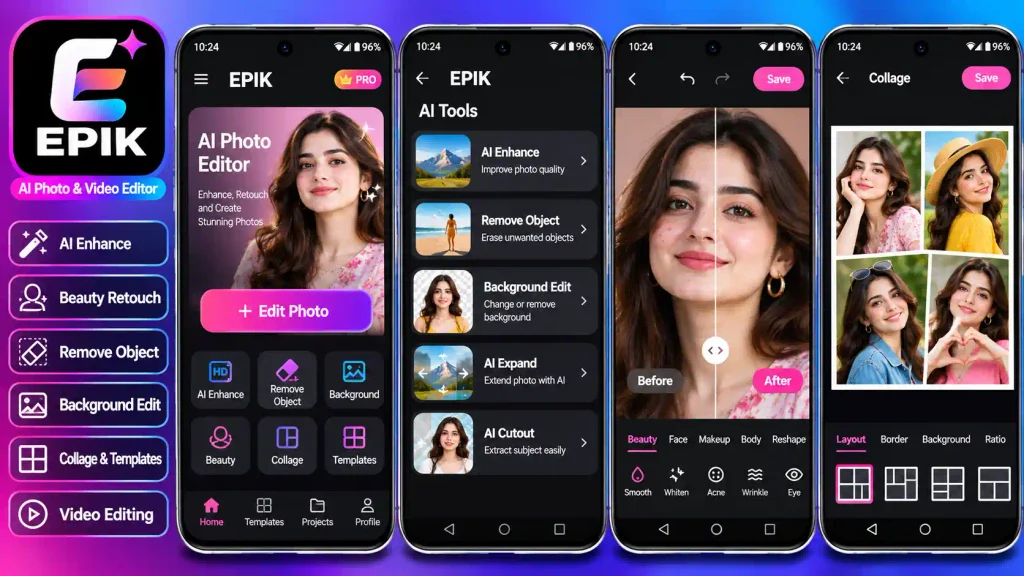
EPIK is a photo and video editor developed by SNOW Corporation. It allows users to import pictures or videos from their device and edit them using different tools and effects. The application includes options for adjusting brightness, contrast, colour, sharpness, and other image settings. It also provides portrait-editing features that can help users retouch faces, adjust makeup, modify hairstyles, and improve the overall appearance of photos.
The app works through a simple editing process. First, users select a photo or video from their gallery. Next, they choose the editing tools they want to apply, such as AI enhancement, background removal, filters, retouching, or video effects. After making the required changes, they can preview the result and save the edited content to their device. Some advanced tools and content may require an EPIK PRO subscription. You can visit the website Apknova
Key Features and Benefits of EPIK Photo Editor
EPIK offers a collection of creative tools for users who want to improve photos and make engaging visual content. Its features are designed for both quick edits and more detailed adjustments.
- AI Photo Enhancement: Improve image clarity and overall appearance with AI-powered enhancement tools.
- Object Removal: Remove selected unwanted objects or distractions from photos.
- Background Editing: Use cutout and background tools to change or adjust the appearance of a photo.
- Portrait Retouching: Edit skin, facial details, makeup, and other portrait features.
- Filters and Effects: Apply different visual styles to give pictures a creative look.
- Collage Maker: Combine multiple pictures into one design using collage layouts.
- Creative Stickers and Text: Add stickers, captions, and decorative elements to images.
- Video Editing: Use available video effects and editing tools to create more interesting clips.
- Photo Adjustment Tools: Control colour, brightness, contrast, and other image settings.
These features make EPIK useful for everyday photo editing, social media content creation, personal projects, and creative experiments. The results depend on the original image, the tools selected, and the user’s editing choices.
EPIK App Interface and Main Editing Tools
EPIK has a visual interface that helps users find and use its editing features. The main editing process generally starts by selecting a photo or video from the device gallery. After opening a file, users can explore the available tools and preview their changes before saving the final result.
Some of the main interface components include:
- Home Screen: Provides access to editing options and available creative features.
- Photo Selection: Allows users to choose pictures from their device.
- Editing Workspace: Displays the selected photo or video while editing.
- AI Tools: Provides access to enhancement, object removal, and other AI-powered options.
- Retouch Tools: Includes portrait, beauty, face, and body adjustment options.
- Filters and Effects: Helps users apply different styles and visual effects.
- Collage and Templates: Provides layouts and designs for combining pictures.
- Save and Export Options: Allows users to save their completed edits.
The availability and arrangement of tools may vary depending on the app version and device. Some options may also be available only to PRO subscribers.
EPIK App Download, Installation, and Account Setup Guide
Users can download EPIK through official app stores on supported devices. Before installing the application, make sure your device has enough storage space and meets the app’s current system requirements.
How to Download and Install EPIK on Android
- Open the Google Play Store on your Android device.
- Search for EPIK – AI Photo and Video Editor.
- Check that the app is published by SNOW Corporation.
- Tap Install and wait for the download to finish.
- Open the application after installation.
- Allow the requested permissions that are necessary for selecting and editing your photos or videos.
- Start editing by choosing an image or video from your gallery.
How to Download EPIK on iPhone
- Open the Apple App Store.
- Search for EPIK Photo and Video Editor.
- Check the developer information.
- Tap Get to download the app.
- Open EPIK after installation.
- Follow the on-screen instructions to begin editing.
Account Setup and Login
Depending on the version and features you want to use, EPIK may offer account sign-in or other access options. Follow the instructions displayed in the app. Review any permissions and subscription details before proceeding.
EPIK AI Photo Editing Tools – Enhance, Remove, and Background Editing
EPIK includes AI-powered tools that can help users improve photos and make specific changes without relying on complicated editing software. These tools are useful when a picture needs better clarity, a cleaner background, or the removal of unwanted distractions.
AI Photo Enhancement helps improve the appearance of selected images. Depending on the available tool, users may be able to make photos look clearer and improve visible details.
Object Removal allows users to select unwanted elements in a picture and attempt to remove them. This can be useful for cleaning up backgrounds or removing small distractions. Results may vary, especially when the selected object covers complicated details.
Background Editing and Cutout tools help separate a subject from its background. Users can use these options to create a different visual appearance or place the subject into another design.
AI Filters and Creative Adjustments provide additional ways to change the style and appearance of photos. Users can experiment with different effects and compare the results before saving.
EPIK Photo Retouching – Beauty, Makeup, Face, and Body Editing
EPIK provides portrait-editing tools for users who want to make adjustments to selfies and other personal photographs. These features allow users to explore different looks while keeping control over the final appearance of their images.
Skin Retouching: Users can adjust the appearance of skin and reduce the visibility of selected imperfections.
Makeup Tools: Available options may allow users to experiment with makeup styles and create different looks in portraits.
Face Editing: Face-related tools can help adjust selected facial details and create a preferred appearance.
Hairstyle and Hair Colour: Users can try supported hairstyle or hair-colour effects to explore different styles.
Body Editing: Selected tools allow users to adjust certain body proportions and image details.
Wrinkle and Blemish Editing: These options can help reduce the appearance of selected marks and imperfections in portraits.
For natural-looking results, it is usually best to apply retouching carefully. Making too many adjustments can change the original appearance of a photograph.
EPIK Filters, Effects, Stickers, and Creative Design Tools
EPIK includes creative tools that help users give their photos a different style. Filters can change the overall colour and mood of an image, while effects can add distinctive visual details. Users can try different combinations to find a look that suits their photographs.
Filters and Effects: Apply visual styles to change the appearance of photos. Different effects can create soft, colourful, vintage, or artistic results.
Stickers and Text: Add decorative stickers, captions, and text to make pictures more expressive. These options are useful for social media posts, greetings, and personal designs.
Drawing and Shapes: Use supported drawing tools and shapes to add creative details to an image.
Colour and Lighting Adjustments: Fine-tune the appearance of a photo by adjusting colour, brightness, and other settings.
Creative Templates: Use ready-made designs to create visual content without building every element from the beginning.
These tools give users more freedom to personalize their photos and create content for different occasions.
EPIK Collage, Templates, and Photo Layout Features
The collage and layout features in EPIK help users combine multiple pictures into a single design. Instead of sharing several separate photographs, users can arrange them together in a collage. This is useful for travel memories, family pictures, special occasions, and social media posts.
Photo Collage: Select multiple images and arrange them in a chosen layout. Different layouts can help users create simple or more creative designs.
Templates: Use available templates to create designs with prepared arrangements and decorative elements.
Backgrounds and Patterns: Add suitable backgrounds or patterns to make a collage more attractive.
Photo Arrangement: Adjust the position and presentation of images within a layout to achieve the desired result.
Custom Stickers: Some creative options allow users to make or use stickers as part of their designs.
After completing a collage, users can preview the design and save the final image to their device. Available layouts and templates may differ between app versions.
EPIK Video Editing Tools – Video Effects, Face Editing, and Retro Clips
Although EPIK is widely used for photo editing, it also provides selected tools for video editing. These features allow users to add creative effects and make changes to supported video clips.
Video Effects: Apply available visual effects to change the appearance and style of a video.
Video Mosaic: Use mosaic effects to cover selected areas of a video. Some versions provide tracking-related options for following a selected area as the video plays.
Video Face Editing: Explore supported face-editing features for video content.
Retro Clips: Create a vintage-inspired appearance using available retro video effects.
Video Preview and Export: Review the edited clip before saving it, and check the available export options.
EPIK’s video tools may be more limited than those found in dedicated video-editing applications. However, they can be useful for users who want to make simple creative changes without switching between several apps.
EPIK PRO Subscription Plans, Pricing, and Free Features
EPIK offers free editing options as well as a paid subscription called EPIK PRO. The free version allows users to explore selected photo-editing tools and creative features. However, some advanced tools, effects, templates, or other content may be restricted to PRO subscribers.
Free Features
- Access to selected photo-editing tools.
- Basic image adjustments.
- Selected filters and effects.
- Some portrait and creative editing options.
- Access to supported collage and design features.
EPIK PRO Features
- Access to additional premium editing tools.
- More advanced AI-powered features where available.
- Additional filters, effects, and creative content.
- Premium templates and editing options.
- Other benefits included in the active subscription plan.
EPIK PRO Pricing
Subscription prices can vary depending on the country, platform, subscription duration, promotional offers, and current app-store policies. For this reason, users should check the price displayed inside EPIK or on their official app-store listing before purchasing.
Before subscribing, review the renewal period, billing amount, free-trial conditions (if offered), and cancellation policy. A subscription may renew automatically unless it is cancelled according to the relevant app-store instructions.
Frequently Asked Questions (FAQs) About EPIK
Q1. What is EPIK used for?
EPIK is used for editing photos and videos. It includes tools for image enhancement, portrait retouching, filters, effects, collages, templates, and selected video-editing features.
Q2. Is available for Android?
Yes. EPIK is available for supported Android devices through the Google Play Store. Users should check the current device requirements before installing it.
Q3. Can I use on an iPhone?
Yes. Users with compatible Apple devices can look for in the Apple App Store.
Q4. Is free to use?
EPIK offers free features, but some advanced tools and creative content may require an PRO subscription.
Q5. Does EPIK use artificial intelligence?
Yes. The application includes AI-powered features for tasks such as photo enhancement, object removal, and selected portrait or background editing.
Q6. Can EPIK remove unwanted objects from photos?
Yes. EPIK provides an object-removal feature that can help remove selected unwanted elements. The final result depends on the image and the complexity of the background.
Q7. Can I edit selfies with EPIK?
Yes. EPIK includes portrait and beauty-editing tools for adjusting skin, makeup, facial details, and other supported features.
Q8. Does EPIK support video editing?
Yes. It offers selected video-editing features, including effects and other creative options. Its video tools may be more limited than those of dedicated video editors.
Q9. Can I create photo collages using EPIK?
Yes. Users can combine multiple photos using available collage layouts, templates, backgrounds, and creative design tools.
Q10. Is EPIK PRO worth purchasing?
EPIK PRO may be useful for users who regularly edit photos and need access to its premium tools and content. Casual users may find that the free features are enough for basic editing.
Conclusion – Is EPIK Worth Using for Photo and Video Editing?
EPIK is a useful photo and video editing application for people who want to improve pictures, edit portraits, apply creative effects, and design attractive collages. Its combination of traditional editing tools and AI-powered features makes it suitable for beginners as well as users who enjoy experimenting with different photo styles. The app also provides selected video-editing options for creating more engaging clips.
Overall, EPIK is worth trying if you want a convenient editing application with a wide range of creative tools in one place. The free version can be a good starting point for basic editing, while EPIK PRO may be worth considering if you need its additional premium features. Download it from an official app store, explore the available tools, and choose the features that best match your editing needs.







