
Easypaisa Digital Wallet, Online Payments & Money Transfer in Pakistan
Just Now
9.5 MB
V5.5
Andriod +
1200K +
Description
Introduction to Easypaisa – Pakistan’s Digital Banking and Mobile Wallet App
Easypaisa is one of Pakistan’s well-known digital financial platforms that allows users to manage their money through a mobile phone. It provides convenient financial services, including sending and receiving money, paying utility bills, purchasing mobile balance, transferring funds, and making online payments. Easypaisa has made digital transactions easier by allowing customers to access many financial services without visiting a traditional bank branch.
The Easypaisa mobile application is designed to make everyday banking and payments simple, fast, and accessible. Users can open an account, check their balance, transfer money, pay bills, and explore additional financial services directly from their smartphones. Its digital wallet and payment facilities are useful for individuals, families, and small businesses across Pakistan.
What Is Easypaisa and How Does It Work?
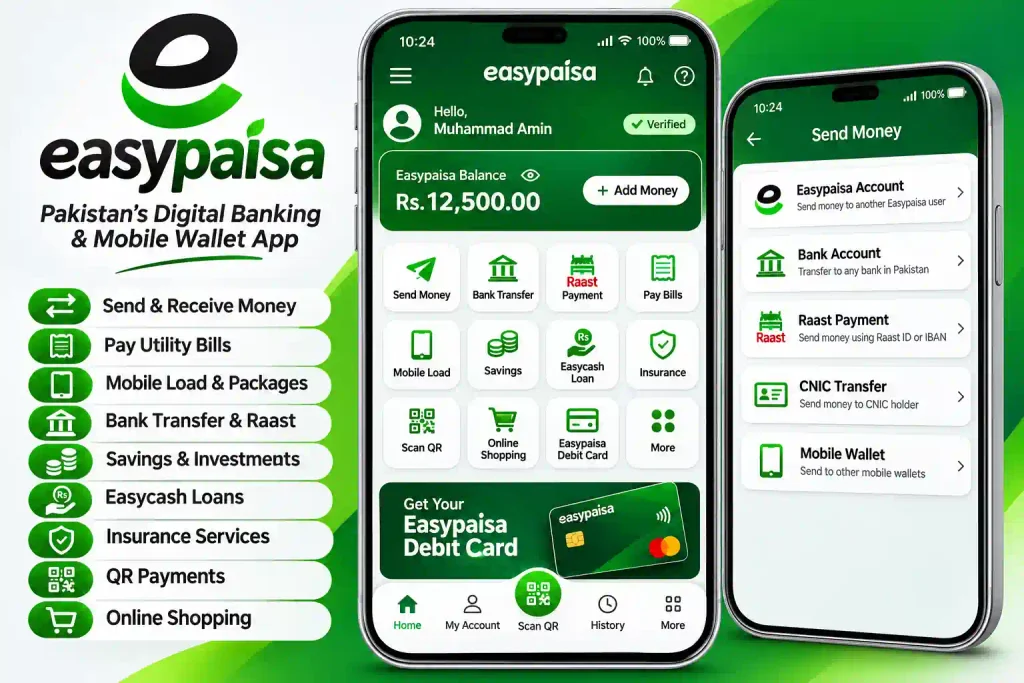
Easypaisa is a digital banking and mobile wallet service that allows customers to store, send, receive, and manage money electronically. Users can register through the Easypaisa application using their mobile number and valid CNIC, subject to identity verification requirements. After creating an account, customers can access different services, including wallet transfers, bank payments, mobile top-ups, and supported merchant payments.
Easypaisa works by connecting a customer’s digital account with available financial payment networks. Users can add money through supported bank transfers, Easypaisa agents, and other available methods. They can then transfer funds to other accounts, pay utility bills, purchase mobile packages, or make payments at participating merchants. The application also provides transaction records and security features to help customers manage their accounts. You can visit the website Apknova
Key Features and Benefits of Easypaisa
Easypaisa offers a range of digital financial services designed to make everyday transactions easier and more convenient.
- Money Transfers: Send and receive money through Easypaisa and supported bank accounts.
- Bank Transfers: Transfer funds between Easypaisa and eligible bank accounts.
- Raast Payments: Make digital payments using supported Raast services.
- Utility Bill Payments: Pay electricity, gas, water, telephone, and internet bills.
- Mobile Recharge: Purchase prepaid mobile balance and subscribe to network packages.
- Online Shopping: Make payments at supported online stores and merchants.
- Debit Cards: Access available Easypaisa debit card facilities.
- QR Payments: Pay participating merchants by scanning QR codes.
- Savings Services: Explore available savings and investment products.
- Easycash: Access eligible short-term digital financing services.
- Insurance: Explore selected insurance products.
- Transaction History: Review previous payments and transfers.
These features make Easypaisa a useful platform for customers who want to manage their everyday financial activities digitally.
Easypaisa Account Registration and Login Guide
Creating an Easypaisa account is a simple process. Customers can register through the official application by providing their mobile number and completing the required identity verification.
How to Register an Easypaisa Account:
- Download the official Easypaisa application from Google Play Store or Apple App Store.
- Open the application on your smartphone.
- Enter your active Pakistani mobile number.
- Verify your number using the OTP sent through SMS.
- Provide your CNIC details as requested.
- Complete the required identity and biometric verification.
- Create your account PIN.
- Follow the remaining instructions to activate your account.
How to Login to Easypaisa:
- Open the Easypaisa application.
- Enter your registered mobile number if requested.
- Provide your account PIN or complete the available authentication process.
- Access your account dashboard.
- Select the financial service you want to use.
Always keep your account PIN and OTP private to protect your wallet from unauthorized access.
Easypaisa Money Transfers, Bank Transfers, and Raast Payments
Easypaisa makes it easy for customers to send and receive money using their mobile wallets. Users can transfer funds to other Easypaisa accounts, supported Pakistani bank accounts, and eligible CNIC-based recipients. These services help customers manage personal payments, send money to family members, and complete financial transactions without visiting a bank branch.
The application also supports Raast payments, which allow users to transfer money through supported Raast IDs and IBANs. Customers can use available bank transfer options to move funds between Easypaisa and other financial institutions. Transaction limits, processing times, and charges depend on the selected transfer method and account eligibility. State Bank of Pakistan+2
Available Money Transfer Options:
- Easypaisa to Easypaisa transfers.
- Easypaisa to bank account transfers.
- Bank account to Easypaisa transfers.
- Raast ID and IBAN payments.
- Eligible CNIC-based money transfers.
- Supported international remittances.
Easypaisa Mobile Payments, Utility Bills, and Online Shopping
Easypaisa provides convenient digital payment facilities that allow customers to pay everyday expenses directly through their mobile phones. Users can pay supported electricity, gas, water, telephone, and internet bills without visiting payment offices. The application also provides mobile recharge and package subscription services for different Pakistani mobile networks.
Customers can also use Easypaisa to make payments at supported online shopping websites and participating merchants. These facilities make purchasing products, paying bills, and managing daily expenses easier. Users can check their transaction history to review completed payments and monitor their spending.
Main Payment Services Include:
- Electricity and gas bill payments.
- Water and telephone bill payments.
- Internet and broadband payments.
- Mobile balance and package subscriptions.
- Online shopping payments.
- Merchant payments.
- Government and institutional payments where supported.
Easypaisa Debit Card, Mobile Load, and Package Subscriptions
Easypaisa offers debit card facilities that allow eligible customers to access their wallet funds through supported payment channels. Depending on the available card option, customers can use their Easypaisa debit cards for ATM withdrawals, online purchases, and payments at supported retail stores.
The mobile recharge feature is another useful service for everyday users. Customers can purchase prepaid mobile balance and activate available internet, call, and SMS packages through the application. This allows users to recharge their phones without purchasing physical scratch cards or visiting mobile shops.
Available Services Include:
- Easypaisa physical debit card.
- Online debit card payments.
- Supported ATM cash withdrawals.
- Prepaid mobile balance recharge.
- Internet package subscriptions.
- Call and SMS package activation.
- Mobile services for supported networks.
Easypaisa Savings, Investments, Easycash Loans, and Insurance
Easypaisa provides several financial products that allow eligible customers to explore savings, investments, short-term financing, and insurance services. Through its savings facilities, users can explore different options for depositing money and earning returns according to the applicable product terms.
The platform also offers Easycash, a short-term digital financing service for eligible customers. Users can check available loan offers, repayment dates, and applicable charges through the application. In addition, Easypaisa provides selected insurance products and investment opportunities, including available term deposit options. Customers should carefully review all conditions, fees, and financial risks before using these services. Apps on Google Play+1
Financial Services Include:
- Digital savings products.
- Term deposit investment options.
- Easycash short-term loans.
- Selected insurance plans.
- Financial account management.
- Eligible investment opportunities.
Easypaisa QR Payments, Merchant Services, and Digital Transactions
Easypaisa supports QR-based payments that allow customers to pay participating merchants by scanning a QR code through their mobile applications. This payment method reduces the need to carry cash and makes everyday shopping transactions more convenient.
Businesses and shopkeepers can also use supported Easypaisa merchant services to receive digital payments from customers. QR payments and merchant facilities help simplify transactions at retail stores, restaurants, and other participating businesses. Customers should check the payment amount and merchant details before confirming a transaction. Apps on Google Play+1
QR and Merchant Payment Features:
- Scan and pay using QR codes.
- Raast QR payment support.
- Digital merchant payments.
- Cashless shopping transactions.
- Payment confirmation and transaction records.
- Convenient payments at participating stores.
Easypaisa Security, Account Verification, and Privacy
Easypaisa uses different security measures to help protect customer accounts and financial transactions. Account registration requires mobile number verification and personal identification details. Depending on the account category and applicable requirements, customers may also need to complete biometric verification to access higher transaction limits.
The application uses account PIN authentication and OTP verification for selected activities. Customers should protect their login information and regularly review their transaction history to identify suspicious activity.
Important Security Tips:
- Never share your account PIN with anyone.
- Do not disclose OTP verification codes.
- Download the official application only.
- Avoid suspicious links and unknown payment requests.
- Keep your mobile application updated.
- Protect your registered SIM card and smartphone.
- Check transaction notifications regularly.
- Contact official Easypaisa support if you notice unauthorized transactions.
Easypaisa customers should also review the official privacy policy to understand how their personal and financial information is collected and protected.
Easypaisa Fees, Transaction Limits, and Charges
Easypaisa provides different account categories with specific transaction limits. These limits determine how much money customers can send, receive, and maintain in their accounts. The available limits depend on account level, identity verification, and applicable banking regulations.
Transaction charges also vary depending on the service being used. Some digital transfers and payments may be free, while certain cash withdrawals, deposits, and bank transfers may include service fees.
Common Charges and Services:
| Transaction Type | Charges |
|---|---|
| New Mobile Account Opening | Free |
| Easypaisa to Easypaisa Transfer | Check current applicable schedule |
| Bank Account Transfer | Depends on amount and monthly usage |
| ATM Withdrawal | Applicable service charges |
| Cash Deposit | Applicable service charges |
| Online Payments | Check supported payment terms |
| Utility Bill Payments | Depends on current schedule |
| Mobile Recharge | Depends on current schedule |
Important: Updates its Schedule of Charges periodically. Customers should check the latest official fee schedule before making transactions. Account limits can be checked through the Account Level section of the application. Easypaisa+2
Pros and Cons of Using
Offers several advantages for customers who prefer digital banking and mobile payments. However, like other financial applications, it also has some limitations that users should understand.
| Pros (Advantages) | Cons (Disadvantages) |
|---|---|
| Easy account registration through a mobile phone. | Requires mobile number verification. |
| Convenient money transfers. | Transaction limits depend on account level. |
| Supports bank transfers and Raast payments. | Some transactions include service charges. |
| Easy utility bill payments. | Internet access is required for most app services. |
| Mobile recharge and package subscriptions. | Transactions can occasionally be delayed. |
| Supports QR code payments. | Biometric verification may be required. |
| Offers debit card facilities. | Some services have eligibility requirements. |
| Provides savings and investment options. | Investment returns and conditions may vary. |
| Offers Easycash financing to eligible users. | Loans may include additional charges. |
| Supports online shopping payments. | Not every merchant accepts |
Overall, is a convenient digital banking platform for managing everyday financial transactions. Users should understand its charges, transaction limits, and financial product conditions before using its services.
Frequently Asked Questions (FAQs)
Q1. What is ?
Is a Pakistani digital banking platform that allows users to send and receive money, pay bills, recharge mobile phones, transfer funds, and access other financial services through a mobile application.
Q2. How can I create an account?
Download the official application, enter your mobile number, provide your CNIC details, complete the required verification, and create your account PIN.
Q3. Can I use without a Telenor SIM?
Yes. Supports customers using different Pakistani mobile networks, including Jazz, Zong, Ufone, and Telenor, subject to registration requirements.
Q4. How can I send money through ?
Open the application, select Send Money, choose your preferred transfer method, enter the recipient’s details and amount, and confirm the transaction.
Q5. Can I transfer money from to a bank account?
Yes. Supports transfers to participating Pakistani bank accounts through its available bank transfer facilities.
Q6. Does support Raast payments?
Yes. Supports Raast payment facilities, allowing eligible customers to send money using supported Raast IDs and IBANs.
Q7. Can I pay electricity and gas bills through ?
Yes. Customers can pay supported electricity, gas, water, telephone, and internet bills directly through the mobile application.
Q8. Does offer a debit card?
Yes. Offers debit card facilities that customers can use for supported online purchases, retail payments, and ATM withdrawals.
Q9. What is Easycash in ?
Easycash is a short-term digital financing service available to eligible customers. Loan amounts, repayment periods, and charges depend on the offer provided.
Q10. Is safe to use?
Provides security features such as PIN authentication, OTP verification, and identity verification. Users should never share their confidential account information.
Q11. Can I recharge my mobile phone using ?
Yes. You can purchase mobile balance and subscribe to supported internet, call, and SMS packages through the application.
Q12. Can I use for online shopping?
Yes. supports online payments through participating merchants and eligible debit card payment options.
Q13. Does offer savings and investment services?
Yes. Customers can explore available savings products and term deposit investment options, subject to eligibility and applicable terms.
Q14. What are the transaction limits?
Transaction limits depend on the customer’s account category and verification level. Users can check their available limits through the Account Level section of the application.
Q15. How can I recover my account PIN?
Use the PIN recovery option in the official application and complete the required verification steps to create a new PIN.
Q16. How can I contact Easypaisa customer support?
You can contact Easypaisa through its official mobile application, website, or customer support helpline. The published helpline for Telenor users is 3737.







