
DeepSeek, Features, DeepThink, Uses & Complete Guide for Android
Just Now
7.78MB
V4.6
Andriod +
15000K +
Description
Introduction to DeepSeek – AI-Powered Chatbot and Virtual Assistant
DeepSeek is an artificial intelligence (AI) platform designed to help users find information, answer questions, solve problems, and complete everyday tasks. It works like a virtual assistant, allowing users to communicate through text-based conversations. Whether you need help with writing, learning, research, mathematics, or coding, DeepSeek provides AI-powered assistance in one convenient platform.
DeepSeek is useful for students, professionals, developers, and everyday users who want quick answers and helpful explanations. Its AI models can understand questions, process information, and generate responses based on user instructions. The platform is accessible through its website and mobile applications, making it easier to use AI tools on different devices.
What Is DeepSeek and How Does It Work?
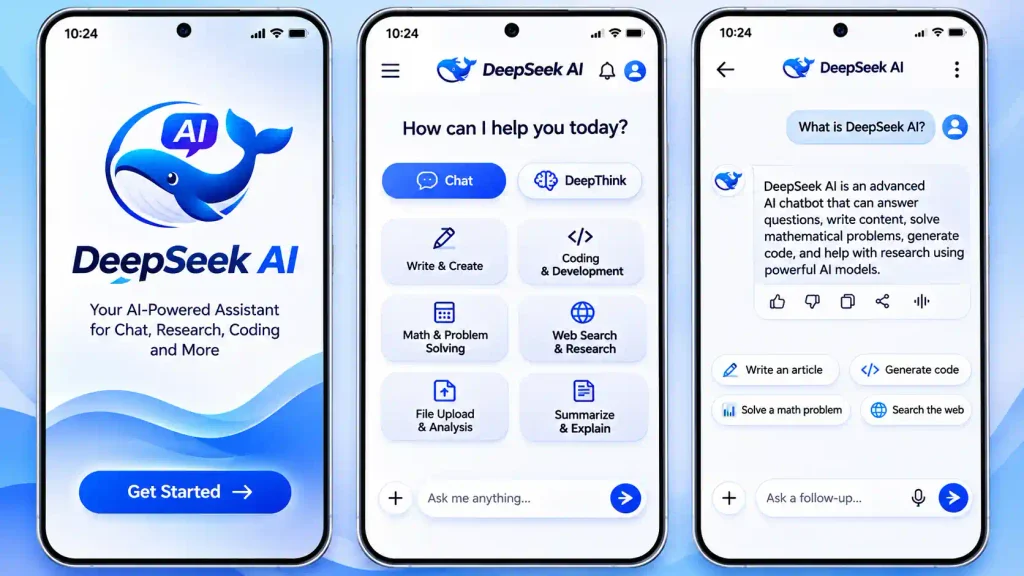
DeepSeek is an AI chatbot platform developed by the Chinese artificial intelligence company DeepSeek. It uses advanced large language models (LLMs) to understand human language and generate relevant responses. Users can enter questions, provide instructions, or submit text, and the AI processes the input to produce answers, explanations, summaries, and other useful content.
DeepSeek works by processing the user’s input and predicting suitable responses based on patterns learned during model training. Depending on the available model and features, it can assist with logical reasoning, coding, mathematics, writing, and research. Users can continue conversations with follow-up questions to explore a topic in greater detail. You can visit the website Apknova
Key Features of DeepSeek AI
- AI Chat Assistant: Communicate with DeepSeek and receive answers to different questions.
- Advanced Reasoning: Use DeepThink capabilities for more detailed problem-solving.
- Writing Assistance: Generate articles, emails, summaries, and creative content.
- Coding Support: Write, explain, review, and troubleshoot programming code.
- Mathematical Solutions: Get assistance with calculations and mathematical problems.
- Multilingual Support: Communicate in different languages, depending on model capabilities.
- User-Friendly Interface: Access AI conversations through a simple and convenient interface.
DeepSeek AI Chat, Conversations, and Smart Responses
- Ask Questions: Enter questions and receive AI-generated answers.
- Natural Conversations: Communicate using everyday language.
- Detailed Explanations: Request explanations for complicated topics.
- Follow-Up Questions: Continue conversations without explaining the entire topic again.
- Content Generation: Create articles, descriptions, messages, and other written content.
- Quick Responses: Get assistance with everyday questions and tasks.
- Conversation History: Access previous chats when history is available in your account.
DeepSeek DeepThink Mode and Advanced Reasoning
- Advanced Thinking: DeepThink helps the AI work through complex questions.
- Logical Problem-Solving: Break complicated problems into smaller steps.
- Mathematical Reasoning: Assist with mathematical questions and calculations.
- Detailed Answers: Generate more structured explanations for challenging topics.
- Step-by-Step Solutions: Explain how a problem can be approached and solved.
- Educational Support: Help students understand difficult subjects.
- Complex Questions: Explore technical and analytical topics in greater detail.
DeepSeek Web Search and Information Research
- Search Information: Find relevant information about different topics when web search is available.
- Research Assistance: Explore subjects for educational and professional purposes.
- Current Information: Search for recent information using supported search features.
- Topic Summaries: Turn lengthy information into shorter explanations.
- Information Comparison: Compare different ideas, products, or concepts.
- Learning Support: Find useful information for assignments and research projects.
- Source Checking: Review available references and verify important information independently.
- DeepSeek Coding, Mathematics, and Problem-Solving Tools
- Code Generation: Generate programming code based on written instructions.
- Code Explanation: Understand how different programming languages and functions work.
- Error Detection: Identify possible mistakes in code and suggest corrections.
- Mathematical Calculations: Assist with equations, formulas, and calculations.
- Algorithm Assistance: Explain programming logic and algorithm development.
- Technical Learning: Help beginners understand programming concepts.
- Problem-Solving: Provide step-by-step approaches to technical and mathematical challenges.
DeepSeek File Upload, Document Analysis, and Text Extraction
- File Upload: Upload supported documents when the feature is available.
- Document Analysis: Ask questions about uploaded files.
- Text Summarization: Create short summaries of lengthy documents.
- Information Extraction: Find important details from supported files.
- Document Explanation: Understand complicated paragraphs and technical content.
- Content Organization: Convert information into structured notes and points.
- File Support: Available file formats and upload limits may depend on the app version and account.
How to Create an Account and Sign In to DeepSeek
- Visit the Official Website: Open the official DeepSeek website
- Open the Sign-In Page: Select the login or sign-up option.
- Choose a Registration Method: Use an available email or supported account registration method.
- Enter Your Details: Provide the information requested during registration.
- Verify Your Account: Complete any email or security verification process.
- Sign In: Enter your registered account details to access DeepSeek.
- Start Using AI: Open a new conversation and enter your first question.
How to Use DeepSeek AI on Android Devices
- Open Google Play: Launch the Google Play Store on your Android phone.
- Search for DeepSeek: Type DeepSeek in the search bar.
- Check the Developer: Confirm that the application is published by the official DeepSeek developer.
- Install the App: Tap the Install button and wait for installation.
- Open DeepSeek: Launch the application after installation.
- Sign In: Log in or create an account using an available method.
- Start a Conversation: Enter your question in the chat box and receive an AI-generated response.
DeepSeek APK Download and Installation Guide
- Choose an Official Source: Prefer the official Google Play Store or DeepSeek’s official website.
- Find the Application: Search for the official DeepSeek Android app.
- Check App Details: Verify the developer name, application information, and permissions.
- Download the App: Download the application from a trusted source.
- Install on Android: Follow the installation instructions displayed on your device.
- Open the Application: Launch DeepSeek and complete the initial setup.
- Start Using DeepSeek: Sign in and explore its AI chat and other available features.
Safety tip: Avoid modified or unofficial APK files because they may contain harmful software or compromise your personal information.
DeepSeek Security, Privacy, and Data Protection
- Account Protection: Use a strong password and protect your login details.
- Personal Information: Avoid sharing sensitive personal or financial information in conversations.
- Privacy Policy: Review DeepSeek’s official privacy policy to understand how information is collected and processed.
- Chat Management: Check the available controls for managing or deleting conversations.
- App Permissions: Review the permissions requested by the application.
- Secure Access: Use trusted devices and secure internet connections when accessing your account.
- Data Awareness: Understand that information submitted to an online AI service may be processed and stored according to its privacy policy and applicable settings.
Advantages and Disadvantages
| Advantages | Disadvantages |
|---|---|
| Easy-to-use AI chatbot interface | AI responses may sometimes be inaccurate |
| Helps with writing and content creation | Requires an internet connection |
| Supports coding and programming assistance | Complex answers may need verification |
| Provides mathematical problem-solving support | Some features may vary by model or region |
| Offers advanced reasoning capabilities | Privacy considerations require attention |
| Useful for learning and research | May misunderstand unclear questions |
| Available through web and mobile platforms | Availability and performance may change |
Frequently Asked Questions (FAQs)
1. What is ?
Is an artificial intelligence platform that helps users answer questions, generate content, solve problems, and perform different tasks through AI-powered conversations.
2. Is free to use?
Official app announcement describes the app as free to use. However, API services may have separate pricing. Introducing
3. Is available for Android?
Yes. Offers an official Android application that users can find through Google Play. Apps on Google Play+1
4. Can help with writing articles?
Yes. You can use to write articles, create descriptions, summarize information, draft emails, and improve written content.
5. Can solve mathematical problems?
Yes. can help with mathematical calculations, equations, logical reasoning, and step-by-step explanations.
6. What is DeepThink mode?
DeepThink is a reasoning feature designed to help work through complex questions and provide more detailed solutions.
7. Does support web search?
Yes. The official app includes a web search feature that can help users find information online. Introducing App+1
8. Can I upload documents to ?
Yes. The official app announcement lists file uploads and text extraction among its features. Supported formats and limits may vary. Introducing
9. Can help programmers?
Yes. can generate code, explain programming concepts, identify possible errors, and assist with technical problem-solving.
10. Do I need an account to use ?
You can use the official sign-in options to access your account and its features. Available access and registration requirements may vary.
11. Is DeepSeek safe to use?
You should use the official website or app and avoid sharing sensitive information. privacy policy explains how it processes account details, prompts, uploaded files, and other information.
12. Can I use DeepSeek on a computer?
Yes. You can access DeepSeek through its official website using a supported web browser.
13. Does DeepSeek support multiple languages?
Yes. DeepSeek can understand and generate responses in multiple languages, although response quality may vary depending on the language and task.
14. Where can I download the official DeepSeek app?
You can download the official Android application from Google Play or visit the official download page:







