
Claude AI – 7 Best Features of This Powerful AI Chatbot and Virtual Assistant
Just Now
9.5 MB
V5.2
Andriod +
50M+
Description
Claude AI is an advanced artificial intelligence chatbot developed by Anthropic. It is designed to help people with everyday tasks such as answering questions, writing content, solving problems, understanding information, and generating ideas. Users can communicate with Claude through natural language, making it easy to ask questions and receive helpful responses without needing technical knowledge. It can assist students, professionals, developers, business owners, and content creators with different types of work.
Claude AI is more than a basic chatbot because it offers several useful tools for writing, coding, document analysis, research, and creative tasks. Users can upload supported files, discuss complex topics, generate computer code, and work on longer projects. Depending on the available plan and platform, Claude also offers features such as web search, voice conversations, Projects, and Artifacts. These capabilities make it a useful AI assistant for learning, productivity, and professional activities.
What Is Claude AI and How Does It Work?
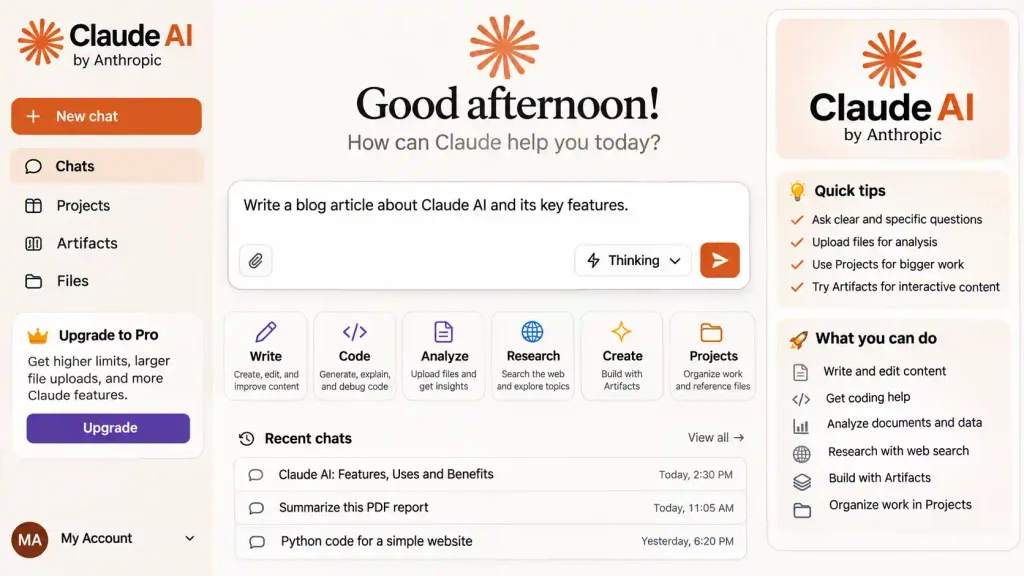
Claude AI is a conversational AI assistant that understands user instructions and generates responses using advanced language models. Users can type a question, provide instructions, upload supported documents, or describe a task. Claude processes the information and produces a response based on the conversation and available context. For example, users can ask it to explain a difficult topic, summarize a report, write an article, translate text, or suggest improvements to a business document.
Claude works by analyzing the words and information provided by the user and predicting a suitable response based on patterns learned during its training. It can understand context, follow instructions, and handle follow-up questions within a conversation. Some versions also support tools such as web search and file analysis, which can help with tasks that require additional information. However, Claude can sometimes make mistakes or provide outdated information, so important details should always be checked. You can visit the website Apknova
Key Features and Benefits of Claude AI
1. AI-Powered Conversations: Claude allows users to ask questions and receive natural-language responses. It can help explain topics, answer general questions, and support everyday problem-solving.
2. Content Writing Assistance: Users can create articles, emails, reports, summaries, product descriptions, and other written content. Claude can also rewrite text to improve clarity and readability.
3. Coding and Programming Support: Claude can generate code, explain programming concepts, identify errors, and suggest improvements. It supports developers working with different programming languages.
4. Document Analysis: Users can upload supported documents and ask Claude to summarize information, explain important sections, or identify specific details.
5. Research and Information Support: Claude can help organize research, compare information, explain complex subjects, and, where available, search the web for additional information.
6. Artifacts and Project Tools: Artifacts can display certain generated content, such as code, interactive prototypes, and documents, in a separate workspace. Projects help users organize related conversations and reference materials.
7. Easy-to-Use Experience: Claude has a simple chat-based interface that makes it accessible to beginners and experienced users. Users can start conversations without complicated setup.
Claude AI Interface and Main Components
1. Chat Window: The main conversation area displays user questions and Claude’s responses. Users can continue asking questions in the same conversation.
2. Message Input Box: This is where users type instructions, questions, and prompts. It is the primary way to communicate with Claude.
3. New Chat Option: Users can start a fresh conversation when they want to discuss a different subject or work on a separate task.
4. Sidebar and Chat History: The sidebar provides access to previous conversations and other available navigation options. It helps users return to earlier discussions.
5. File Upload Option: Users can attach supported files for analysis, summarization, and information extraction. Available file types and limits may vary.
6. Model and Tool Options: Depending on the account and platform, users may find model choices or additional tools for tasks such as research and analysis.
7. Account and Settings Menu: This area provides access to account information, subscription settings, preferences, and other available controls.
Claude AI Account Registration, Sign Up, and Login Guide
1. Visit the Official Website: Open a web browser and visit the official Claude website at claude.ai.
2. Select the Sign-Up Option: Choose the option to create a new account and follow the registration instructions displayed on the screen.
3. Enter Your Email Address: Provide a valid email address if you choose email registration. Make sure you can access the inbox.
4. Complete Verification: Follow the verification instructions provided by Claude. Depending on the available registration method, additional verification may be required.
5. Complete Account Setup: Follow the introductory steps and any questions presented during account creation.
6. Log In to Your Account: Existing users can visit the official website, select the login option, and complete the required authentication steps.
7. Start Using Claude: After logging in, open a new conversation and enter your first question or instruction in the message box.
Claude AI Chat, Conversations, and Smart Responses
1. Natural-Language Chat: Users can communicate with Claude using everyday language. There is no need to write complicated commands to ask basic questions.
2. Context-Aware Conversations: Claude can use the earlier messages in a conversation to understand follow-up questions and provide more relevant answers.
3. Detailed Explanations: Users can request step-by-step explanations of difficult subjects, technical concepts, and general topics.
4. Question and Answer Support: Claude can answer questions related to education, business, technology, writing, and many other subjects.
5. Response Customization: Users can ask Claude to make an answer shorter, longer, simpler, more formal, or more detailed.
6. Conversation Management: Users can keep related questions together in one chat and use separate conversations for different projects.
7. Problem-Solving Assistance: Claude can help organize ideas, compare possible solutions, identify challenges, and explain different approaches to a problem.
Claude AI Writing, Content Creation, and Text Editing Tools
1. Article Writing: Claude can help create blog posts, website articles, guides, and informative content based on user instructions.
2. Email Writing: Users can prepare professional emails, business messages, customer replies, and workplace communication.
3. Text Rewriting: Claude can rewrite existing content to make it clearer, more natural, more concise, or easier to understand.
4. Grammar and Spelling Assistance: Users can ask Claude to identify grammar mistakes, spelling problems, and unclear sentences.
5. Content Summarization: Long documents and articles can be summarized into shorter versions that highlight the main points.
6. Creative Writing: Claude can assist with stories, scripts, descriptions, ideas, and other creative writing projects.
7. SEO Content Support: Website owners can use Claude to develop article outlines, headings, meta descriptions, FAQs, and keyword-focused content. Users should review the results for accuracy and originality before publishing.
Claude AI Coding, Programming, and Software Development Features
1. Code Generation: Claude can generate programming code based on instructions. Developers can describe what they want to build and request a suitable code example.
2. Programming Explanations: Beginners can ask Claude to explain programming languages, functions, variables, and technical concepts in simple terms.
3. Debugging Assistance: Users can share code and error messages to get suggestions about possible problems and solutions.
4. Code Improvement: Claude can review existing code and recommend ways to improve its structure, readability, and efficiency.
5. Website Development: It can help create HTML, CSS, JavaScript, and other code used in website development.
6. Application Development: Developers can use Claude for planning application features, designing components, and writing code for software projects.
7. Technical Documentation: Claude can help prepare code explanations, project documentation, API descriptions, and development instructions.
Claude AI Document Upload, File Analysis, and Data Processing
1. File Upload: Users can upload supported documents and other files through the conversation interface, subject to account and platform limits.
2. Document Summarization: Claude can review lengthy documents and provide shorter summaries of their main information.
3. Information Extraction: Users can ask Claude to find particular details, dates, names, figures, or statements within uploaded files.
4. PDF Analysis: Where supported, Claude can help review PDF documents and explain their contents.
5. Spreadsheet Assistance: Users can provide supported spreadsheet files and request help understanding data, identifying patterns, and summarizing information.
6. Comparison of Documents: Claude can compare information from multiple uploaded files and highlight similarities or differences.
7. Business Report Analysis: Professionals can use Claude to review reports, organize findings, and prepare explanations. Important calculations and financial results should be independently verified.
Claude AI Web Search, Research, and Information Analysis
1. Web Search: Where the feature is available, Claude can search the internet to help answer questions using more recent online information.
2. Research Assistance: Users can ask Claude to explore a subject, organize findings, and explain important information.
3. Information Summarization: Claude can turn lengthy research material into shorter summaries that are easier to understand.
4. Source-Based Answers: When using web search, Claude may provide links or references to supporting sources so users can review the original information.
5. Topic Comparison: Users can ask Claude to compare products, services, technologies, ideas, or different approaches to a subject.
6. Market Research Support: Business owners can use Claude to organize market information, identify trends, and prepare research outlines.
7. Fact Checking: Claude can help identify claims that need verification, but users should check important facts directly against reliable and authoritative sources.
Claude AI Artifacts, Projects, and Interactive Content Creation
1. Artifacts Workspace: Artifacts allow certain generated content to appear in a separate viewing area instead of only inside the conversation.
2. Code and Web Components: Users can create and review supported code, web components, and interactive prototypes through Artifacts.
3. Document Creation: Claude can help prepare structured documents and display supported content in a more organized format.
4. Interactive Prototypes: Users can request simple interactive designs, demonstrations, and prototypes for ideas or projects.
5. Project Organization: Projects help users keep related conversations, instructions, and reference materials together.
6. Project Knowledge: Users can add relevant information to a Project so Claude can use that context when working on related tasks.
7. Creative Collaboration: Artifacts and Projects can support brainstorming, planning, writing, and development work in an organized environment.
Claude AI Voice Mode and Communication Features
1. Voice Conversations: Where available, voice mode allows users to communicate with Claude by speaking instead of typing.
2. Spoken Questions: Users can ask questions aloud and receive spoken responses, making conversations more convenient in supported versions.
3. Hands-Free Interaction: Voice features can make it easier to interact with Claude when typing is inconvenient.
4. Natural Communication: Users can discuss topics in a conversational way and ask follow-up questions during supported voice sessions.
5. Learning Assistance: Students can use voice conversations to discuss subjects, practise explanations, and explore new ideas.
6. Mobile Communication: Voice features can be particularly useful on supported mobile devices, depending on app version and account availability.
7. Feature Availability: Voice capabilities may vary by platform, language, region, and subscription plan. Users should check the current Claude interface for available options.
Claude AI Mobile App Download and Installation Guide
1. Open the App Store: Android users should open Google Play Store, while iPhone users should open Apple’s App Store.
2. Search for Claude: Enter “Claude by Anthropic” in the search bar to find the official mobile application.
3. Check the Developer: Before installing, verify that the app is published by Anthropic to avoid unofficial or misleading applications.
4. Download the App: Select the official application and tap Install or Get, depending on your device.
5. Open Claude: Once installation is complete, open the app from your phone’s home screen.
6. Sign Up or Log In: Create a new account or log in using your existing Claude account and follow the verification instructions.
7. Start Using the App: Enter a question, start a conversation, or explore the available mobile features.
Important: Always download Claude from its official website or the trusted app store for your device. App availability may differ by country and device.
Claude AI Free vs Paid Plans and Subscription Features
Claude offers free access as well as paid subscription options. The exact features, usage limits, and prices can change over time and may vary by country or billing method.
1. Free Plan: The free option allows users to try Claude and use its basic AI conversation features without paying a subscription fee.
2. Paid Subscription Plans: Paid plans provide additional access and higher usage limits compared with the free option, depending on the selected subscription.
3. Usage Limits: Free users may have lower message or usage limits. Paid plans generally offer more capacity, although limits can still apply.
4. Access to Models: Different plans may provide access to different Claude models or higher levels of usage for advanced models.
5. Advanced Features: Certain capabilities and tools may have different availability depending on the subscription, including features for productivity and research.
6. Individual and Business Options: Claude offers plans designed for individual users as well as organizations that need team-oriented features and administration.
7. Choosing the Right Plan: Casual users may find the free option sufficient, while professionals and frequent users may benefit from a paid subscription if its additional features meet their needs.
For the latest plan details and pricing, visit the official
Claude AI Advantages and Disadvantages
| Advantages | Disadvantages |
|---|---|
| Easy-to-use conversational interface. | Free usage may have limits. |
| Helpful for writing and editing content. | Responses can sometimes contain incorrect information. |
| Supports coding and programming tasks. | Complex code may require manual testing. |
| Can analyze supported uploaded documents. | File size and usage limits may apply. |
| Useful for research and information organization. | Web search and other tools may not be available to every user. |
| Artifacts support interactive content and prototypes. | Some advanced features may require a paid plan. |
| Offers mobile and web access. | Availability can vary by country, platform, and version. |
16. Frequently Asked Questions (FAQs) About Claude AI
Q1. What is Claude AI?
Claude AI is an artificial intelligence chatbot developed by Anthropic. It helps users with writing, research, coding, document analysis, problem-solving, and everyday questions.
Q2. Is Claude AI free to use?
Yes. Claude offers a free option with certain usage limits. Paid subscriptions provide additional access and features.
Q3. How can I create a Claude AI account?
Visit claude.ai, select the sign-up option, provide the required information, and follow the verification instructions to create your account.
Q4. Can Claude AI write articles and blog posts?
Yes. Claude can help create articles, blog posts, website content, product descriptions, emails, and other written materials.
Q5. Can Claude AI help with programming?
Yes. It can generate code, explain programming concepts, identify possible errors, and suggest improvements for software projects.
Q6. Can I upload PDF files to Claude AI?
Yes. Claude supports document uploads, including PDFs in supported versions. Users can ask questions about uploaded documents and request summaries or explanations.
Q7. Does Claude AI support voice conversations?
Yes. Voice features are available in supported versions and allow users to interact with Claude through spoken conversations.
Q8. Is Claude AI available on mobile phones?
Yes. Official Claude applications are available for supported Android and iOS devices, subject to regional availability.
Q9. What are Claude AI Artifacts?
Artifacts are a feature that displays certain generated content, such as code, documents, and interactive prototypes, in a separate workspace.
Q10. Is Claude AI useful for students and professionals?
Yes. Students can use it for learning and explanations, while professionals can use it for writing, research, coding, and document analysis. Its answers should still be reviewed for accuracy.
Conclusion – Is Claude AI a Useful AI Assistant?
Claude AI is a useful artificial intelligence assistant for people who want support with writing, research, coding, document analysis, and everyday tasks. Its conversational interface makes it easy to ask questions and receive explanations, while features such as Projects and Artifacts help users organize their work and create different types of content. It can be helpful for students, developers, business owners, and professionals who want to improve their productivity.
Overall, Claude AI is worth exploring if you need a flexible AI assistant for personal, educational, or professional use. The free option is a convenient way to get started, while paid plans may be suitable for people who need additional usage or features. However, Claude is not perfect, and its responses should be checked before using important information in business, academic, or technical work.







