
BOTIM Download Latest Version – Features & Review
Just Now
9.5 MB
V5.2
Andriod +
Description
Introduction to BOTIM – Video Calling and Instant Messaging Application
BOTIM is a popular communication application that allows users to stay connected with friends, family members, and colleagues through instant messaging, voice calls, and video calls. It provides a convenient way to communicate over the internet using smartphones and other supported devices. Users can send text messages, share photographs, exchange videos, and make audio and video calls without relying on traditional SMS services. BOTIM is particularly known among users in the UAE and other countries for its communication services.
BOTIM offers several features that make everyday communication easier and more convenient. In addition to messaging and calling, the application provides group conversations, file sharing, contact management, and additional digital services in supported regions. Its simple interface helps users navigate different communication tools without difficulty. Whether someone wants to contact family abroad, communicate with friends, or participate in group conversations, BOTIM provides a useful platform for online communication.
What Is BOTIM and How Does It Work?
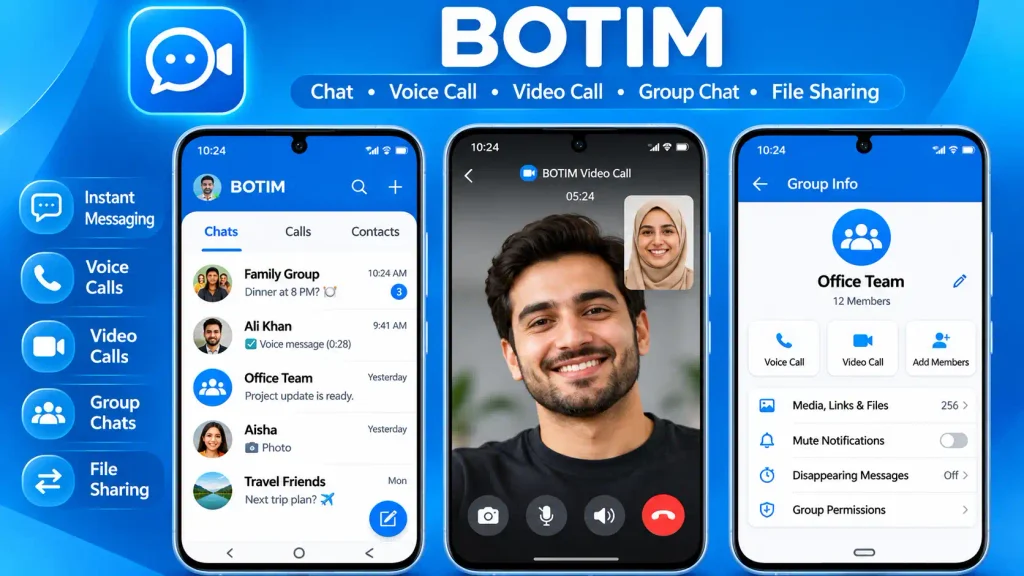
BOTIM is an instant messaging and internet calling application developed by Astra Tech. It allows users to communicate through an internet connection by sending messages, making voice calls, and participating in video conversations. Users can create an account using their mobile phone number, verify their identity, and connect with other BOTIM users. The application is available for Android, iOS, and supported desktop platforms.
BOTIM works by connecting users through its online communication services. After registering, users can access their contacts, start individual conversations, create group chats, and make calls where the service is supported. The application also provides media-sharing options and additional services depending on the user’s country and account eligibility. An active internet connection is required for most communication features, and calling availability may depend on local regulations and network conditions. You can visit the website Apknova
3. Key Features of BOTIM
BOTIM offers different communication and digital services that help users stay connected and manage their everyday activities. Some of its main features include:
- Instant Messaging: Send and receive text messages with other BOTIM users.
- Voice Calling: Make internet-based voice calls where supported.
- Video Calling: Communicate face-to-face through video conversations.
- Group Chats: Create group conversations with friends, family, and colleagues.
- Contact Management: Find and communicate with available contacts.
- Photo Sharing: Send photographs and memorable moments.
- Video Sharing: Exchange video clips through supported chats.
- Voice Messages: Record and share audio messages.
- File Sharing: Exchange supported documents and other files.
- Payment Services: Access supported financial and payment services in eligible regions.
- User-Friendly Interface: Navigate messaging and calling features easily.
- Account Security: Manage privacy and account protection settings.
BOTIM Chats, Messages, and Contact Management
BOTIM provides messaging features that allow users to communicate with friends, family members, and colleagues. Users can send text messages, share important information, exchange photographs, and send other supported media files through individual conversations. The messaging interface is designed to make everyday communication simple and convenient.
The application also provides contact management options that help users find people who are using BOTIM. Depending on the device permissions and settings, the application can synchronize contacts to identify available connections. Users can start new conversations, manage existing chats, and organize their communication according to their needs.
BOTIM Voice and Video Calls – Communication Features
Voice and video calling are among the main features of BOTIM. Users can make internet-based voice calls to communicate with friends and family members without using traditional mobile calling services. This feature is particularly useful for people who want to stay connected with relatives living in different countries.
BOTIM also supports video calling, allowing users to communicate face-to-face through their smartphones. The video calling feature makes conversations more personal and helps people share important moments from different locations. Call quality generally depends on internet speed, device performance, and regional service availability.
BOTIM Group Chats and Conference Calling
BOTIM allows users to create group chats where multiple participants can communicate in one conversation. This feature is useful for families, friends, colleagues, and other communities that want to share updates and information. Group members can exchange text messages, photographs, videos, and other supported content.
The application also provides group calling options in supported versions and regions. These features allow multiple participants to communicate through voice or video conversations. Group communication can be helpful for family discussions, online meetings, and coordinating activities without sending individual messages to every participant.
BOTIM File Sharing, Photos, Videos, and Voice Messages
BOTIM makes it easier for users to share different types of media through their conversations. Users can send photographs, videos, and supported documents directly to their contacts. These features are useful for sharing personal memories, educational materials, work documents, and other important information.
The application also supports voice messages, allowing users to record audio and send it through chats. This is convenient when typing a long message is difficult or when users prefer speaking instead of writing. File-sharing availability and size limits may depend on the application version, device, and service restrictions.
How to Create a BOTIM Account – Registration Guide
Creating a BOTIM account is a straightforward process that allows new users to access its messaging and communication features. Users generally need an active mobile phone number to register and complete the verification process.
Follow these steps to create a new BOTIM account:
- Download and install BOTIM from the Google Play Store or official website.
- Open the BOTIM application on your smartphone.
- Select your country or region.
- Enter your active mobile phone number.
- Tap the Continue or Next button.
- Enter the verification code sent to your phone, if requested.
- Add your name and profile picture if required.
- Allow contact permissions if you want to find people from your contact list.
- Review your account and privacy settings.
After completing these steps, your BOTIM account will be ready to use.
BOTIM Login Guide – How to Access Your Account
BOTIM provides a simple login process that allows registered users to access their accounts from supported devices. Users generally need their registered mobile phone number and a verification code to sign in.
Follow these steps to log in:
- Open the BOTIM application on your smartphone.
- Select your country or region.
- Enter your registered mobile phone number.
- Tap Continue to proceed.
- Enter the verification code received through the available verification method.
- Complete any additional security verification if requested.
- Once verified, access your BOTIM account and start communicating.
If you experience login difficulties, check your internet connection, confirm that your phone number is correct, and follow the available account recovery instructions.
How to Download and Install BOTIM APK on Android
Android users can download BOTIM through the Google Play Store or its official website. The official application provides access to messaging, voice calls, video calls, and other supported services. Downloading from trusted sources helps protect your device from modified or potentially harmful applications.
Follow these steps to download and install BOTIM on Android:
- Open the Google Play Store on your Android smartphone.
- Search for in the search bar.
- Select the official application.
- Tap the Install button.
- Wait for the download and installation process to finish.
- Open from your application menu.
- Enter your mobile phone number to register or log in.
- Complete the verification process.
- Start using available communication features.
Always download the application from official or trusted sources to ensure a safer installation experience.
BOTIM Privacy, Security, and Account Settings
BOTIM provides account and privacy settings that allow users to manage their personal information and communication preferences. Users can review available privacy options, manage application permissions, control notifications, and adjust account-related settings. These options help users maintain better control over their communication experience.
For improved security, users should protect their accounts with appropriate device security settings and avoid sharing verification codes with unknown people. It is also important to download from official sources and avoid suspicious links or messages. Users should review the application’s current privacy policy to understand how their personal information is collected and processed.
BOTIM Payments, Money Transfers, and Additional Services
BOTIM offers additional digital services beyond messaging and video calling. Depending on the user’s country, account eligibility, and available services, the application may provide payment options, money transfers, and other financial features. These services can make it convenient for eligible users to access certain digital transactions through the application.
Availability of payment and money transfer services varies by region and may require additional account verification. Users should check the official BOTIM application for current service availability, transaction fees, supported countries, and applicable requirements. Before making any financial transaction, it is important to review the payment details and ensure that the recipient information is correct.
BOTIM Advantages and Disadvantages (Pros and Cons)
BOTIM offers several benefits for everyday communication, especially for people who frequently make internet-based calls and exchange messages. However, it also has some limitations that users should understand.
| Advantages (Pros) | Disadvantages (Cons) |
|---|---|
| Provides convenient instant messaging. | Requires an internet connection. |
| Supports voice and video calling. | Calling availability varies by region. |
| Allows users to create group chats. | Call quality depends on network conditions. |
| Supports photo and video sharing. | Some media transfers may have size limitations. |
| Offers contact management features. | Requires phone number registration. |
| Provides additional digital services in supported regions. | Payment services are not available everywhere. |
| Has a simple and user-friendly interface. | Some features may require additional verification. |
| Helps users communicate internationally. | Performance may vary depending on device and internet speed. |
Personal Review of BOTIM
In my personal review, BOTIM is a useful communication application because it combines instant messaging, voice calling, video calling, and media sharing in one platform. I particularly like its simple interface and group communication features, which make it convenient for staying connected with friends, family members, and colleagues. Its additional digital services can also be useful for eligible users in supported regions. However, calling availability, network quality, and regional restrictions should be considered before using the application. Overall, BOTIM is a practical option for everyday online communication.
Conclusion – Is BOTIM Worth Using?
BOTIM is a convenient messaging and communication application that offers several useful features for connecting with people around the world. Its instant messaging, voice calls, video calls, group chats, and media-sharing options make it suitable for personal and professional communication. The application also provides additional digital services in supported regions, making it more than a basic messaging platform. Although internet connectivity and regional availability can affect the user experience, BOTIM remains a useful choice for people looking for an alternative communication application.
Frequently Asked Questions (FAQs)
Q1. What is BOTIM?
BOTIM is an instant messaging and communication application that allows users to send messages, make voice and video calls, and share media files through the internet.
Q2. Is free to use?
offers messaging and communication features, but some services, subscriptions, or additional features may involve charges depending on the region and service provider.
Q3. Who developed ?
is developed and operated by Astra Tech.
Q4. Is available for Android?
Yes, is available for Android devices through the Google Play Store and its official website.
Q5. How can I create a account?
Download the application, enter your mobile phone number, complete the verification process, and follow the registration instructions.
Q6. Can I use for video calls?
Yes, supports video calling in regions where the service is available.
Q7. Does support group chats?
Yes, users can create group chats to communicate with multiple friends, family members, or colleagues.
Q8. Can I send photos and videos through ?
Yes, supports sharing photographs, videos, voice messages, and other supported files.
Q9. Is available on computers?
BOTIM offers supported desktop access. Availability and features may vary depending on the operating system and application version.
Q10. Can I use for international calls?
supports internet-based communication with users in different countries, subject to regional calling availability and applicable restrictions.
Q11. Does provide money transfer services?
Yes, offers financial services in selected regions, subject to eligibility, verification, and service availability.
Q12. Is safe to use?
Provides account and privacy settings, but users should protect their verification codes, review privacy options, and avoid suspicious links and messages.
Q13. Can I use without a phone number?
BOTIM registration generally requires a mobile phone number for account verification.
Q14. Why is working properly?
Possible reasons include a weak internet connection, an outdated application, device compatibility issues, or regional service restrictions.
Q15. How can I update ?
Open the Google Play Store, search for , and select Update if a newer version is available.
Q16. Is available in Pakistan?
Can be downloaded in supported regions, but individual features, especially calling and financial services, may depend on local availability and applicable regulations.







