
Bluesky 2026 – 10 Best Social Networking & Microblogging Features
Just Now
7.78MB
V4.6
Andriod +
10M+
Description
Bluesky is a social networking and microblogging application that allows users to share messages, photos, videos, links, and personal updates with people around the world. It provides a platform where users can connect with friends, follow content creators, participate in discussions, and discover communities based on their interests. Its familiar social media interface makes it easy to publish posts, reply to other users, like content, and share interesting updates.
One of the main attractions of Bluesky is its customisable social networking experience. The platform is built on the AT Protocol, an open networking technology designed to support greater flexibility and account portability. Users can explore different content feeds, discover new accounts through Starter Packs, manage their profiles, and use moderation tools to control unwanted interactions. Bluesky is available on Android, iOS, and desktop browsers, allowing users to access their accounts across supported devices.
What Is Bluesky and How Does It Work?
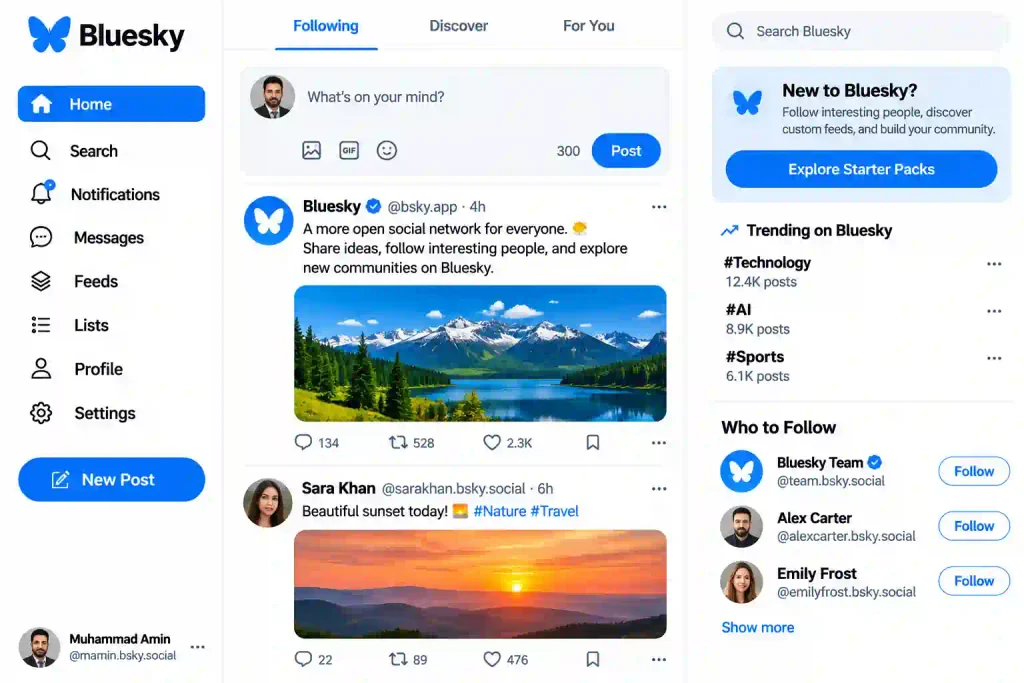
Bluesky is a social networking service where users communicate by publishing short posts and interacting with content shared by others. After creating an account, users can add profile information, follow other accounts, and explore different feeds. They can share text, images, videos, and website links, as well as reply to posts, like updates, and repost content. These features help users participate in discussions and build connections with people who share similar interests.
Bluesky works through the AT Protocol, which provides the technical foundation for its social networking system. After signing in, users can access their home feed, search for accounts, explore custom feeds, and discover new communities. They can also create Starter Packs, manage their interactions, send direct messages, and adjust moderation preferences. This combination of familiar social media features and an open networking protocol provides a flexible way to communicate online. You can visit the websit Apknova
Key Features and Benefits of Bluesky
- Social Networking: Connect with friends, creators, professionals, and communities from different parts of the world.
- Text and Media Posts: Share messages, personal updates, photographs, videos, and website links.
- Custom Feeds: Explore different feeds based on selected topics, interests, and communities.
- Starter Packs: Discover collections of recommended accounts and feeds to find interesting people.
- AT Protocol Technology: Use a platform built on an open protocol designed to support flexibility and account portability.
- Privacy and Moderation Tools: Block accounts, mute unwanted users, and manage content moderation preferences.
- Direct Messaging: Communicate privately with other users through the platform’s messaging feature.
Bluesky Interface and Main Dashboard
- Home Feed: View posts from accounts you follow and other selected content sources.
- Following Feed: Browse updates shared by people and accounts you follow.
- Discover Section: Find interesting posts, accounts, and topics from across the platform.
- Search Bar: Search for specific users, posts, and available content.
- Notifications Tab: Check likes, replies, reposts, mentions, and other account activities.
- Profile Section: View your personal information, published posts, followers, and following list.
- Navigation Menu: Move between different sections and access account settings and other available tools.
Bluesky Account Registration, Sign Up, and Login Guide
- Visit Bluesky: Open the official Bluesky website or download its application from the appropriate app store.
- Select Sign Up: Choose the sign-up option to begin creating a new account.
- Choose a Hosting Provider: Follow the registration instructions and select an available service provider if requested.
- Enter Your Details: Provide the required information, such as your email address, date of birth, and password.
- Verify Your Information: Complete any verification steps requested during registration.
- Choose Your Handle: Create a unique Bluesky username or handle for your profile.
- Complete Your Profile: Add a profile picture and biography, then sign in and start exploring the platform.
Bluesky Posts, Replies, Likes, and Reposts Features
- Create Posts: Write and publish updates to share your thoughts, information, or experiences.
- Add Images: Attach supported photographs and images to make your posts more informative.
- Share Videos: Upload supported video content to communicate through visual media.
- Reply to Posts: Join conversations by responding to updates shared by other users.
- Like Content: Show appreciation for posts by using the like feature.
- Repost Updates: Share another user’s public post with your followers through the repost feature.
- Share Website Links: Include website links in your posts to direct followers to articles, resources, and other online content.
Bluesky Feeds, Discover, and Content Exploration Guide
- Following Feed: View updates from accounts you have chosen to follow.
- Discover Feed: Explore recommended posts and interesting content from different users.
- Custom Feeds: Browse feeds that focus on particular topics, interests, and communities.
- Popular Discussions: Find conversations and posts attracting attention across selected feeds.
- Topic Exploration: Discover content related to technology, entertainment, sports, education, and other subjects.
- Search and Discovery: Use search tools to find specific accounts, posts, and discussions.
- Feed Management: Pin, organise, or remove feeds according to available options and personal preferences.
Bluesky Followers, Following, and Community Building Features
- Follow Accounts: Follow people, creators, and organisations to receive their updates.
- Manage Followers: View the accounts that follow your profile.
- Following List: Check the users and communities you have chosen to follow.
- Build Connections: Interact with other users through replies, likes, and reposts.
- Join Discussions: Participate in conversations about subjects that match your interests.
- Discover Communities: Find groups of users who share similar hobbies, professional interests, or ideas.
- Grow Your Audience: Publish useful and engaging posts to help more people discover and follow your account.
Bluesky Starter Packs and Custom Feeds Guide
- Explore Starter Packs: Discover collections created to introduce users to interesting accounts and feeds.
- Find Relevant Accounts: Browse suggested users based on different topics, communities, and interests.
- Follow Suggested Users: Select accounts from a Starter Pack to build your following list.
- Discover Custom Feeds: Explore feeds created around specific subjects and content preferences.
- Add Interesting Feeds: Save or pin useful feeds for easier access, depending on available options.
- Create Your Own Feed: Use supported tools and services to create feeds around selected topics or interests.
- Manage Feed Preferences: Organise your feeds and adjust your selections as your interests change.
Bluesky Profile Customization, Bio, and Account Settings
- Profile Picture: Upload an image to help other users recognise your account.
- Display Name: Choose a name that represents your personal or professional identity.
- Profile Biography: Write a short introduction describing your interests, activities, or work.
- Cover Image: Add a profile banner to personalise the appearance of your account.
- Username and Handle: Manage your unique Bluesky handle through the available account settings.
- Profile Links: Add supported website or social links to help people find more information about you.
- Account Preferences: Manage available profile, language, accessibility, and other settings.
Bluesky Privacy, Security, Blocking, and Moderation Tools
- Block Accounts: Block users whose interactions or content you do not want to see.
- Mute Accounts: Mute selected accounts to reduce unwanted content in your social networking experience.
- Content Filters: Use available moderation settings to manage sensitive or unwanted content.
- Moderation Lists: Use moderation lists to organise blocking or muting preferences.
- Report Content: Report posts or accounts that appear to violate platform rules.
- Account Security: Use a strong, unique password and protect your registered email account.
- Privacy Settings: Review available privacy and interaction controls to manage your account experience.
Bluesky Notifications, Direct Messages, and User Interaction Features
- Activity Notifications: Receive updates about selected activities involving your account.
- Like Notifications: See when other users like your posts.
- Reply Notifications: Check responses and conversations related to your posts.
- Mention Notifications: Find posts where other users mention your account.
- Repost Notifications: Stay informed when other users repost your content.
- Direct Messages: Send private messages to other users through the messaging feature.
- Notification Settings: Manage available notification preferences to control which updates you receive.
Bluesky Download and Installation Guide for Android, iOS, and Desktop
For Android Devices
- Open the Google Play Store on your Android smartphone or tablet.
- Search for Bluesky.
- Select the official Bluesky application.
- Tap the Install button.
- Wait for the application to download and install.
- Open Bluesky and sign in or create a new account.
- Complete your profile and start exploring posts and feeds.
For iPhone and iPad
- Open the Apple App Store on your device.
- Search for Bluesky.
- Select the official Bluesky application.
- Tap Get to download the app.
- Complete any authentication requested by your device.
- Open the application and sign in to your account.
- Explore your feed, follow accounts, and start sharing posts.
For Desktop and Computers
- Open a web browser on your Windows PC, Mac, or supported computer.
- Visit the official website: https://bsky.app/.
- Select the sign-in option.
- Enter your registered Bluesky account details.
- Complete any requested verification.
- Open your home feed and explore the available features.
- Bookmark the website in your browser for convenient future access.
Advantages and Disadvantages of Bluesky
| Advantages | Disadvantages |
|---|---|
| Simple and user-friendly interface. | Some users may find its features unfamiliar at first. |
| Supports text, images, and video posts. | Media upload limits and supported formats may apply. |
| Provides custom feeds for different interests. | Finding the right feeds can take time. |
| Uses open AT Protocol technology. | Some protocol features may require technical knowledge. |
| Offers blocking, muting, and moderation tools. | Moderation may not prevent every unwanted interaction. |
| Helps users discover communities and new accounts. | The experience depends on the activity of the communities you follow. |
| Available through mobile apps and a web browser. | Some features may differ between platforms and app versions. |
Frequently Asked Questions (FAQs) About Bluesky
1. What is Bluesky?
Bluesky is a social networking and microblogging platform where users can share posts, photos, videos, and links while connecting with other people.
2. Is Bluesky free to use?
Yes, creating an account and using the main Bluesky social networking features is generally free.
3. How do I create a Bluesky account?
Visit the official Bluesky website or download its application, select Sign Up, enter the required details, and follow the registration instructions.
4. Is Bluesky available on Android and iPhone?
Yes, Bluesky offers official applications for supported Android and iOS devices.
5. Can I use on my computer?
Yes, you can access Bluesky through a web browser by visiting its official website.
6. What is the AT Protocol?
The AT Protocol is an open networking protocol designed to support decentralised social networking, account portability, and flexible content discovery.
7. Can I share photos and videos ?
Yes, Bluesky supports image and video sharing, subject to its current upload requirements and limits.
8. What are Starter Packs?
Starter Packs are collections of suggested accounts and feeds that help users discover people and communities with similar interests.
9. Can I customise my feed?
Yes, you can explore and add custom feeds based on your interests and available feed options.
10. Does Bluesky have direct messaging?
Yes, Bluesky provides a direct messaging feature that allows users to communicate privately, subject to its messaging settings.
11. Can I block or mute someone on Bluesky?
Yes, Bluesky provides blocking and muting tools that help users manage unwanted accounts and interactions.
12. Is Bluesky similar to X (Twitter)?
Bluesky offers similar social networking features, including short posts, replies, likes, reposts, and following accounts. However, it uses the AT Protocol and provides customisable feeds as part of its approach to social networking.
Conclusion
Bluesky is a social networking platform that offers a simple way to share ideas, publish updates, follow interesting accounts, and participate in online communities. Its custom feeds, Starter Packs, direct messaging, and moderation tools provide different ways to personalise the social media experience. Built on the AT Protocol, Bluesky also introduces a flexible approach to social networking. Whether users want to connect with friends, discover new content, or join public discussions, Bluesky provides a useful platform for online communication.
What's new
Introduction to Bluesky – Social Networking and Microblogging Application
Bluesky is a social networking and microblogging application that allows users to share messages, photos, videos, links, and personal updates with people around the world. It provides a platform where users can connect with friends, follow content creators, participate in discussions, and discover communities based on their interests. Its familiar social media interface makes it easy to publish posts, reply to other users, like content, and share interesting updates.
One of the main attractions of Bluesky is its customisable social networking experience. The platform is built on the AT Protocol, an open networking technology designed to support greater flexibility and account portability. Users can explore different content feeds, discover new accounts through Starter Packs, manage their profiles, and use moderation tools to control unwanted interactions. Bluesky is available on Android, iOS, and desktop browsers, allowing users to access their accounts across supported devices.
2. What Is Bluesky and How Does It Work?
Bluesky is a social networking service where users communicate by publishing short posts and interacting with content shared by others. After creating an account, users can add profile information, follow other accounts, and explore different feeds. They can share text, images, videos, and website links, as well as reply to posts, like updates, and repost content. These features help users participate in discussions and build connections with people who share similar interests.
Bluesky works through the AT Protocol, which provides the technical foundation for its social networking system. After signing in, users can access their home feed, search for accounts, explore custom feeds, and discover new communities. They can also create Starter Packs, manage their interactions, send direct messages, and adjust moderation preferences. This combination of familiar social media features and an open networking protocol provides a flexible way to communicate online.
3. Key Features and Benefits of Bluesky
1. Social Networking: Connect with friends, creators, professionals, and communities from different parts of the world.
2. Text and Media Posts: Share messages, personal updates, photographs, videos, and website links.
3. Custom Feeds: Explore different feeds based on selected topics, interests, and communities.
4. Starter Packs: Discover collections of recommended accounts and feeds to find interesting people.
5. AT Protocol Technology: Use a platform built on an open protocol designed to support flexibility and account portability.
6. Privacy and Moderation Tools: Block accounts, mute unwanted users, and manage content moderation preferences.
7. Direct Messaging: Communicate privately with other users through the platform's messaging feature.
4. Bluesky Interface and Main Dashboard
1. Home Feed: View posts from accounts you follow and other selected content sources.
2. Following Feed: Browse updates shared by people and accounts you follow.
3. Discover Section: Find interesting posts, accounts, and topics from across the platform.
4. Search Bar: Search for specific users, posts, and available content.
5. Notifications Tab: Check likes, replies, reposts, mentions, and other account activities.
6. Profile Section: View your personal information, published posts, followers, and following list.
7. Navigation Menu: Move between different sections and access account settings and other available tools.
5. Bluesky Account Registration, Sign Up, and Login Guide
1. Visit Bluesky: Open the official Bluesky website or download its application from the appropriate app store.
2. Select Sign Up: Choose the sign-up option to begin creating a new account.
3. Choose a Hosting Provider: Follow the registration instructions and select an available service provider if requested.
4. Enter Your Details: Provide the required information, such as your email address, date of birth, and password.
5. Verify Your Information: Complete any verification steps requested during registration.
6. Choose Your Handle: Create a unique Bluesky username or handle for your profile.
7. Complete Your Profile: Add a profile picture and biography, then sign in and start exploring the platform.
6. Bluesky Posts, Replies, Likes, and Reposts Features
1. Create Posts: Write and publish updates to share your thoughts, information, or experiences.
2. Add Images: Attach supported photographs and images to make your posts more informative.
3. Share Videos: Upload supported video content to communicate through visual media.
4. Reply to Posts: Join conversations by responding to updates shared by other users.
5. Like Content: Show appreciation for posts by using the like feature.
6. Repost Updates: Share another user's public post with your followers through the repost feature.
7. Share Website Links: Include website links in your posts to direct followers to articles, resources, and other online content.
7. Bluesky Feeds, Discover, and Content Exploration Guide
1. Following Feed: View updates from accounts you have chosen to follow.
2. Discover Feed: Explore recommended posts and interesting content from different users.
3. Custom Feeds: Browse feeds that focus on particular topics, interests, and communities.
4. Popular Discussions: Find conversations and posts attracting attention across selected feeds.
5. Topic Exploration: Discover content related to technology, entertainment, sports, education, and other subjects.
6. Search and Discovery: Use search tools to find specific accounts, posts, and discussions.
7. Feed Management: Pin, organise, or remove feeds according to available options and personal preferences.
8. Bluesky Followers, Following, and Community Building Features
1. Follow Accounts: Follow people, creators, and organisations to receive their updates.
2. Manage Followers: View the accounts that follow your profile.
3. Following List: Check the users and communities you have chosen to follow.
4. Build Connections: Interact with other users through replies, likes, and reposts.
5. Join Discussions: Participate in conversations about subjects that match your interests.
6. Discover Communities: Find groups of users who share similar hobbies, professional interests, or ideas.
7. Grow Your Audience: Publish useful and engaging posts to help more people discover and follow your account.
9. Bluesky Starter Packs and Custom Feeds Guide
1. Explore Starter Packs: Discover collections created to introduce users to interesting accounts and feeds.
2. Find Relevant Accounts: Browse suggested users based on different topics, communities, and interests.
3. Follow Suggested Users: Select accounts from a Starter Pack to build your following list.
4. Discover Custom Feeds: Explore feeds created around specific subjects and content preferences.
5. Add Interesting Feeds: Save or pin useful feeds for easier access, depending on available options.
6. Create Your Own Feed: Use supported tools and services to create feeds around selected topics or interests.
7. Manage Feed Preferences: Organise your feeds and adjust your selections as your interests change.
10. Bluesky Profile Customization, Bio, and Account Settings
1. Profile Picture: Upload an image to help other users recognise your account.
2. Display Name: Choose a name that represents your personal or professional identity.
3. Profile Biography: Write a short introduction describing your interests, activities, or work.
4. Cover Image: Add a profile banner to personalise the appearance of your account.
5. Username and Handle: Manage your unique Bluesky handle through the available account settings.
6. Profile Links: Add supported website or social links to help people find more information about you.
7. Account Preferences: Manage available profile, language, accessibility, and other settings.
11. Bluesky Privacy, Security, Blocking, and Moderation Tools
1. Block Accounts: Block users whose interactions or content you do not want to see.
2. Mute Accounts: Mute selected accounts to reduce unwanted content in your social networking experience.
3. Content Filters: Use available moderation settings to manage sensitive or unwanted content.
4. Moderation Lists: Use moderation lists to organise blocking or muting preferences.
5. Report Content: Report posts or accounts that appear to violate platform rules.
6. Account Security: Use a strong, unique password and protect your registered email account.
7. Privacy Settings: Review available privacy and interaction controls to manage your account experience.
12. Bluesky Notifications, Direct Messages, and User Interaction Features
1. Activity Notifications: Receive updates about selected activities involving your account.
2. Like Notifications: See when other users like your posts.
3. Reply Notifications: Check responses and conversations related to your posts.
4. Mention Notifications: Find posts where other users mention your account.
5. Repost Notifications: Stay informed when other users repost your content.
6. Direct Messages: Send private messages to other users through the messaging feature.
7. Notification Settings: Manage available notification preferences to control which updates you receive.
13. Bluesky Download and Installation Guide for Android, iOS, and Desktop
For Android Devices
-
Open the Google Play Store on your Android smartphone or tablet.
-
Search for Bluesky.
-
Select the official Bluesky application.
-
Tap the Install button.
-
Wait for the application to download and install.
-
Open Bluesky and sign in or create a new account.
-
Complete your profile and start exploring posts and feeds.
For iPhone and iPad
-
Open the Apple App Store on your device.
-
Search for Bluesky.
-
Select the official Bluesky application.
-
Tap Get to download the app.
-
Complete any authentication requested by your device.
-
Open the application and sign in to your account.
-
Explore your feed, follow accounts, and start sharing posts.
For Desktop and Computers
-
Open a web browser on your Windows PC, Mac, or supported computer.
-
Visit the official website: https://bsky.app/.
-
Select the sign-in option.
-
Enter your registered Bluesky account details.
-
Complete any requested verification.
-
Open your home feed and explore the available features.
-
Bookmark the website in your browser for convenient future access.
14. Advantages and Disadvantages of Bluesky
| Advantages | Disadvantages |
|---|---|
| Simple and user-friendly interface. | Some users may find its features unfamiliar at first. |
| Supports text, images, and video posts. | Media upload limits and supported formats may apply. |
| Provides custom feeds for different interests. | Finding the right feeds can take time. |
| Uses open AT Protocol technology. | Some protocol features may require technical knowledge. |
| Offers blocking, muting, and moderation tools. | Moderation may not prevent every unwanted interaction. |
| Helps users discover communities and new accounts. | The experience depends on the activity of the communities you follow. |
| Available through mobile apps and a web browser. | Some features may differ between platforms and app versions. |
15. Frequently Asked Questions (FAQs) About Bluesky
1. What is Bluesky?
Bluesky is a social networking and microblogging platform where users can share posts, photos, videos, and links while connecting with other people.
2. Is Bluesky free to use?
Yes, creating an account and using the main Bluesky social networking features is generally free.
3. How do I create a Bluesky account?
Visit the official Bluesky website or download its application, select Sign Up, enter the required details, and follow the registration instructions.
4. Is Bluesky available on Android and iPhone?
Yes, Bluesky offers official applications for supported Android and iOS devices.
5. Can I use Bluesky on my computer?
Yes, you can access Bluesky through a web browser by visiting its official website.
6. What is the AT Protocol?
The AT Protocol is an open networking protocol designed to support decentralised social networking, account portability, and flexible content discovery.
7. Can I share photos and videos on Bluesky?
Yes, Bluesky supports image and video sharing, subject to its current upload requirements and limits.
8. What are Bluesky Starter Packs?
Starter Packs are collections of suggested accounts and feeds that help users discover people and communities with similar interests.
9. Can I customise my Bluesky feed?
Yes, you can explore and add custom feeds based on your interests and available feed options.
10. Does Bluesky have direct messaging?
Yes, Bluesky provides a direct messaging feature that allows users to communicate privately, subject to its messaging settings.
11. Can I block or mute someone on Bluesky?
Yes, Bluesky provides blocking and muting tools that help users manage unwanted accounts and interactions.
12. Is Bluesky similar to X (Twitter)?
Bluesky offers similar social networking features, including short posts, replies, likes, reposts, and following accounts. However, it uses the AT Protocol and provides customisable feeds as part of its approach to social networking.
Conclusion
Bluesky is a social networking platform that offers a simple way to share ideas, publish updates, follow interesting accounts, and participate in online communities. Its custom feeds, Starter Packs, direct messaging, and moderation tools provide different ways to personalise the social media experience. Built on the AT Protocol, Bluesky also introduces a flexible approach to social networking. Whether users want to connect with friends, discover new content, or join public discussions, Bluesky provides a useful platform for online communication.







