
Amazon Prime Video Download 2026 – 10 Best Movies, TV Shows & Streaming Features
Just Now
V5.3
Andriod +
500M+
Description
Amazon Prime Video is a popular online streaming platform that allows users to watch movies, television shows, documentaries, and exclusive entertainment content through an internet connection. It offers a wide collection of entertainment for people with different interests, including action, comedy, romance, drama, thriller, science fiction, and family content. Users can enjoy their favourite programmes on smartphones, tablets, computers, smart TVs, and other supported devices.
The platform provides access to Amazon Originals, licensed movies, popular TV series, and additional entertainment options. Depending on the country and subscription plan, users may also rent or purchase selected movies and TV shows. Amazon Prime Video makes entertainment more convenient by offering features such as personalised recommendations, watchlists, subtitles, multiple audio languages, and offline downloads on supported devices.
What Is Amazon Prime Video and How Does It Work?
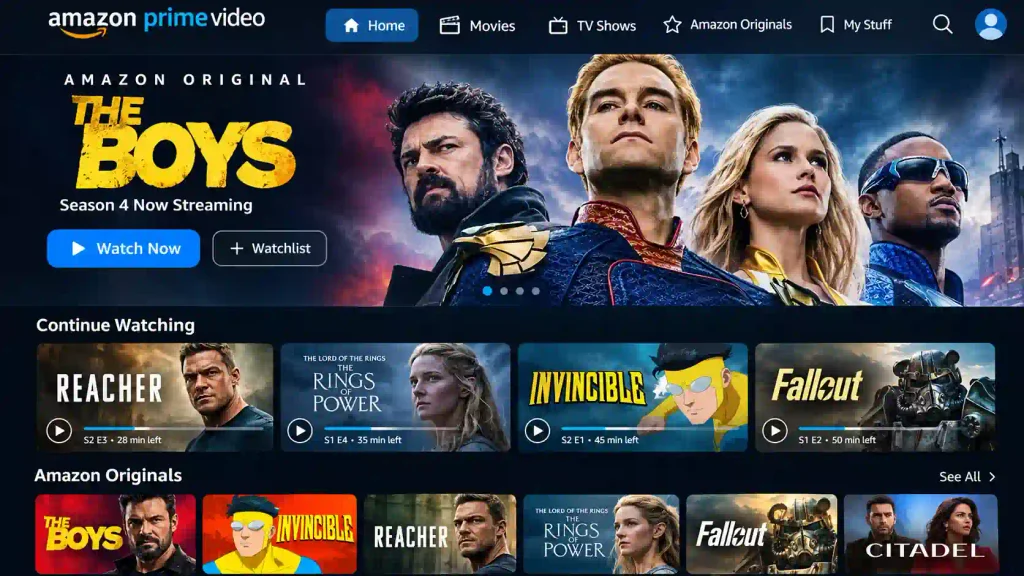
Amazon Prime Video is a video-on-demand streaming service operated by Amazon. It allows users to browse a digital entertainment library and watch available movies and TV shows whenever they want. Instead of downloading every movie separately, users can stream content directly through the Prime Video application or website. The platform offers subscription-based content, while some titles may require an additional rental or purchase payment.
To use Amazon Prime Video, users need an Amazon account and access to the service in their country. After signing in, they can explore different categories, search for specific titles, select a movie or episode, and start watching. The platform recommends content based on viewing activity and allows users to create watchlists for later viewing. An internet connection is generally required for streaming, although selected titles can be downloaded for offline viewing on supported devices. You can visit the website Apknova
Key Features and Benefits of Amazon Prime Video
- Large Entertainment Library: Explore a wide selection of movies, TV shows, documentaries, and other entertainment content.
- Amazon Originals: Watch exclusive productions released under the Amazon Originals brand.
- Personalised Recommendations: Discover movies and shows based on your viewing activity and interests.
- Offline Downloads: Download selected titles on supported mobile devices and watch them without an active internet connection.
- Multiple Audio Languages: Enjoy supported content with different audio language options.
- Subtitles and Captions: Use available subtitles and captions to make content easier to follow.
- Watchlist Feature: Save movies and TV shows in one place so you can find and watch them later.
Amazon Prime Video Interface and Main Dashboard
- Home Screen: The main dashboard displays recommended movies, TV shows, and recently added entertainment.
- Navigation Menu: Users can move between different sections of the application using the navigation options.
- Search Bar: Find specific movies, actors, TV shows, or other available content.
- Content Categories: Browse entertainment through categories such as movies, series, comedy, action, and drama.
- Featured Banners: Discover selected movies, popular shows, and promotional content displayed on the home screen.
- My Stuff Section: Access saved titles, watchlists, and other personal viewing items.
- Account and Settings: Manage profiles, language preferences, playback options, and account-related settings.
Amazon Prime Video Account Registration, Sign Up, and Login Guide
- Visit the Official Platform: Open the Amazon Prime Video website or install its official application.
- Select Sign In: Choose the sign-in option to access your Amazon account.
- Create an Amazon Account: If you are a new user, select the option to create an account.
- Enter Your Details: Provide your name, email address or mobile number, and a secure password.
- Verify Your Account: Complete the verification process using the code or instructions provided by Amazon.
- Sign In to Prime Video: Enter your registered Amazon account details to access the platform.
- Check Membership Access: Confirm that Prime Video is available through your subscription or selected payment option in your country.
Amazon Prime Video Movies, TV Shows, and Original Content Library
- Movies Collection: Explore movies from different genres, including action, comedy, romance, horror, and adventure.
- TV Series: Watch television series covering drama, crime, science fiction, comedy, and other categories.
- Amazon Originals: Discover exclusive movies and series produced or distributed under Amazon Originals.
- Documentaries: Find documentaries covering real-life stories, history, sports, nature, and other subjects.
- International Content: Explore selected entertainment from different countries and languages.
- Kids and Family Entertainment: Find age-appropriate movies and shows for family viewing.
- New Releases: Browse recently added titles and selected new entertainment available in your region.
Amazon Prime Video Search, Categories, and Content Discovery Features
- Title Search: Search for a movie or TV show by entering its name in the search bar.
- Genre Categories: Explore different genres such as action, comedy, romance, thriller, and drama.
- Actor and Director Search: Find available titles associated with selected actors, directors, and other creators.
- Recommended Content: Discover suggested movies and shows based on your viewing preferences.
- Trending Entertainment: Explore popular and highlighted titles available in your region.
- Content Details: Check descriptions, cast information, release dates, ratings, and other available details before watching.
- Related Recommendations: Discover similar movies and shows when browsing a particular title.
Amazon Prime Video Subscription Plans, Membership, and Pricing
- Prime Membership: In supported countries, Prime Video access is included with an eligible Amazon Prime membership.
- Prime Video Subscription: Some countries offer a separate Prime Video subscription with its own pricing.
- Monthly Plans: Users may have the option to pay for a subscription monthly, depending on regional availability.
- Annual Plans: Selected markets provide annual membership options for eligible customers.
- Rental Options: Some movies can be rented separately without purchasing a full subscription, where available.
- Purchase Options: Selected titles may be available for individual purchase through the platform.
- Regional Pricing: Subscription costs, taxes, payment methods, and available plans depend on the user’s country.
Amazon Prime Video Offline Downloads and Watch Anywhere Guide
- Open the Application: Launch Prime Video on a supported Android or iOS device.
- Sign In: Log in using your registered Amazon account.
- Find a Title: Search for the movie or TV show you want to watch.
- Check Download Availability: Open the title’s details and look for the download option.
- Select Download Quality: Choose an available video quality based on your storage space and preferences.
- Access Downloaded Content: Open the downloads section to find your saved movies and episodes.
- Watch Offline: Play downloaded content without an internet connection, subject to applicable download limits and viewing restrictions.
Amazon Prime Video Profiles, Watchlist, and Personalized Recommendations
- User Profiles: Create separate profiles where the feature is supported to organise individual viewing preferences.
- Kids Profiles: Use child-friendly profiles with suitable content controls where available.
- Watchlist: Save movies and TV shows that you want to watch later.
- Personalised Suggestions: Receive recommendations based on your viewing history and activity.
- Continue Watching: Return to movies and episodes you started watching previously.
- Viewing Preferences: Manage supported profile settings to improve your entertainment experience.
- Profile Management: Switch between available profiles and manage them through the account interface.
Amazon Prime Video Streaming Quality, Subtitles, and Audio Settings
- Video Quality Options: Select from available streaming quality settings according to your device and internet connection.
- HD Streaming: Watch supported titles in high definition when the device, content, subscription, and connection allow it.
- 4K Ultra HD: Enjoy selected titles in 4K quality on compatible devices and eligible plans.
- Subtitle Settings: Turn subtitles on or off and select an available language.
- Audio Language: Choose from supported audio languages for selected movies and shows.
- Playback Controls: Pause, play, rewind, fast-forward, and manage other playback options.
- Data Usage Settings: Adjust streaming quality where supported to manage internet data consumption.
12. Amazon Prime Video Supported Devices and Screen Casting Features
- Android Smartphones: Use the official Prime Video application on supported Android phones.
- iPhones and iPads: Access movies and TV shows through the Prime Video app for supported Apple devices.
- Windows and Mac Computers: Watch entertainment through a compatible web browser.
- Smart TVs: Use the Prime Video application on supported smart television models.
- Streaming Devices: Access Prime Video through compatible devices such as Fire TV and selected streaming players.
- Game Consoles: Watch content on supported gaming consoles where the application is available.
- Screen Casting: Cast or stream content to compatible televisions and devices using supported technologies and regional features.
Amazon Prime Video Download and Installation Guide for Android, iOS, and Smart TVs
For Android Devices
- Open the Google Play Store on your Android smartphone or tablet.
- Search for Amazon Prime Video.
- Select the official application published by Amazon.
- Tap the Install button.
- Wait for the application to download and install.
- Open Prime Video and sign in using your Amazon account.
- Browse available movies and TV shows and start watching.
For iPhone and iPad
- Open the Apple App Store on your device.
- Search for Amazon Prime Video.
- Select the official application.
- Tap Get to begin downloading.
- Complete authentication if your device requests it.
- Open the installed application and sign in.
- Explore available entertainment and enjoy streaming.
For Smart TVs
- Turn on your smart TV and connect it to the internet.
- Open the television’s application store.
- Search for Prime Video.
- Select the official Amazon Prime Video application.
- Install or download the application if supported.
- Open the app and sign in using the available activation or account login method.
- Browse the entertainment library and select a title to watch.
Advantages and Disadvantages of Amazon Prime Video
| Advantages | Disadvantages |
|---|---|
| Offers a large collection of movies and TV shows. | Content availability varies by country. |
| Includes exclusive Amazon Originals. | Some titles require additional rental or purchase payments. |
| Supports multiple devices. | A stable internet connection is needed for streaming. |
| Provides offline downloads for selected content. | Download options are not available for every title or device. |
| Offers subtitles and multiple audio languages for supported titles. | Language options differ between titles. |
| Provides personalised recommendations and watchlists. | Recommendations may not always match user preferences. |
| Offers different membership and subscription options in selected regions. | Subscription prices and plans vary by country. |
Frequently Asked Questions (FAQs) About Amazon Prime Video
1. What is Amazon Prime Video?
Amazon Prime Video is an online streaming service that allows users to watch movies, TV shows, documentaries, and exclusive entertainment content.
2. Is Amazon Prime Video free to use?
Prime Video generally requires a subscription or eligible Amazon Prime membership. Some titles may also be available through separate rental or purchase payments.
3. Can I watch Amazon Prime Video on my mobile phone?
Yes, you can watch Prime Video on supported Android smartphones and iPhones using the official application.
4. Can I download movies from Amazon Prime Video?
Yes, selected movies and TV episodes can be downloaded on supported mobile devices for offline viewing.
5. Does Amazon Prime Video offer original movies and series?
Yes, the platform offers exclusive productions under the Amazon Originals brand.
6. Can I watch Amazon Prime Video on a Smart TV?
Yes, Prime Video is available on many supported smart TVs and streaming devices.
7. Does Amazon Prime Video support subtitles?
Yes, many movies and TV shows provide subtitles and captions in different languages, depending on the title.
8. Can I share my Amazon Prime Video account?
Account access and household sharing options depend on Amazon’s current policies, membership type, and country.
9. Does Amazon Prime Video support 4K streaming?
Yes, selected titles are available in 4K Ultra HD on compatible devices and with eligible subscription access.
10. Can I watch Amazon Prime Video without the internet?
You can watch previously downloaded titles offline on supported devices. Online streaming requires an internet connection.
11. Is Amazon Prime Video available in Pakistan?
Prime Video availability and its available features can change by country. Check the official Prime Video website or app for current access and subscription options in Pakistan.
12. How can I cancel my Amazon Prime Video subscription?
You can manage or cancel an eligible subscription through your Amazon account’s membership or subscription settings. The exact steps depend on how you subscribed.
Conclusion
Amazon Prime Video is a convenient entertainment streaming platform that brings movies, TV shows, documentaries, and exclusive Amazon Originals together in one place. Its features, including personalised recommendations, watchlists, offline downloads, subtitles, and support for multiple devices, make it useful for different types of viewers. Although subscription costs, content libraries, and certain features vary by country, Prime Video offers a flexible way to enjoy digital entertainment at home or while travelling.







