Upwork, Freelance Jobs, Online Earning & Complete Guide
Just Now
V5.3
Andriod +
1500K +
Description
Introduction to Upwork – Freelancing and Remote Work Platform
Upwork is one of the world’s popular online freelancing platforms, connecting businesses, companies, and individuals with skilled professionals from different countries. It allows freelancers to offer their services remotely in various fields, including accounting, finance, graphic design, content writing, web development, digital marketing, data entry, and virtual assistance. Through Upwork, clients can find qualified freelancers for short-term projects, long-term contracts, and specialized business tasks without needing to hire employees locally.
Upwork provides opportunities for freelancers to build their careers, earn money online, and work with international clients from different locations. Freelancers can create professional profiles, showcase their skills, submit proposals, communicate with clients, and receive payments through supported withdrawal methods. Whether someone is an experienced professional or a beginner looking for online work, Upwork provides a platform to explore freelance opportunities, develop professional relationships, and grow a remote career.
2. What Is Upwork and How Does It Work?
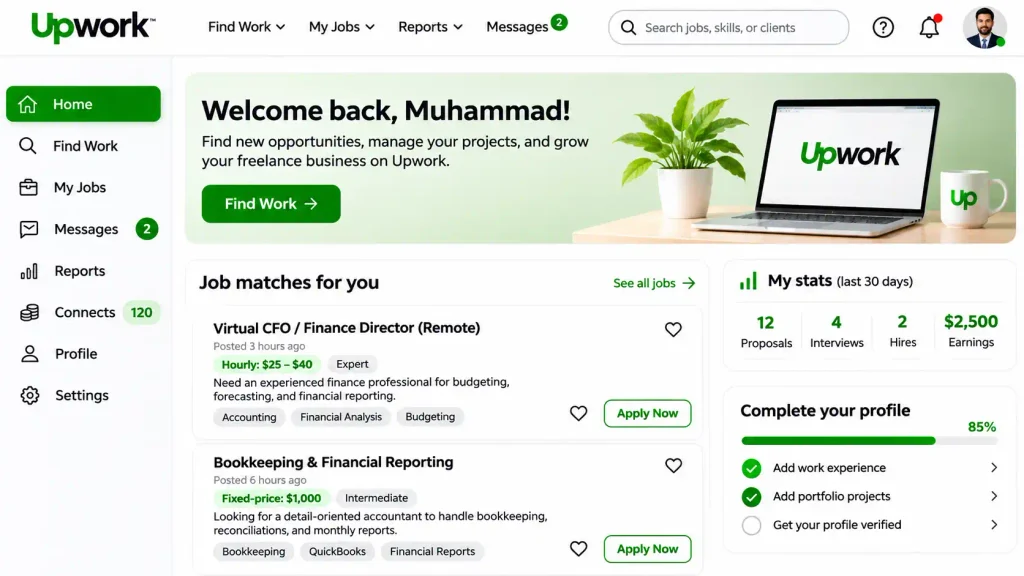
Upwork is an online marketplace that connects freelancers with clients who need professional services. Clients publish job opportunities, explain their project requirements, and invite freelancers to submit proposals. Freelancers can search for suitable jobs, apply using Connects, discuss project details with clients, and agree on payment terms. Once a client hires a freelancer, the work can be completed through a fixed-price contract or an hourly contract. Upwork also provides communication tools, payment processing, contract management, and dispute assistance to support both parties. Freelancers receive their earnings through available withdrawal methods after applicable fees and payment processing requirements. You can visite the website Apknova
Key Features of Upwork
Upwork offers several features that help freelancers and clients manage their professional projects online.
- Freelance Job Marketplace: Explore thousands of opportunities across different industries.
- Professional Profiles: Create profiles highlighting skills, experience, qualifications, and portfolios.
- Job Proposals: Submit proposals to clients and explain why you are suitable for their projects.
- Client-Freelancer Communication: Discuss project requirements through messaging and communication tools.
- Hourly Contracts: Work on projects and receive payment based on tracked working hours.
- Fixed-Price Contracts: Agree on a specific project price and milestone-based payments.
- Payment Protection: Access eligible payment protection features under Upwork’s policies.
- Work Portfolio: Showcase previous projects, achievements, and professional experience.
- Client Reviews: Build credibility through feedback and work history.
- Mobile Application: Manage your freelance activities through supported mobile devices.
Upwork Freelance Jobs and Career Opportunities
Upwork provides freelance opportunities across different professional industries, allowing people to work with international clients. Freelancers can search for projects according to their qualifications, experience, and professional interests.
Popular freelance job categories include:
- Accounting and Finance: Bookkeeping, financial reporting, budgeting, forecasting, and financial analysis.
- Virtual CFO Services: Financial planning, business consulting, and management reporting.
- Web Development: Website design, WordPress development, and programming.
- Graphic Design: Logo creation, branding, banners, and social media designs.
- Content Writing: Blog writing, SEO articles, website content, and copywriting.
- Digital Marketing: SEO, social media management, and online advertising.
- Data Entry: Excel data management, data processing, and administrative support.
- Virtual Assistance: Email management, scheduling, research, and business administration.
- Customer Support: Online assistance, client communication, and helpdesk services.
Freelancers can work on individual projects, hourly assignments, or ongoing contracts depending on their skills and client requirements.
Upwork Client and Freelancer Accounts
Upwork provides two main account roles: clients and freelancers. Each account is designed to support a different purpose within the freelancing marketplace.
Client Account
A client account is designed for businesses and individuals who want to hire professionals for their projects. Clients can publish job descriptions, review freelancer profiles, compare proposals, interview candidates, and manage contracts.
Freelancer Account
A freelancer account is designed for professionals who want to offer services and earn money online. Freelancers can create professional profiles, display their qualifications, build portfolios, search for jobs, submit proposals, and manage their earnings.
Both account types include tools for communication, project management, and payments. Users should select the appropriate account role according to their requirements.
Upwork Profile Creation and Optimization
Creating a professional Upwork profile is an important step toward attracting potential clients and securing freelance projects. Your profile should clearly explain your professional background, skills, qualifications, and services.
Important profile optimization tips include:
- Professional Profile Title: Choose a clear title that describes your main services.
- Profile Overview: Write an attractive introduction explaining your experience and expertise.
- Relevant Skills: Add skills that match your professional services and target jobs.
- Work Experience: Include previous employment and relevant professional achievements.
- Educational Qualifications: Mention your degrees, certifications, and professional memberships.
- Portfolio Projects: Upload examples of your previous work to demonstrate your capabilities.
- Professional Photograph: Use a clear and professional profile picture.
- Competitive Hourly Rate: Set a reasonable rate based on your experience and market value.
For example, finance professionals can use a profile title such as:
Finance Director | Virtual CFO | Financial Reporting | Budgeting & Forecasting
A strong profile helps clients understand your expertise and decide whether your services match their requirements.
How to Register and Create an Upwork Account
Creating an Upwork account is a straightforward process. Users can register as freelancers or clients depending on whether they want to offer professional services or hire talent.
Follow these steps to create a freelancer account:
- Visit the official Upwork
- Click the Sign Up button.
- Select the option to work as a freelancer.
- Register using your email address or an available Google or Apple sign-in option.
- Enter your basic personal information.
- Select your professional category and relevant skills.
- Add your work experience, education, and qualifications.
- Write a professional profile overview.
- Upload a suitable profile photograph.
- Complete any required identity verification.
- Review your profile information and submit it for approval if required.
After completing registration, you can access your freelancer dashboard, explore job opportunities, and start building your freelance career.
How to Find and Apply for Jobs on Upwork
Finding suitable jobs is an important part of building a successful freelancing career. Upwork provides a job marketplace where freelancers can search for opportunities according to their skills, experience, budget, and preferred working arrangements.
Steps to find and apply for jobs:
- Log in to your Upwork freelancer account.
- Open the Find Work section.
- Enter relevant keywords related to your professional skills.
- Use filters to identify suitable projects.
- Review the job description and client requirements.
- Check the client’s payment verification and hiring history.
- Review the project budget, experience level, and required skills.
- Click the Submit a Proposal option.
- Write a personalized proposal explaining your experience and approach.
- Set your proposed hourly rate or fixed project price.
- Review the application and submit your proposal using the required Connects.
Important tip: Avoid sending identical proposals to every client. Write customized applications that explain how your professional experience can solve the client’s specific problem.
Upwork Connects – How They Work
Connects are virtual tokens used by freelancers to submit proposals for available jobs on Upwork. They help manage applications and allow freelancers to express interest in projects posted by clients.
Important information about Connects:
- Connects are generally required when submitting job proposals.
- The number of Connects required varies depending on the job.
- Some job applications or invitations may not require Connects.
- Freelancers can purchase additional Connects through their accounts.
- Connects can also be used for certain optional promotional features.
- Eligible freelancers may receive free Connects through specific account activities or membership benefits.
- Connects are different from money earned through freelance contracts.
Freelancers should use Connects carefully and focus on projects that match their qualifications and experience.
Upwork Payments, Earnings, and Withdrawal Methods
Upwork provides payment services that help freelancers receive earnings from completed projects. Freelancers can work under hourly or fixed-price contracts, depending on the agreement with their clients.
Hourly Payments: Freelancers record their working hours using Upwork’s supported time-tracking system. Eligible hours are billed according to the weekly billing cycle and applicable payment protection rules.
Fixed-Price Payments: Clients fund agreed project milestones before work begins. Freelancers submit completed work for review, and milestone payments are released according to the contract and payment protection conditions.
Available withdrawal methods may include:
- Direct to Local Bank (where supported)
- Payoneer
- PayPal (where supported)
- USD Wire Transfer
- Other eligible bank transfer options
The availability of withdrawal methods depends on the freelancer’s country and account eligibility. Payment processing charges, withdrawal fees, and currency conversion charges may apply.
Upwork Fees, Membership Plans, and Service Charges
Upwork offers free and paid membership options for freelancers. Although users can create an account without paying a monthly subscription, certain platform services and transactions involve fees.
Freelancer Membership Plans
| Plan | Main Benefits |
|---|---|
| Freelancer Basic | Free account with essential freelancing features |
| Freelancer Plus | Additional Connects, proposal insights, job alerts, and advanced profile tools |
Freelancer Service Fees
Upwork currently charges freelancers a variable service fee ranging from 0% to 15% per contract. The applicable percentage is displayed before the freelancer submits a proposal or accepts an offer and remains fixed once the contract begins. Upwork Help+1
Other Possible Costs:
- Purchasing additional Connects.
- Freelancer Plus monthly subscription.
- Optional proposal boosting.
- Currency conversion and withdrawal charges.
- Other optional promotional services.
Always review the applicable fees in your account before purchasing services or accepting a contract.
Upwork Mobile App – Download and Installation Guide
Upwork offers a mobile application that allows freelancers and clients to manage their accounts and communicate while away from their computers.
How to Download and Install Upwork on Android:
- Open the Google Play Store on your Android smartphone.
- Search for Upwork.
- Find the official application published by Upwork Global Inc.
- Open the application listing.
- Tap the Install button.
- Wait for the installation to complete.
- Open the Upwork application.
- Log in using your existing account or create a new account.
- Explore job opportunities, messages, and account features.
iPhone Installation:
- Open the Apple App Store.
- Search for Upwork.
- Select the official Upwork application.
- Tap Get to download it.
- Open the application and sign in.
Upwork Pros and Cons
| Pros (Advantages) | Cons (Disadvantages) |
|---|---|
| Access to international clients | High competition for jobs |
| Opportunities to earn in USD | Connects may be required to apply |
| Work remotely from anywhere | Service fees apply to earnings |
| Flexible working hours | Getting the first client can be difficult |
| Wide range of job categories | Some projects have low budgets |
| Secure payment systems | Payment withdrawal fees may apply |
| Opportunities for long-term contracts | Building a strong profile takes time |
| Suitable for beginners and professionals | Some advanced features require paid membership |
| Professional portfolio development | Account verification may be required |
| Work with businesses worldwide | Job availability varies by skill and demand |
Frequently Asked Questions (FAQs) About Upwork
Q1. What is used for?
Is an online freelancing platform where businesses hire professionals for remote projects and freelancers offer their services to international clients.
Yes, freelancers can create a free Basic account. However, additional Connects, optional services, and paid memberships may involve charges.
Q2. Is free to join?
Q3. Can beginners work ?
Yes, beginners can create profiles, showcase their skills, and apply for suitable projects. However, securing the first contract may take time and effort.
Q4. Can I earn money on from Pakistan?
Yes, Pakistani freelancers can use to offer professional services to international clients, subject to account eligibility and verification requirements.
Q5. How does pay freelancers?
Provides several withdrawal methods, including eligible local bank transfers, Payoneer, PayPal, and wire transfers, depending on the freelancer’s country.
Q6. What are Connects?
Connects are virtual tokens used to submit proposals for freelance jobs and access certain promotional features.
Q7. How much does charge freelancers?
Upwork’s freelancer service fee currently ranges from 0% to 15% per contract. The applicable fee is displayed before accepting a contract.
Q8. Can I use on my mobile phone?
Yes, Upwork offers Android and iOS applications that allow users to manage their profiles, search for jobs, communicate with clients, and access other supported features.
Q9. What types of jobs are available on ?
Upwork offers jobs in accounting, finance, web development, graphic design, writing, digital marketing, data entry, customer support, and many other professional fields.
Q10. How can I create a professional profile?
Add a professional title, detailed overview, relevant skills, work experience, educational qualifications, and portfolio examples to create a strong profile.
Q11. What is the difference between hourly and fixed-price contracts?
Hourly contracts pay freelancers according to recorded working hours, while fixed-price contracts involve an agreed project amount, usually divided into milestones.
Q12. What is Upwork Freelancer Plus?
Freelancer Plus is a paid membership that provides additional Connects, proposal insights, job alerts, and other tools to help freelancers grow their businesses.
Q13. Can I work with international clients on Upwork?
Yes, Upwork connects freelancers with clients from different countries, allowing professionals to work remotely on international projects.
Q14. Is Upwork safe for freelancers?
Upwork provides payment protection features, secure payment processing, account verification, and dispute assistance. Freelancers should follow platform rules and avoid suspicious clients or requests to make payments outside the platform.
Q15. Can finance professionals find jobs on Upwork?
Yes, finance professionals can find opportunities in bookkeeping, financial reporting, budgeting, forecasting, financial analysis, accounting, and Virtual CFO consulting.
Q16. How can I get my first job on Upwork?
Create a complete professional profile, select jobs that match your expertise, write personalized proposals, provide relevant portfolio examples, and communicate professionally with clients.