HuggingChat Download – Free AI Chatbot, Open-Source AI Models, Writing & Coding Assistant
Just Now
10 MB
V5.2
Andriod +
100M +
Description
HuggingChat is an artificial intelligence chatbot platform developed by Hugging Face that allows users to interact with different AI models through a simple online interface. It is designed to make open-source artificial intelligence more accessible to students, developers, researchers, professionals, and everyday users. The platform allows people to ask questions, generate written content, explore ideas, receive coding assistance, and complete different tasks using AI-powered conversations. Unlike platforms that focus on a single AI model, HuggingChat provides access to multiple available models, giving users more flexibility when choosing an AI assistant.
One of the main advantages of HuggingChat is its focus on open-source AI technology and model flexibility. Users can select from available AI models or use its Omni feature, which automatically chooses a suitable model for different requests. The platform also provides tools for research, writing, programming, and other activities, depending on the selected model and available features. Whether someone wants to understand a difficult topic, prepare an article, explore programming ideas, or experiment with artificial intelligence, HuggingChat offers a convenient environment for exploring modern AI technology.
What Is HuggingChat and How Does It Work?
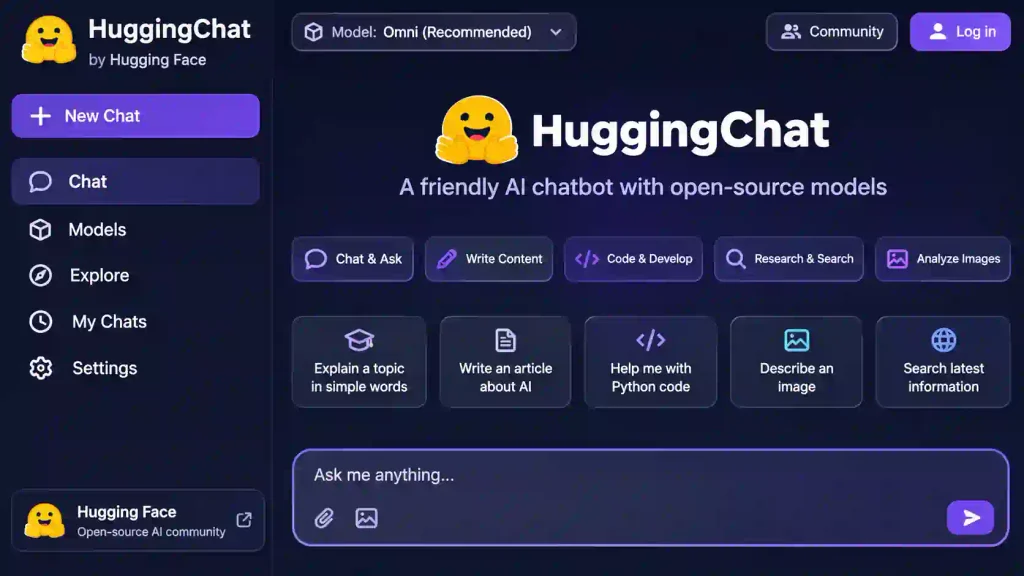
HuggingChat is an online AI chatbot that provides access to artificial intelligence models through the Hugging Face ecosystem. It works as a conversational assistant where users can enter questions, instructions, and prompts to receive AI-generated responses. The platform supports different available language models, including models from the open-model ecosystem. Users can choose a particular model themselves or select Omni, which automatically routes requests to a suitable model based on the task.
HuggingChat works by processing the user’s message through the selected AI model and generating a response based on the information it has learned and the capabilities available to it. For example, users can request explanations, ask for coding help, prepare written content, or explore research topics. Depending on the selected model and enabled tools, users may also access web search, image inputs, and other additional capabilities. This flexible approach makes HuggingChat useful for people who want to explore different AI models and compare their responses. You can visit the website Apknova
Key Features and Benefits of HuggingChat
HuggingChat provides several features that make AI-powered communication and productivity easier.
- AI Chat Assistant: Allows users to ask questions and receive AI-generated responses.
- Multiple AI Models: Provides access to different available AI models.
- Omni Model Selection: Automatically selects a suitable model for different requests.
- Content Writing: Helps users prepare articles, paragraphs, emails, and other written content.
- Coding Assistance: Supports programming questions, code explanations, and debugging assistance.
- Web Search: Provides access to web-related research tools where enabled.
- Open-Source Technology: Offers an environment for exploring models from the open-source AI community.
Chat with AI models+2
HuggingChat Interface and Main Dashboard
HuggingChat offers a straightforward interface that helps users start conversations and explore available AI models.
- Home Screen: Provides access to the main chatbot interface.
- New Chat: Allows users to start a fresh AI conversation.
- Message Box: Provides a space to enter questions and instructions.
- Model Selection: Allows users to select from available AI models.
- Omni Option: Automatically routes requests to an appropriate model.
- Conversation History: Provides access to previous chats when signed in.
- Settings Section: Offers available options for managing models and account preferences.
HuggingChat Account Registration, Sign Up, and Login Guide
Users can access HuggingChat through the official Hugging Face website. Signing in with a Hugging Face account provides access to account-related features and conversation management.
Steps to Create an Account:
- Visit the official website: https://huggingface.co/chat.
- Open the Sign Up option if you do not already have an account.
- Enter your email address and other required information.
- Create a secure password.
- Complete the required verification steps.
- Follow the instructions to finish registration.
- Return to HuggingChat and sign in to start using the platform.
Steps to Log In:
- Open the HuggingChat website.
- Select the Login option.
- Enter your registered Hugging Face account details.
- Complete any requested verification.
- Access the chatbot and available features.
HuggingChat AI Chatbot, Conversations, and Question Answering
HuggingChat provides an interactive chatbot that allows users to communicate with AI models through written prompts and questions.
- AI Conversations: Start conversations with different available AI models.
- Question Answering: Ask questions about general topics and receive explanations.
- Educational Assistance: Get help understanding academic subjects and difficult concepts.
- Writing Support: Generate paragraphs, articles, summaries, and professional messages.
- Problem Solving: Explore solutions to everyday questions and technical problems.
- Follow-Up Questions: Continue conversations to receive additional information.
- Personalized Requests: Provide specific instructions to receive responses according to your requirements.
HuggingChat AI Models and Model Selection Guide
One of HuggingChat’s main features is its ability to provide access to multiple AI models. Users can choose models according to their requirements and explore different responses.
- Multiple Models: Explore different AI models available on the platform.
- Omni Selection: Let the Omni feature automatically choose a suitable model.
- Direct Model Selection: Select an individual model from the available model list.
- Language Models: Use supported models for conversations, explanations, and content generation.
- Coding Models: Explore models designed to assist with programming tasks.
- Model Comparison: Compare responses from different models to understand their strengths.
- Model Availability: Explore newly available models as HuggingChat updates its selection.
HuggingChat Content Writing, Coding, and Creative Assistance
HuggingChat can help users complete different writing, programming, and creative activities through AI-generated assistance.
- Article Writing: Generate ideas, outlines, and complete article drafts.
- Email Writing: Prepare professional emails and business messages.
- Paragraph Generation: Create simple paragraphs for educational and informational content.
- Code Generation: Generate programming examples using written instructions.
- Code Explanation: Understand programming languages, functions, and technical concepts.
- Creative Ideas: Explore ideas for websites, projects, stories, and other activities.
- Content Improvement: Rewrite, summarize, and improve existing written material.
HuggingChat Web Search, Research, and Information Assistance
HuggingChat can support online research and information discovery through its available search and AI assistance tools.
- Web Search: Explore online information using supported search tools.
- Research Assistance: Collect information about different subjects and topics.
- Topic Explanations: Understand complicated subjects through simpler explanations.
- Information Summaries: Generate summaries of available information.
- Technical Research: Explore programming, technology, and scientific topics.
- Source Exploration: Review available references and linked sources when provided.
- Research Support: Organize ideas and prepare useful research notes.
Note: Search capabilities depend on available tools and the current platform configuration. Always verify important information using reliable sources.
HuggingChat File Uploads, Image Inputs, and Multimodal Features
HuggingChat supports additional input capabilities through compatible models and available tools. These features allow users to work with different types of information beyond ordinary text conversations.
- File Uploads: Attach supported files when the upload feature is available.
- Document Assistance: Use compatible models and tools to help analyze document content.
- Image Inputs: Submit images to models that support visual understanding.
- Image Analysis: Ask questions about uploaded images using compatible models.
- Text Extraction: Work with text contained in supported documents and inputs.
- Multimodal Models: Explore models that can process more than one type of input.
- File-Based Questions: Ask questions about uploaded content where supported.
HuggingChat Conversation History and Chat Management
HuggingChat provides conversation management options that help users organize and access their previous AI interactions.
- Chat History: Access previously saved conversations when signed in.
- New Conversations: Start separate chats for different topics and activities.
- Conversation Management: Organize and manage available chat sessions.
- Delete Conversations: Remove individual conversations using available deletion controls.
- Continue Previous Chats: Reopen conversations and continue earlier discussions.
- Research Organization: Keep different conversations for writing, coding, and research activities.
- Chat Privacy: Review available account and privacy settings when managing conversations.
HuggingChat App Access, Website Usage, and Installation Guide
HuggingChat can be accessed through its official website using a supported web browser. Users can also access the website from compatible smartphones and tablets.
For Computer Users:
- Open Google Chrome, Microsoft Edge, or another supported browser.
- Visit the official HuggingChat website.
- Sign in with your Hugging Face account if required.
- Open the chatbot interface.
- Select Omni or an available AI model.
- Enter your question in the message box.
- Start chatting and explore the available features.
For Android Users:
- Open Google Chrome on your Android smartphone.
- Visit the official HuggingChat website.
- Sign in to your account if required.
- Start a new conversation.
- Select your preferred AI model.
- Use the available chatbot features.
- Optionally, use your browser’s Add to Home Screen option for convenient access.
For iPhone Users:
- Open Safari on your iPhone.
- Visit the official HuggingChat website.
- Sign in using your account.
- Open the chat interface.
- Select an available AI model.
- Start asking questions.
- Add the website to your Home Screen if you want quicker access.
Note: Website access is the main recommended option. Do not download unofficial applications claiming to be the official HuggingChat app.
HuggingChat Account Settings, Privacy, and Security
HuggingChat provides account-related and privacy options that users should understand before using the platform.
- Account Management: Use your Hugging Face account to manage access to HuggingChat.
- Privacy Settings: Review the available privacy and data-related controls.
- Conversation Management: Manage or delete saved conversations using available controls.
- Data Protection: Avoid entering passwords, banking details, or confidential information into AI chats.
- Secure Login: Use a strong password to protect your account.
- Account Verification: Follow the platform’s verification and security instructions.
- Privacy Policy: Read Hugging Face’s official privacy policy to understand how account information and data are handled.
You can review the official policy here: Hugging Face Privacy Policy.huggingchat/chat-ui at 5f4c031+1
HuggingChat for Students, Developers, Professionals, and Researchers
HuggingChat can support different types of users by providing AI assistance for education, programming, professional activities, and research.
- For Students: Helps explain academic subjects, prepare notes, and understand difficult topics.
- For Developers: Supports coding, debugging, programming explanations, and technical learning.
- For Professionals: Helps prepare reports, emails, summaries, and business documents.
- For Researchers: Supports research planning, information exploration, and topic summaries.
- For Content Creators: Helps generate article ideas, descriptions, and creative content.
- For Teachers: Provides assistance with lesson ideas, educational explanations, and learning materials.
- For AI Enthusiasts: Allows users to explore and compare different available open AI models.
Advantages and Disadvantages of HuggingChat
HuggingChat offers several benefits for people interested in artificial intelligence, but it also has some limitations.
| Advantages | Disadvantages |
|---|---|
| Provides access to multiple AI models. | Some models may produce inaccurate answers. |
| Offers an easy-to-use chat interface. | Response speed can vary between models. |
| Supports content writing and summarization. | Writing quality may differ depending on the selected model. |
| Provides coding and programming assistance. | Some models may struggle with complex coding tasks. |
| Includes the Omni automatic model selection feature. | Users have less direct control when using automatic selection. |
| Supports research and web search through available tools. | Search tools and capabilities may vary. |
| Focuses on open-source AI technology. | Understanding different models may be difficult for beginners. |
Frequently Asked Questions (FAQs) About HuggingChat
Here are some common questions and answers about HuggingChat.
| Question | Answer |
|---|---|
| What is HuggingChat? | Is an AI chatbot platform developed by Hugging Face that provides access to different AI models. |
| Is HuggingChat free to use? | Offers free access, subject to available model and inference limits. |
| Who developed ? | Was developed by Hugging Face. |
| Can I use without creating an account? | Some access may be available without signing in, but an account is useful for personalized features and saved conversations. |
| Does support multiple AI models? | Yes, users can choose from available models or use the Omni feature. |
| Can write articles? | Yes, it can help generate articles, paragraphs, summaries, emails, and other written content. |
| Can I use for coding? | Yes, compatible AI models can assist with code generation, debugging, and programming explanations. |
| Does support web search? | Yes, web search is available through supported tools and configurations. |
| Can analyze images? | Yes, image analysis is possible with compatible multimodal models. |
| Is HuggingChat available on Android? | You can access through a mobile browser on Android devices. |
| Can I delete my conversations? | Yes, available conversation management controls allow users to delete saved chats. |
| Is HuggingChat suitable for beginners? | Yes, beginners can use it for basic questions, writing assistance, learning, and exploring AI models. |
Conclusion – Is HuggingChat Worth Using?
HuggingChat is a useful AI chatbot platform for people who want to explore different artificial intelligence models and complete everyday tasks. Its multiple model options, Omni selection feature, writing assistance, coding support, and research tools make it a flexible platform for different users. Students, developers, professionals, and researchers can use it to explore AI technology and improve their productivity.