Duolingo – 7 Best Features of This Amazing Language Learning App
Just Now
9.5 MB
V7.1
Andriod +
5000K +
Description
Duolingo is a popular language-learning application that helps people learn new languages through interactive lessons, exercises, and fun educational activities. It is designed for beginners as well as learners who want to improve their existing language skills. The app offers lessons in different languages and makes learning easier through short activities, colourful visuals, audio exercises, and simple explanations. Users can practise at their own pace using a mobile phone or computer.
One of the main reasons Duolingo is popular is its game-like learning experience. Instead of studying long lessons, users complete short exercises, earn experience points, maintain daily streaks, and unlock new learning activities. The platform also offers subjects such as Mathematics, Music, and Chess in supported courses and regions. Duolingo provides free access to many learning features, while optional paid subscriptions offer additional benefits and tools.
What Is Duolingo and How Does It Work?
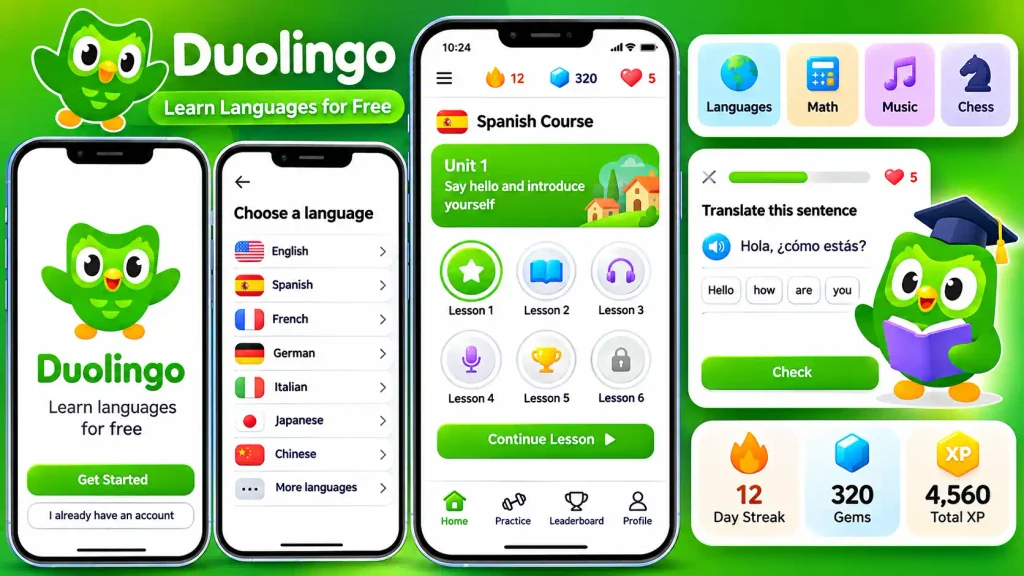
Duolingo is an online educational platform that uses interactive lessons to help users develop language and other learning skills. It combines reading, writing, listening, speaking, vocabulary, and grammar exercises in a structured learning experience. Users can select a language, complete lessons, review previously learned topics, and gradually move through different learning levels. The platform is suitable for people who want to practise regularly without attending traditional classroom lessons.
Duolingo works by presenting users with small learning activities that test their understanding and help them remember new information. For example, a lesson may ask users to translate a sentence, match words with pictures, listen to an audio recording, or speak a phrase into their microphone. Correct answers help users progress through lessons and earn XP points. Daily goals, streaks, and reminders encourage learners to practise consistently. The exact courses and features available may vary by language and device. You can visit the website Apknova
Key Features and Benefits of Duolingo
1. Multiple Language Courses: Duolingo offers courses in many languages, allowing users to choose a language they want to learn or practise.
2. Interactive Lessons: Short activities make learning more engaging and help users understand new words, sentences, and expressions.
3. Speaking Practice: Speaking exercises allow learners to practise pronunciation by repeating words and sentences.
4. Listening Exercises: Audio activities help users recognise spoken words, understand sentences, and improve listening skills.
5. Daily Learning Goals: Users can set daily learning targets and build a regular study routine through short lessons.
6. Gamification and Rewards: XP points, streaks, gems, achievements, and leaderboards make the learning experience more enjoyable.
7. Progress Tracking: Duolingo tracks learning activity and course progress so users can review their achievements and identify areas for improvement.
Duolingo Interface and Main Components
1. Home Screen: The home screen displays the learning path, available lessons, and activities that users can complete next.
2. Course Selection: Users can select their preferred language course and switch between supported courses.
3. Learning Path: The learning path organises lessons into units and topics, helping users follow a structured learning process.
4. Practice Section: This area provides exercises and review activities that help learners strengthen their existing knowledge.
5. Profile Section: Users can view their learning progress, achievements, streaks, and account information.
6. Leaderboard: The leaderboard displays XP rankings and allows users to compare their activity with other learners.
7. Settings Menu: Users can manage account preferences, notifications, learning goals, and other available settings.
Duolingo Account Registration, Sign Up, and Login Guide
1. Visit Duolingo: Open the official Duolingo website or download the application from Google Play Store or Apple App Store.
2. Select Get Started: Open the app and choose the option to begin your language-learning journey.
3. Choose a Language: Select the language you want to learn from the available course options.
4. Set Your Learning Goal: Choose a daily learning target based on how much time you want to spend practising.
5. Select Your Learning Level: Answer the introductory questions or take a placement test if it is offered for your selected course.
6. Create an Account: Register using the available sign-up method, such as an email address or supported account provider.
7. Log In and Start Learning: Existing users can sign in using their registered account details and continue their lessons from where they left off.
Duolingo Language Courses and Learning Options
1. English Course: Users can study English vocabulary, grammar, sentence structure, listening, and speaking through interactive lessons.
2. Spanish Course: The Spanish course helps learners practise everyday vocabulary, common expressions, and basic communication.
3. French Course: Users can learn French words, pronunciation, grammar, and useful sentences through structured activities.
4. German Course: The German course introduces vocabulary, sentence formation, grammar rules, and everyday expressions.
5. Italian Course: Learners can practise Italian words, phrases, listening activities, and basic conversations.
6. Other Language Options: Duolingo offers additional language courses, although course availability and content depth vary.
7. Personalised Learning: Users can follow lessons at their own pace and practise topics according to their course progress and learning needs.
Duolingo Reading, Writing, Listening, and Speaking Exercises
1. Reading Practice: Reading exercises help users understand words, sentences, short passages, and everyday written expressions.
2. Writing Exercises: Users practise spelling, sentence formation, translation, and typing answers in their selected language.
3. Listening Activities: Audio exercises help learners recognise words and understand spoken sentences.
4. Speaking Practice: Supported speaking exercises ask users to repeat or pronounce words and phrases using their microphone.
5. Translation Tasks: Users translate sentences between their chosen learning language and their familiar language.
6. Word Matching: Matching activities connect words with their meanings, translations, or corresponding pictures.
7. Regular Skill Practice: Combining these exercises helps learners develop different language skills through repeated practice.
Duolingo Vocabulary, Grammar, and Pronunciation Practice
1. Vocabulary Building: Duolingo introduces new words through lessons and interactive exercises to help learners expand their vocabulary.
2. Word Meaning: Users learn the meanings of words by matching them with translations, pictures, and example sentences.
3. Grammar Lessons: Available lessons introduce grammar concepts and demonstrate how words are used in sentences.
4. Sentence Formation: Learners arrange words and complete sentences to understand basic language structures.
5. Pronunciation Exercises: Speaking activities help users practise saying words and phrases more clearly.
6. Word Review: Practice activities allow users to revisit previously learned vocabulary and strengthen their memory.
7. Learning Through Repetition: Repeated exposure to words, grammar patterns, and expressions helps learners remember what they have studied.
Duolingo Stories, Audio Lessons, and Conversation Practice
1. Interactive Stories: Stories available in supported courses help learners understand language through short situations and conversations.
2. Reading and Listening Together: Some story activities combine written dialogue with audio to improve comprehension.
3. Everyday Conversations: Dialogue-based lessons introduce useful expressions that learners may encounter in daily communication.
4. Audio-Based Learning: Listening activities help users become more familiar with the sounds and rhythm of their selected language.
5. Speaking Activities: Supported exercises allow users to practise responding to spoken prompts and repeating sentences.
6. Comprehension Questions: Some activities ask questions about a story or conversation to check the learner’s understanding.
7. Feature Availability: Stories, audio lessons, and conversation tools may differ depending on the language course, device, and subscription plan.
Duolingo XP Points, Gems, Streaks, and Leaderboards
1. XP Points: Users earn experience points by completing lessons and other eligible learning activities.
2. Daily Streaks: A streak records consecutive days of learning and encourages users to practise regularly.
3. Gems: Gems are virtual rewards that can be used for certain items and activities within Duolingo.
4. Leaderboards: Leaderboards allow users to compare their XP progress with other learners in a group or league.
5. Achievements: Users can unlock achievements by completing learning milestones and reaching certain goals.
6. Daily Goals: Daily goals help learners set a target for their learning activity and maintain a consistent routine.
7. Learning Motivation: These rewards make lessons more engaging and encourage users to return to their courses regularly.
Duolingo Math, Music, and Chess Learning Features
1. Duolingo Math: The Mathematics course introduces mathematical concepts through interactive lessons and practice activities.
2. Basic Mathematics: Learners can practise topics such as numbers, calculations, and other foundational mathematical skills.
3. Duolingo Music: Music lessons help users explore musical concepts through interactive exercises.
4. Musical Skills: Supported activities may include recognising notes, understanding rhythm, and practising basic music skills.
5. Duolingo Chess: Chess learning features introduce users to chess concepts, moves, and strategic thinking.
6. Interactive Practice: These subjects use activities and challenges to make learning more engaging.
7. Availability: Math, Music, and Chess features may have different device, language, and regional availability.
Duolingo Mobile App Download and Installation Guide
1. Open Google Play Store or Apple App Store: Android users can open Google Play Store, while iPhone users can visit the Apple App Store.
2. Search for Duolingo: Enter “Duolingo” in the search bar and find the official language-learning application.
3. Check App Details: Review the application name, publisher, description, and device compatibility before downloading.
4. Download the Application: Tap the Install or Get button to begin downloading Duolingo.
5. Complete Installation: Wait until the download and installation process finishes on your mobile device.
6. Open the App: Tap the Duolingo icon and follow the initial setup instructions.
7. Choose a Course and Start Learning: Select your preferred language, set a daily goal, and begin completing lessons.
Duolingo Free vs Super Duolingo and Max Subscription Plans
1. Free Duolingo: The free version provides access to many language lessons and learning activities with certain limitations.
2. Super Duolingo: Super is a paid subscription that offers additional benefits, such as an ad-free experience and other learning conveniences.
3. Unlimited Hearts: Super subscribers can generally practise without the same heart restrictions that apply to some free experiences.
4. Additional Practice Tools: Super may provide extra review and practice options to help users improve their language skills.
5. Duolingo Max: Max is a higher-tier subscription in supported markets that includes additional AI-powered learning features.
6. AI Conversation Features: Depending on availability, Max may offer features such as Roleplay and Explain My Answer to support language practice.
7. Subscription Pricing: Prices, features, and availability can change depending on the country, device, and subscription option. Users should check the official app or website before purchasing.
Duolingo Advantages and Disadvantages
| Advantages | Disadvantages |
|---|---|
| Easy-to-use interface for beginners | Some features require a paid subscription |
| Offers courses in multiple languages | Course quality and depth vary by language |
| Short lessons are convenient for daily practice | Some exercises can feel repetitive |
| Includes reading, writing, listening, and speaking activities | Does not replace real-life conversation practice |
| Gamification makes learning enjoyable | XP and streaks may distract from actual learning |
| Tracks progress and learning achievements | Some advanced features are limited by plan or region |
| Offers additional subjects such as Math, Music, and Chess | Not every subject or feature is available on all devices |
Frequently Asked Questions (FAQs) About Duolingo
Q1. What is Duolingo used for?
Duolingo is used to learn languages through interactive lessons, vocabulary exercises, grammar activities, listening tasks, reading practice, and speaking exercises.
Q2. Is Duolingo free to use?
Yes. Duolingo offers a free version with access to many learning activities. However, some additional features require a paid subscription.
Q3. Can beginners learn English with Duolingo?
Yes. Beginners can use Duolingo to learn English vocabulary, basic grammar, pronunciation, and everyday expressions through structured lessons.
Q4. How many languages are available on Duolingo?
Duolingo offers courses in many languages. The exact number and available courses can change over time.
Q5. Can I use Duolingo without an account?
Users may be able to explore some learning activities without creating an account, but signing up helps save progress and access account-based features.
Q6. What are XP points in Duolingo?
XP points are experience points earned by completing lessons and eligible activities. They help track learning activity and contribute to leaderboard rankings.
Q7. What is a Duolingo streak?
A streak records how many consecutive days a user has completed learning activity. It encourages regular practice.